Vista 1 Digital Mixing System
8-18 RELINK
Document generated: 14.04.17
SW V5.3
8.5.7 Control Network
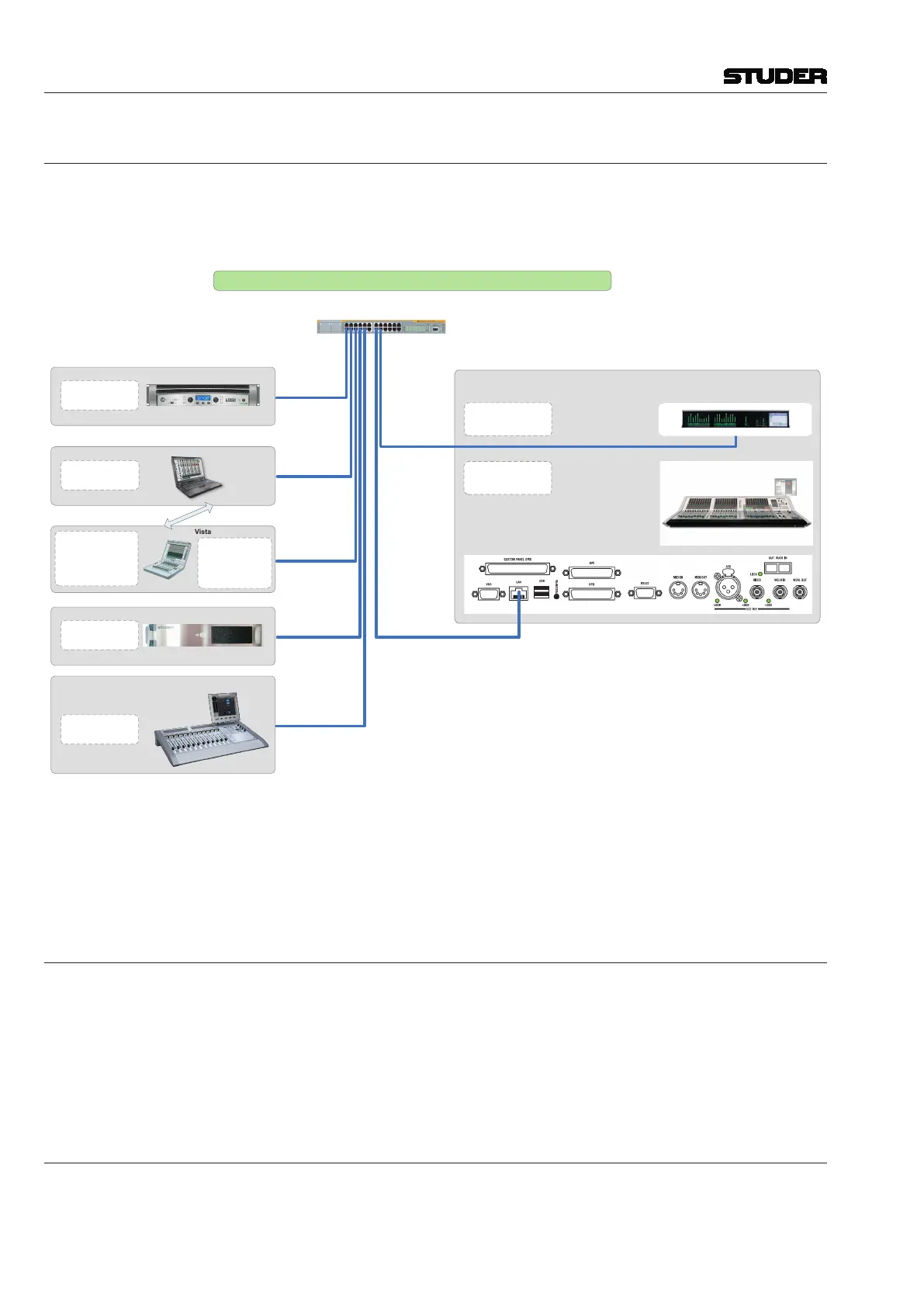
All systems that need to be part of the I/O Sharing network need to be inter-
connected via Ethernet. On the Vista side, it is always the desk that needs to
be networked, as shown the example below.
VISTA 1
NETWORK CONFIGURATION RECOMMENDATION - VISTA 1
HiQnet Device
IP: 192.168.1.xxx
SUBN: 255.255.255.0
STUDER Plugin Engine
IP: 192.168.1.xxx
SUBN: 255.255.255.0
0
1 2
3
4
Vista
NETWORK CONFIGURATION RECOMMENDATION - VISTA 1
IP Configuration Vista 1.vsd
18.04.2017/wp
1 GB Ethernet Switch
(Optional)
LAN 1: 192.168.1.128
SUBN: 255.255.255.0
Vista Compact Remote
Port 1:
IP: 192.168.1.xxx
SUBN: 255.255.255.0
WLAN Port
(Use either Port 1 or WLAN
to connect to the Desk)
IP: 192.168.1.52
SUBN: 255.255.255.0
IP: 192.168.1.xxx
SUBN: 255.255.255.0
Virtual Vista
Only Virtual Vista or Vista CR at a time
RELINK NETWORK - e.g. OnAir 2500
MAC :
IP: 192.168.1.xxx
SUBN: 255.255.255.0
CONTAINER:
Optional Meterbridge
LAN 1: 192.168.1.129
SUBN: 255.255.255.0
12.09.2017/wp
• TheVistadesknetworked(Ethernet)
• Tielinesbetweencoresareused(MADI,AES,orHDLinks)
• DNETtechnologyfromtheOnAirproductrange
• TheOnAirconfigurationtoolcanalsobeusedforsetupontheVistaside
8.5.7.1 Vista 1, 6, 7, 8
Since Vista 1, 6, 7 and 8 are not equipped with a second network port per
default, an external Ethernet switch needs to be used. In the case of a Vista 8
with a redundant control system it is recommended to connect the Ethernet
switch between the network port of the main control system and the bridge
card of the SCoreLive. The network port of the redundant control system
would then still be connected straight to the second port of the bridge card.
8.5.8 IP Addresses
See the blockdiagram above.


 To Next Page