Vista 1 Digital Mixing System
1-20 Introduction
Document generated: 18.04.17
SW V5.3
1.5 Monitoring and Communication
Monitoring The Control Room (CR) monitoring section provides control of two different
speaker systems; one of them is multi-channel, the other one is two-channel
stereo and is normally used for the near field monitor speakers. All internal
digital sources can be assigned to any of the source selector keys, and up to
32 source selector keys are available. A headphone socket for control room
monitoring is located at the console’s right front edge below the hand rest.
The Studio Monitor is configurable in the same way as the CR monitor sec-
tion. Two stereo loudspeaker pairs are supported.
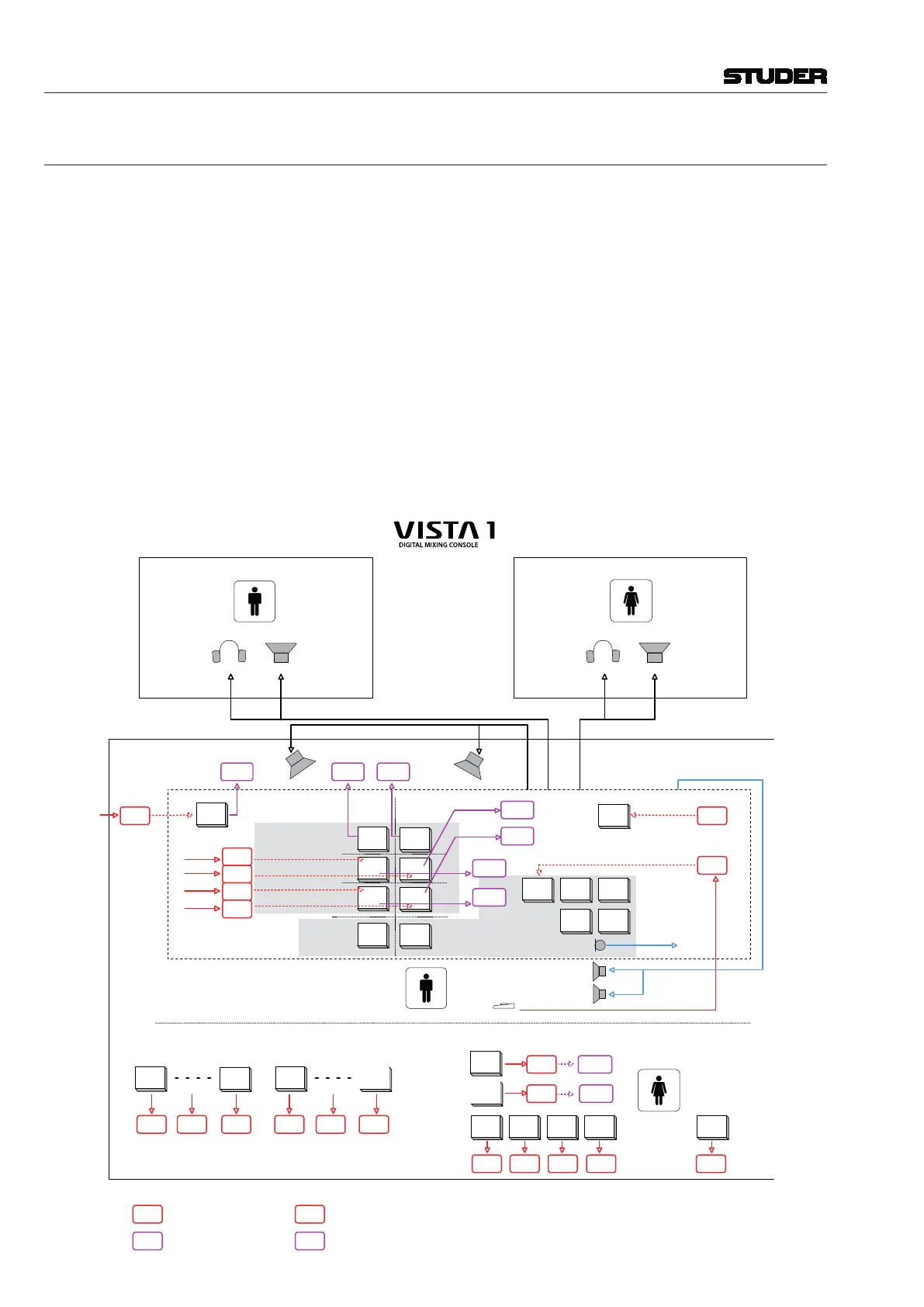
Talkback An extensive talkback system is implemented within Vista. The talkback
source can be either the desk operator’s microphone or an external producer
microphone. Several destin ations, such as busses, direct outputs, auxiliaries,
groups, and master outputs are available block.
Each channel is fitted with a talkback key that activates talkback to the direct
output of the corresponding channel and, if the channel is an N–X owner, to
the N–X output. For details see the block diagram below.
Studio A
Studio Monitor A
e.g. Speaker
Studio B
Studio Monitor B
e.g. Speaker
Control Room
CR Monitor
Signaling Keys
GPI X
GPI X
Vista 1 Desk
GPO XGPO 1
Live
GPI X
GPO X
GPI X
GPI X
Studio A Studio B
Red
Light
SIG1
SIG2
Talk
Red
Light
SIG1
SIG2
Talk
PFL Out
Talk to Talk to
DIM
Talk to Talk to
Talk to
GPO 3
GPO 2
GPI 1
Foot Switch
TB Mic
GPI 2
GPO X
GPO X
TB Keys
Desk
Operator
Talk to
AUX 1
Talk to
AUX 2
Talk to
AUX 3
Talk to
AUX 4
GPI X
Talk to
Studio
A
Talk to
Studio
B
GPI 1
GPO 2
GPI X
GPO X
Producer area (in control room or separate room)
Talk to
Chan Out
Grp 01
Talk to
Chan Out
Grp N
Channel
Mute
Grp 01
Channel
Mute
Grp N
GPI X GPI X GPI X GPI XGPI XGPI X
Talk to
GPI XGPI X GPI X GPI X
Producer
GPI X
GPI X
GPO X
GPO X
Already configured:
GPI 1 Footswitch to talk to preselected
GPI 2 CR DIM
GPO 1 Live Key on Desk
GPO 2 Signaling 1 Studio A
GPO 3 Signaling 2 Studio A
preselected
AUX1 AUX2
AUX3 AUX4
preselected
Legend:
= GPI already configured in .ini files
= GPO already configured in .ini files
= GPI prepared to use, bot not
assigned to signaling card.
Can be configured in .ini files
= GPO prepared to use, bot not
assigned to signaling card.
Can be configured in .ini files
Talkback and Signaling Block Diagram Using Desk-Internal GPIO



 To Next Page