Vista 1 Digital Mixing System
Parameters 3-27
Document generated: 18.04.17
SW V5.3
3.4.2 Graphic EQ Parameters
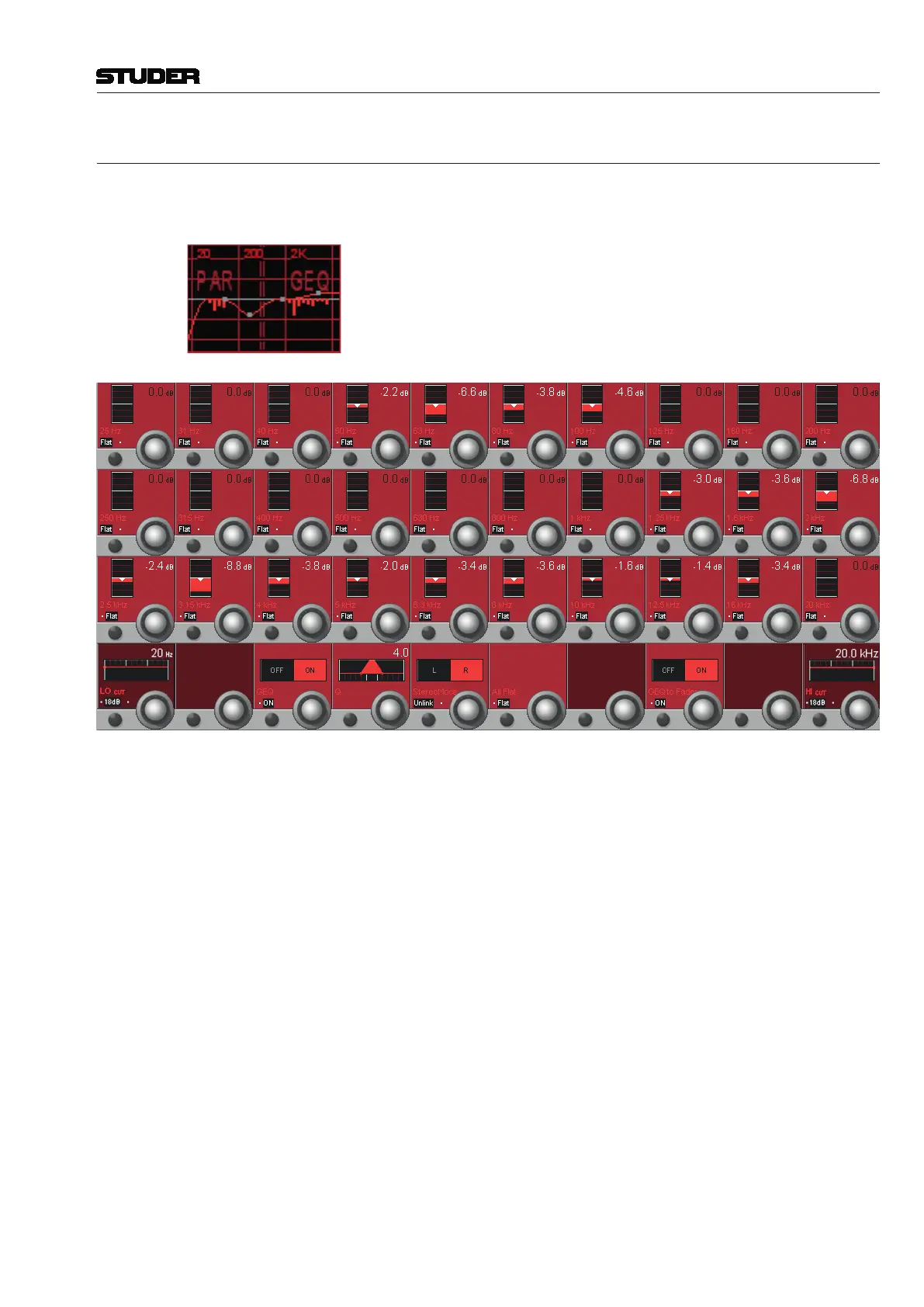
Note Since SW V4.7 there is an additional 30-band graphic EQ available; both
graphic and parametric EQs can be set up either for all or specific channels
using the Vista Configuration Editor.
If both EQs are configured within one single channel, the display is split into
two different touch areas, showing the combined response of both EQs. It
allows unfolding either the graphic or the parametric EQ parameters of this
channel on the Vistonics screen for adjustment. For details of the parametric
EQ please refer to the previous chapter.
Boost/Cut (Rotary Knobs) The 30 rotary knobs in the three upper rows control boost or cut for the dif-
ferent frequency bands. The individual band center frequencies are fixed and
displayed in the corresponding Vistonics fields. Boost/cut can be adjusted in
a ±12 dB range in steps of 0.2 dB.
Flat Every band may individually be set to ‘flat’, i.e., to 0 dB.
LO/HI CUT The low- and high-cut filters are the same as described in the previous chapter.
GEQ OFF/ON The complete graphic EQ can be switched on or off by pressing this Vistonics
key or by turning the rotary encoder. This is as opposed to the EQ hardware
key in the CH PROCESSING section that is used to activate or deactivate the
parametric and the graphic EQ at once. Please note that the hardware key
overrides the Vistonics key setting.
Q Allows setting the width (Q) of all the EQ bands simultaneously between 4
(wider) and 6 (less wide) in five steps.
StereoMode For stereo channels, the graphic EQ can be linked or unlinked for the left and
right channels. If ‘Unlink’ is selected, individual settings for L and R can be
set; selection between L and R is done with the rotary knob. Default setting
is ‘Link’.
All Flat Sets all bands to ‘flat’, i.e., to 0 dB.



 To Next Page