Vista 1 Digital Mixing System
3-16 Parameters
Document generated: 18.04.17
SW V5.3
3.3.8 Dynamics Parameters
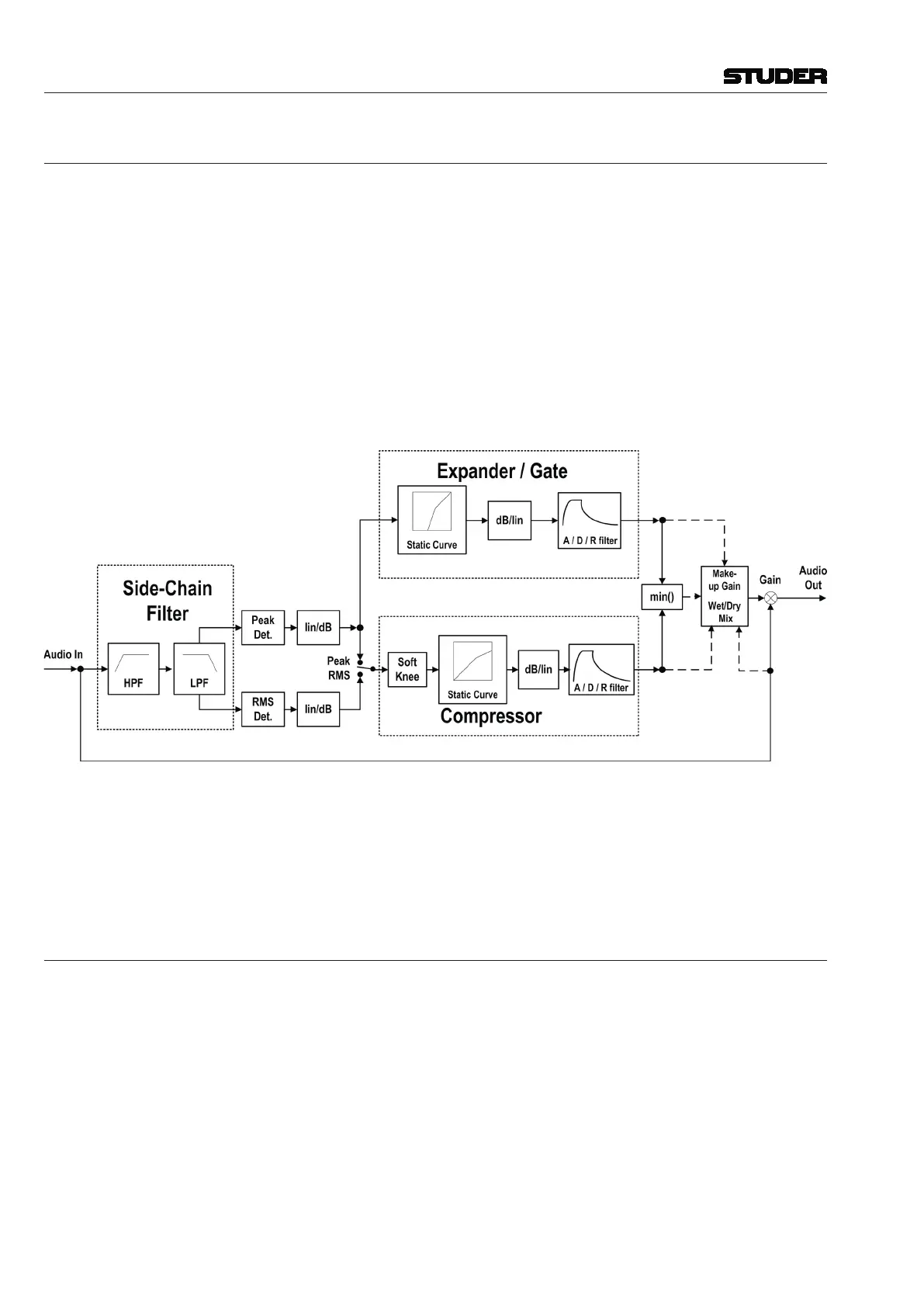
Standard or Vintage Dynamics? Since SW version 4.0 there is an alternative dynamics processing block
available for mono and stereo channels. It is called ‘Vintage Dynamics’ and
consists of a compressor that can be used together with an expander/noise-
gate. The design focus was very clearly set on the compressor.
This compressor algorithm provides an alternative to the current dynamics
section in the Vista consoles, which has been described as rather ‘transparent’.
For some applications, however, a compressor can be utilized in a more pro-
nounced way, i.e., as an effect itself. For this purpose the ‘vintage dynamics’
was created. It is targeted to be flexible enough for different types of sound
coloration including extreme and unusual settings, but does not feature a
dedicated limiter.
Selection of standard or vintage dynamics depends on the currently loaded
configuration.
Vintage Dynamics Block Diagram:
The standard dynamics section features a limiter, while the vintage dynam-
ics section only has compressor parameters – knowing this might be helpful
when sitting at the console and having to discriminate the dynamics sections.
In the illustration on the next page, the left-hand channel shows the standard
dynamics section parameters, the right-hand channel the ones of a vintage
dynamics section.
3.3.8.1 Compressor / Limiter Parameters
Press GLOBAL VIEW: COMP LIMIT.
This view enables the user to control the most important parameters of the
dynamics section’s compressor and limiter parts. The complete parameter
set is available on the channel-related dynamics view, refer to chapter 3.4.3.
There you will also find all parameter details.
For 5.1 surround channels, the compressor and limiter settings are valid for all
surround signal legs except the LFE. For further information on this subject,
please refer to chapter 3.4.3.2.
The compressor and limiter parts of the dynamics section can simultaneously
be activated with the COMP LIMIT hardware key above the Vistonics section,
in addition to the individual on/off keys described below.



 To Next Page