120
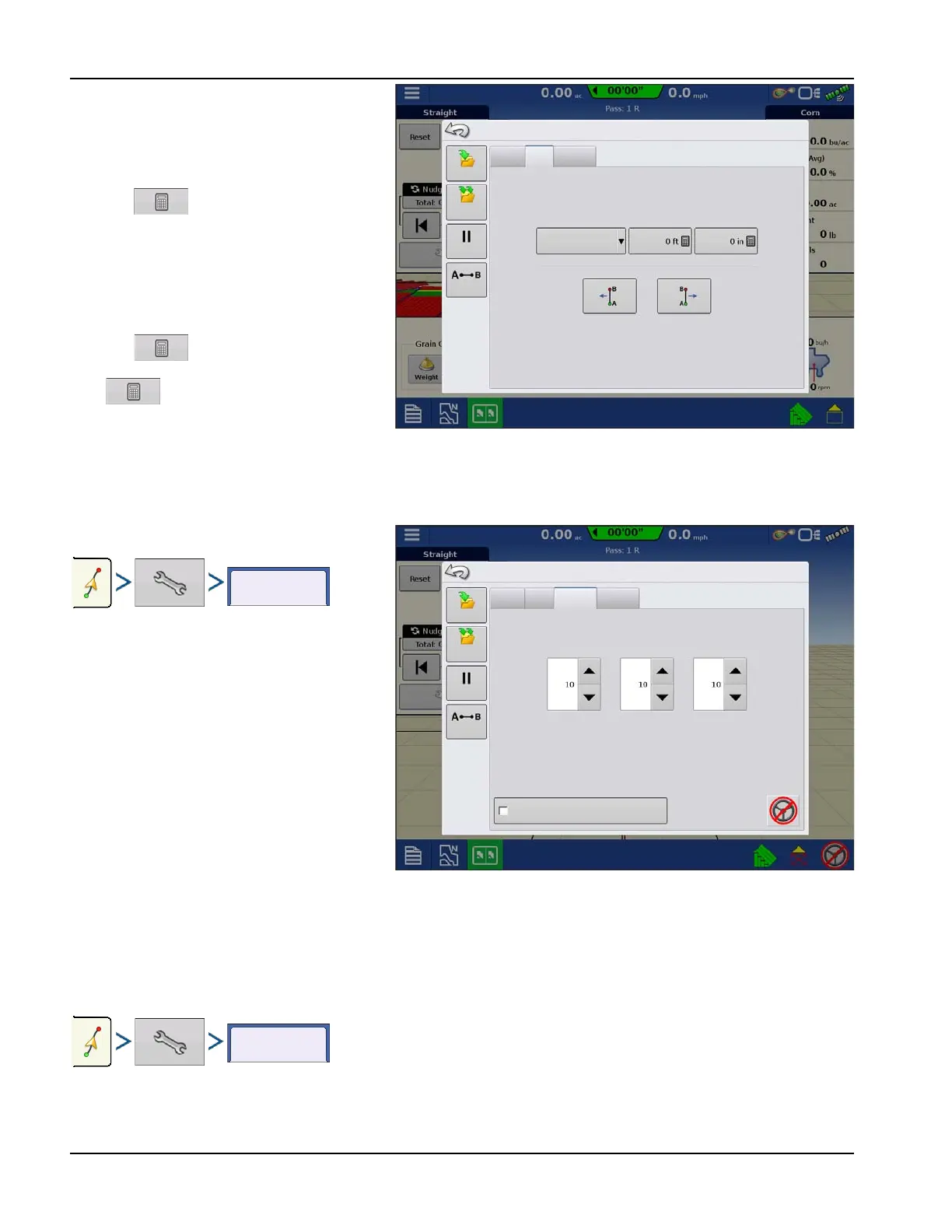
Shift moves all of the swaths by a specified
distance to the left or right, (including the AB
line). The swaths can be shifted by a distance or
number of rows.
• Shift by Distance
Use to enter the distance that the
pattern needs shifted. Use the bottom
drop-down menu to enter the direction,
(either left or right). Press Apply button to
accept change.
• Shift by Rows
Use to enter the number of rows
the pattern needs shifted. Use the second
to select the row spacing. Use the
drop-down menu to enter the direction to
shift the pattern. Press Apply button to
accept the change.
÷
NOTE!: The Shift setting is not available with the SmartPath patterns.
Steering
Steering allows users to make autosteer turning
adjustments on the go.
• Line Acquisition—Determines how
aggressively the system steers onto the
desired steering path. The ideal setting
allows the system to take the shortest route
without excessively sharp or sudden
movements of the vehicle.
• Steering Response—Controls the
oscillations of the vehicle when it is on the
desired path.
• Reverse Response—Controls the
oscillations of the vehicle when it is on the
desired path in reverse.
• Log coverage while AutoSteer is engaged— checkbox (check for yes, un-check for no). Coverage while engaged
is available when an AutoSteering system (SteerCommand, GeoSteer, ParaDyme) is connected. User can still manually
control coverage logging with the on-screen coverage button. AutoSwath is unaffected by this selection.
Lightbar
Nudge
Shift
Lightbar
Save
Group
Pause
Shift Left
Guidance Options
Remark A
Shift Right
Distance
Save
Shift By
Feet
Inches
Nudge
Shift
Lightbar
Save
Save
Group
Guidance Options
Remark A
Line
Acquisition
Steering
Steering
Responce
Reverse
Responce
Log coverage while Autosteer is engaged
Pause



 To Next Page