72
Map Views and Split Screen
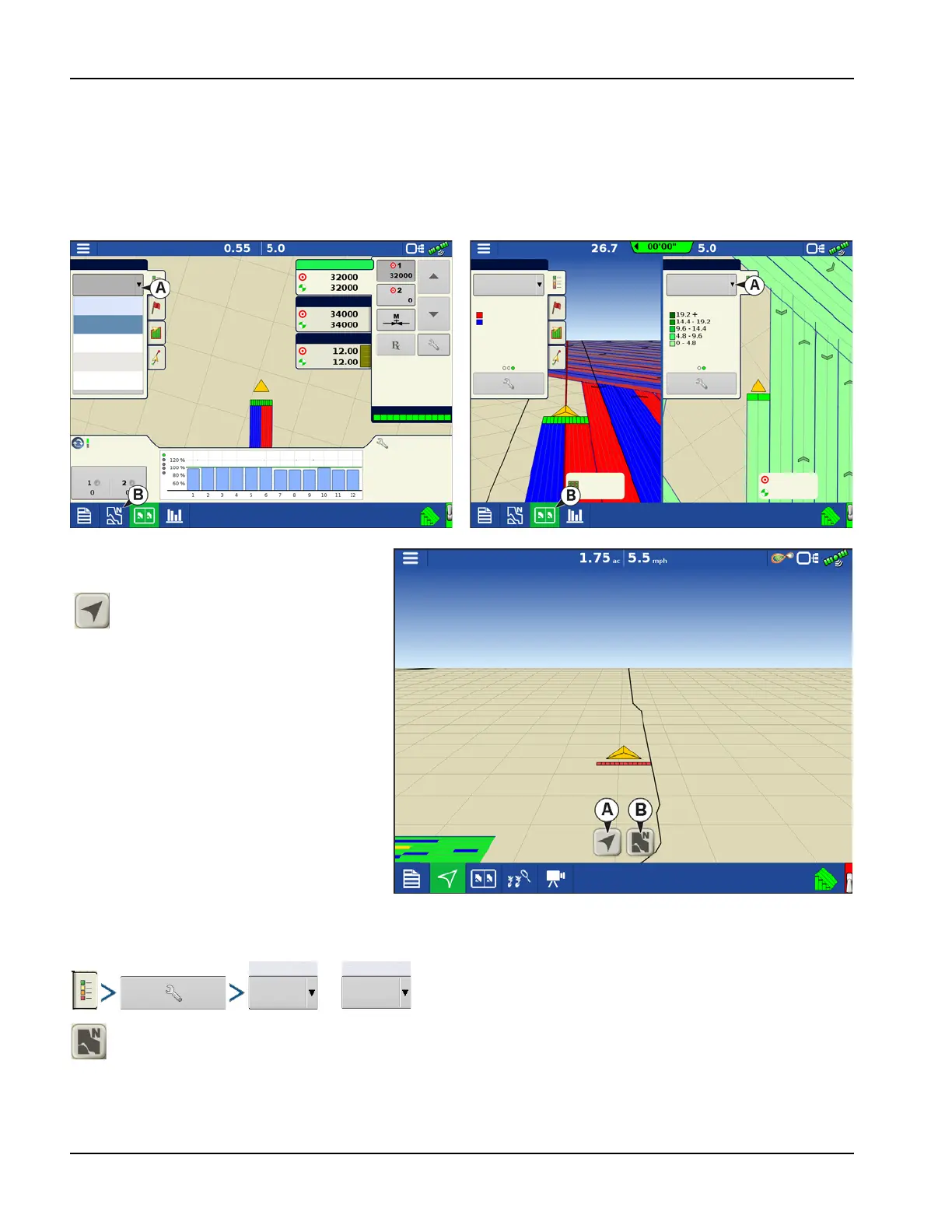
The InCommand 1200 has the capability of showing multiple views at the same time from the Mapping screen. This has
multiple uses like showing guidance in Follow view and North Oriented view at the same time, splitting the screen
between guidance and Universal Terminal, or watching two products at the same time like planting and liquid application.
• Maps can be selected individually from the legend drop-down (A).
• Map view can be changed by tapping on the mapping icon (B) in the task bar.
Map Views
Setting the Follow View mode
or
North Oriented View(B)—Zooms the map out to the full extends of the field boundary or mapped area and
orients the map north regardless of the vehicles direction of travel.
Follow View(A)—Sets the map to
follow the vehicle icon. The default
Follow View can be set to either
Perspective view or Top-Down view
Hybrid 1
Current
Hybrid 1
Hybrid 2
Seed Monitor
32% UAN
Hybrid 1
Hybrid 2
Legend
32% UAN
Planting
Planter Drives (rpm)
Population 320000 sds/area Spacing 6.3
Legend
Legend
StarterHybrid 1
Pass: 7 L
Varieties
Hybrid 2
Hybrid 1
Rate
32000 sds/ac
12.00 gal/ac
12.00 gal/ac



 To Next Page