48
(E) Sync to Cloud Using Wi-Fi ONLY—By default, AgFiniti Mobile will sync with AgFiniti Cloud using a cellular connection
if Wi-Fi is not available. If this option is enabled, syncing will only occur over a Wi-Fi connection. Transferring over a cellular
network could potentially use a large amount of data. Turning this option on prevents this from occurring.
Display and Device Location
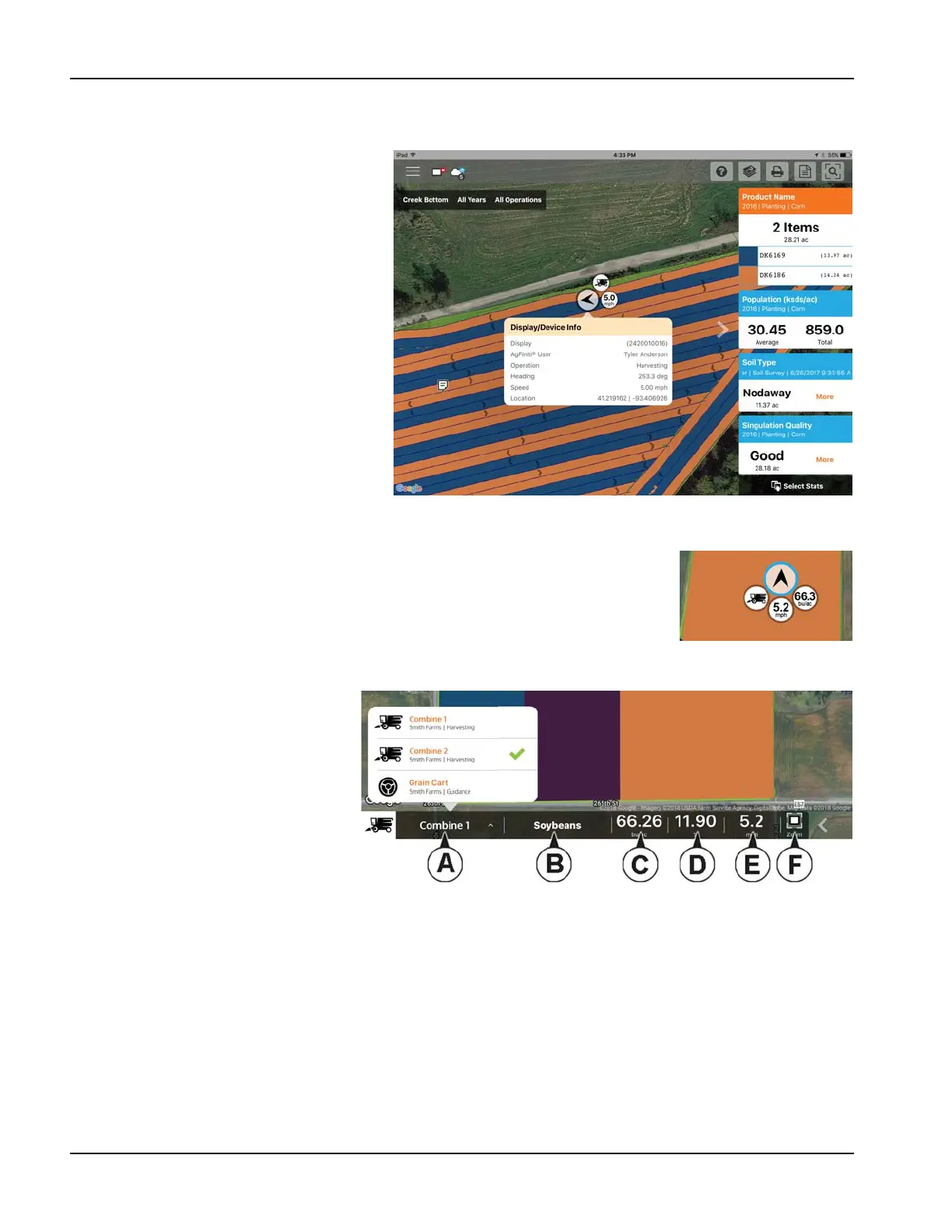
An AgFiniti Essentials license allows for display
and device location indicators to appear in
AgFiniti Cloud and AgFiniti Mobile. Any displays
or devices (iPads running the app or devices
logged into AgFiniti Cloud) will be displayed. The
indicator will include position, direction of travel,
speed, and current operating state. Tap on the
position indicator to get additional details for
that specific display/device. You can toggle
these on/off from within the app menu.
Live Stats - Mobile
Live Stats indicators are present with the device location on the InCommand and AgFiniti
Mobile. The indicators will represent the main attribute, speed, and operation for any device
logged into AgFiniti.
Live Stats will be shown for these operations: planting/seeding, application, (liquid and dry),
Harvest (grain and forage), and site verification (will be missing main attributes indicator).
Live stat data and device location are updated on a 5 second interval.
The Live Stats bar provides more live stat
data for each device logged in. It will
always be present as long as the device is
logged in.
A. Device Selection - Selected device
displays its current stats in the bar.
Device can be selected from this list,
or by pressing on the device location
in the app.
a. Device is identified by the
display’s nickname or ipad name
(nickname will only update upon each log in). If no display nickname is entered the displays serial number will be
shown.
B. Product
a. For planting, individual varieties will be able to be selected.
C. Main Attribute
a. Rate and Yield
D. Secondary Attribute
a. Population percentage, container level, and moisture
E. Speed



 To Next Page