60
Live Stats—DisplayCast
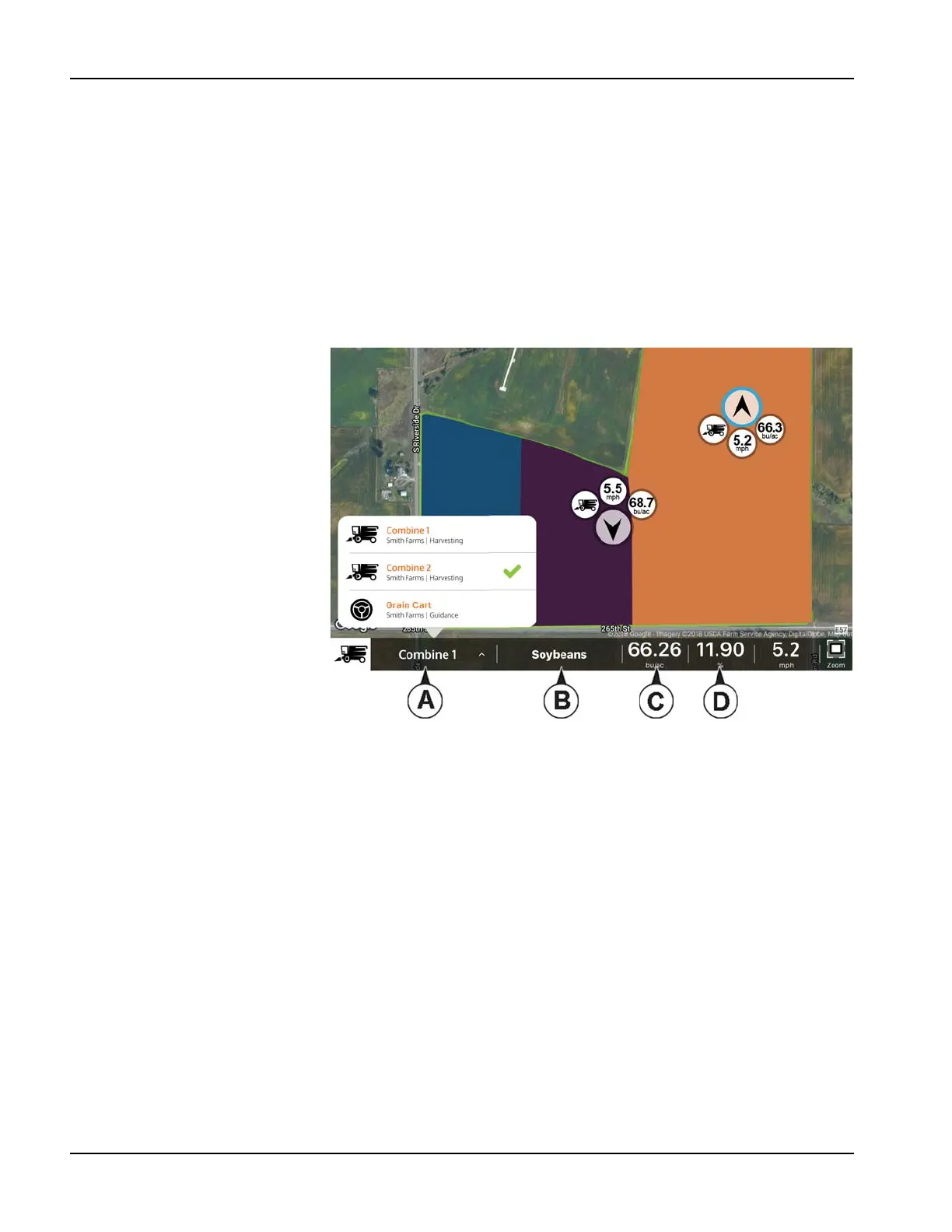
Live Stat indicators are present with the device location on the InCommand and AgFiniti Mobile. The indicators will
represent the main attribute, speed, and operation for any device logged into AgFiniti. The InCommand requires the
DisplayCast unlock to display Live Stats.
Live Stats will be shown for
• planting/seeding
• applications (liquid and dry)
• harvest (grain and forage)
• site verification (will be missing main attribute and indicator).
Live Stat data and device location are updated every 5 seconds.
The Live Stat bar provides data for each
device logged in.
A. Device Selection—displays its
current stats of this device in bar.
Device can be selected from this
drop-down menu or by pressing
on the display location on the
screen.
a. Device is identified by the
display’s nickname or iPad
name (nickname updates at
login). If no nickname is
entered, the display serial
number will be shown.
B. Product
a. For planting, individual
varieties will be able to be
selected.
C. Main Attribute
a. Rate and Yield
D. Secondary Attribute
a. Population percentage,
container level, and moisture



 To Next Page