8 DTrack2 frontend software
8.3 Main GUI
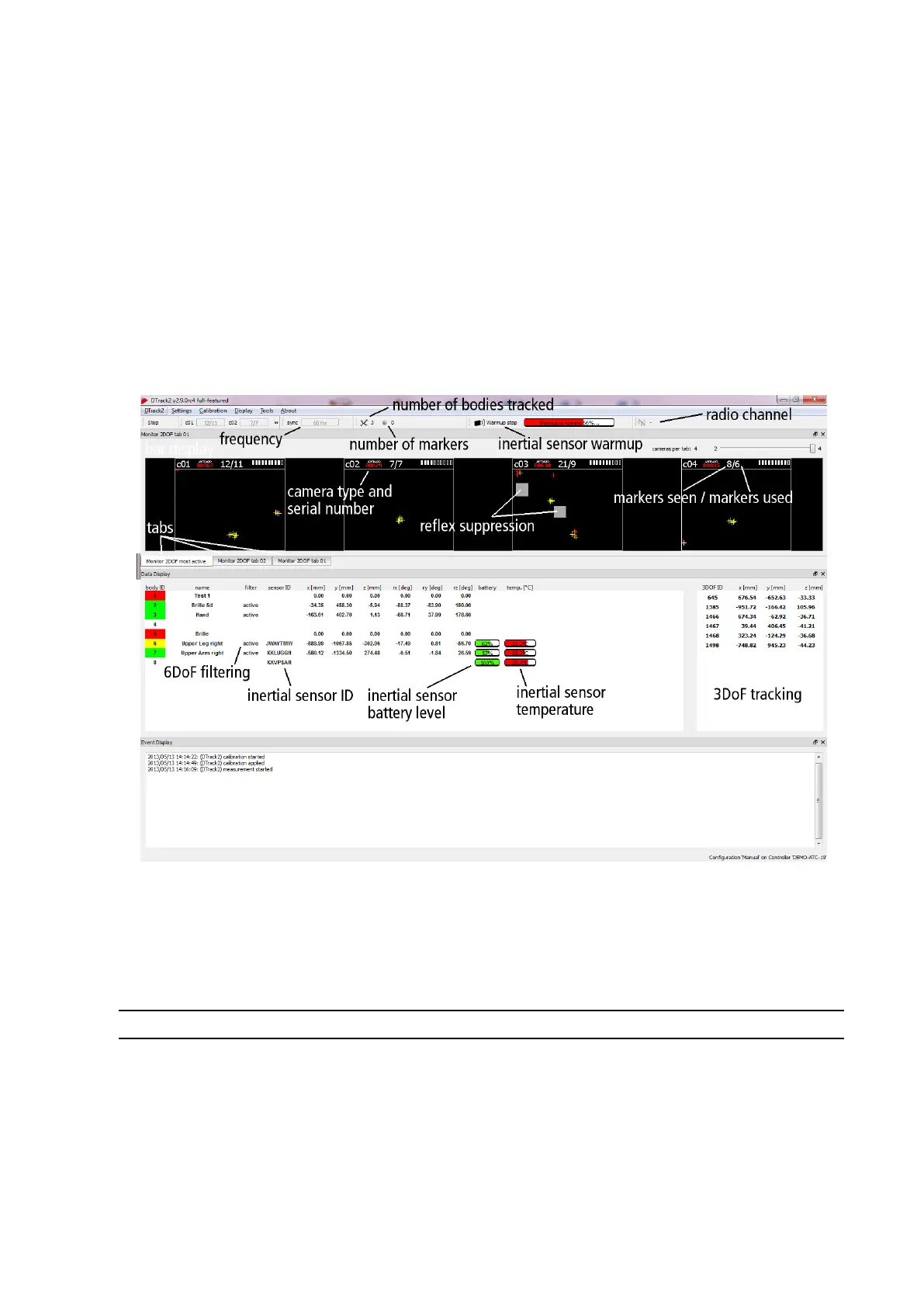
The graphical user interface of DTrack2 can be divided into the following parts (see figure
8.5 on page 132):
• the menu bar with access to all settings (please refer to chapter 8.3.1 on page 132)
• the toolbar with graphical elements regarding the status of the tracking system
(please refer to chapter 8.3.2 on page 134)
• the docking displays with graphical information (see chapter 8.3.3.1 on page 135)
and measurement results (please refer to chapter 8.3.3 on page 135).
Figure 8.5: Graphical user interface of DTrack2
8.3.1 Menu bar overview
DTrack2 Shortcut page 141
Licenses License overview → Adding licenses (e.g. higher
amount of cameras, Fingertracking, Measurement
Tool or Cascaded Systems)
Configurations Select, create new and save different configurations,
lock the current configuration, backup all settings or ex-
port system information
132



 To Next Page