6 Interaction devices
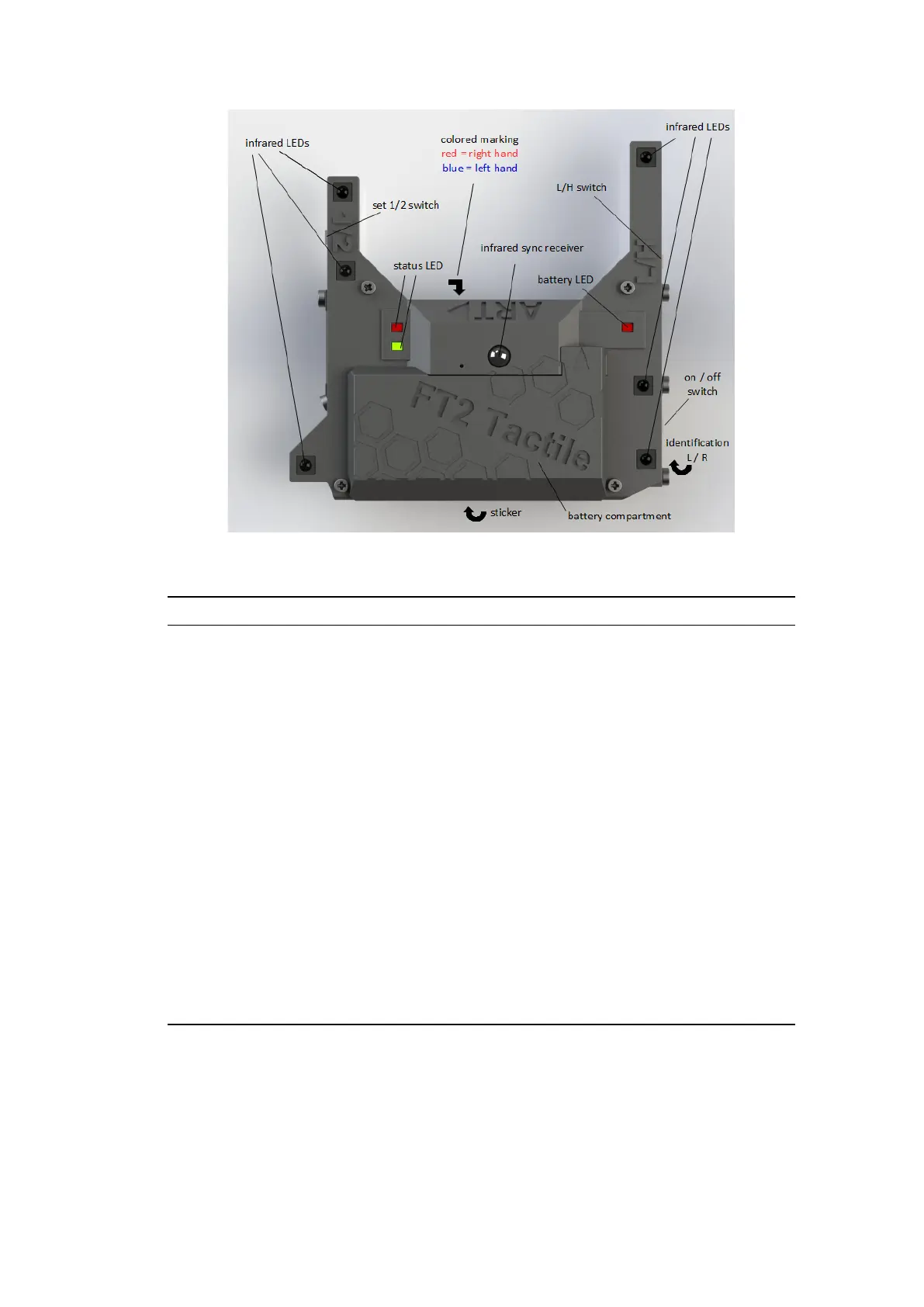
Figure 6.16: FINGERTRACKING2 Tactile hand target
Top View Event Description
green status LED
continuously → synchronization received and tracking
flashing → assigned to ART Controller, no active
tracking
red status LED
active → indicates radio communication
flashing → not assigned to ART Controller
red battery LED continously → battery low or discharged
infrared LEDs IR LEDs for tracking
On/Off switch activates / deactivates the hand target
L/H switch select the IR LED brightness (low / high)
set 1/2 switch select the target geometry (i.e. 2=second
pair)
colored marking front-
side
indicates the correct thimble set (red=right
hand or blue=left hand)
letters (L and R) em-
bossed bottom-side
indicates whether the hand target is dedi-
cated for the red=right hand or blue=left hand
sticker bottom-side showing the type and serial number of the
tactile device
infrared sync receiver receiver for the coded IR flash (i.e. synchro-
nization signal)
Table 6.7: Description of FINGERTRACKING2 Tactile handheld
lifetime by switching to L position.
88



 To Next Page