Chapter 8
8.5 Menu Settings
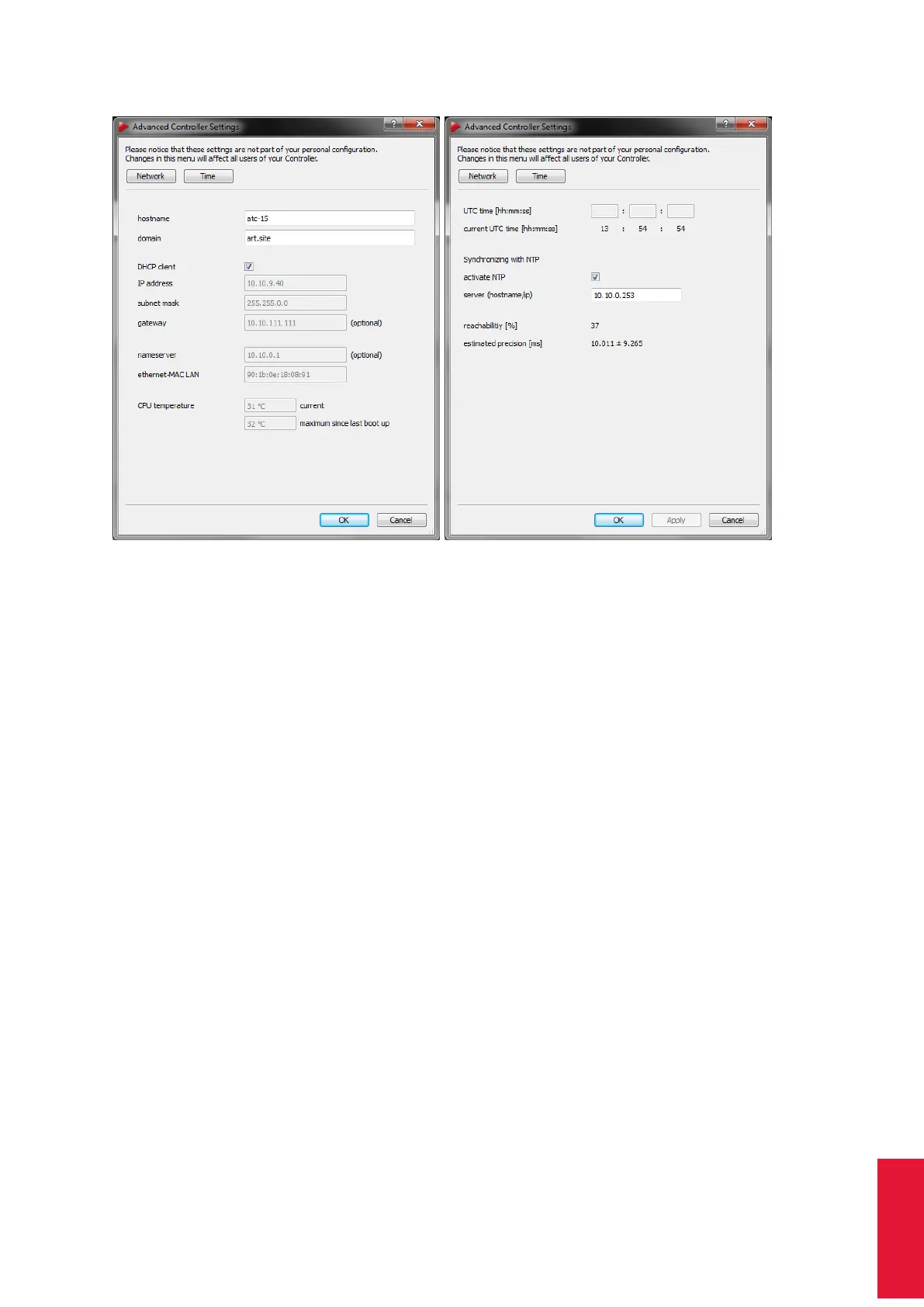
(a) Network Configuration (b) NTP Configuration
Figure 8.20: Advanced Controller Settings
i
If the network cable is unplugged or the DHCP support is unavail-
able while booting the controller uses its default IP address (i.e.
192.168.0.1).
By unticking the checkbox DHCP you may also specify a static IP address, subnet mask,
gateway and nameserver. The MAC address of the controller is printed in the line
ethernet-MAC LAN for your information. Please refer to chapter 8.2.2 on page 125 for
details how to set a static IP address.
CPU temperature On the bottom of this dialogue you can read the CPU temperature
inside the controller. The upper value shows the current temperature in
◦
C, while the lower
value indicates the temperature maximum since last boot up, i.e. the highest temperature
reached since the controller was started. When reaching elevated or critical levels, the
values are highlighted in orange or red color.
8.5.11.2 NTP Configuration
On the Time tab you can set the ART controller’s internal clock as well as synchronize it
with a master clock (i.e. a reference time source) using NTP (=Network Time Protocol).
NTP is a protocol designed to synchronize the clocks of computers over a network or even
the internet (not recommended).
The UTC time (UTC = Coordinated Universal Time) can be set either manually using the
163



 To Next Page