Operating Modes
Parameter manual b maXX BM5800
Document No.: 5.16029.03 Baumüller Nürnberg GmbH
590
of 814
3.8
deleted. bit 12 „In position“ in Z149.1– Spindle positioning status is a copy of bit 10 "Set
value reached" in Z108.3– Status word 1.
Operating sequence of a spindle positioning with a subsequent sequential
positioning
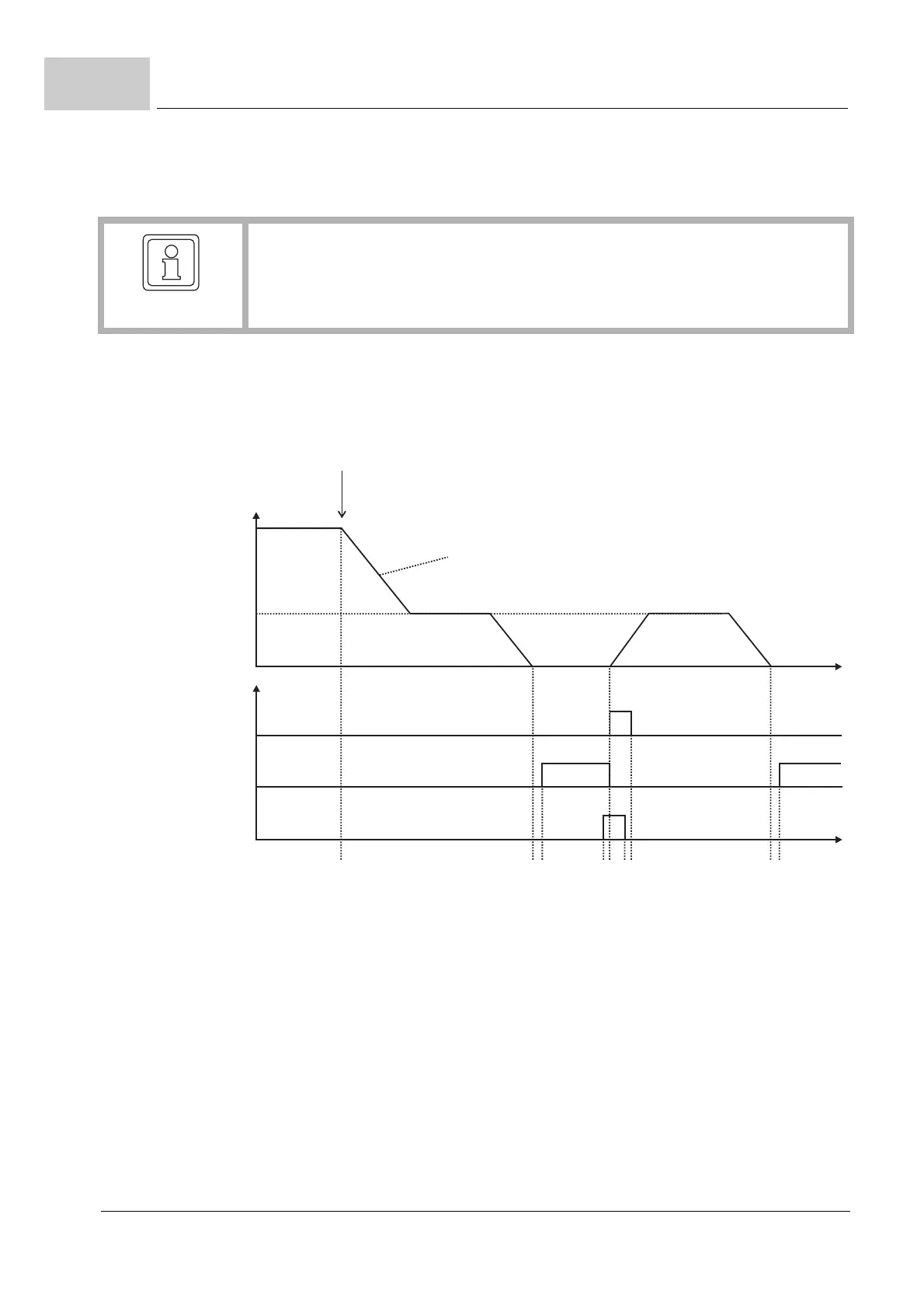
Figure 164: Spindle positioning with sequential positioning
Instant of time 1: Switching to operating mode spindle positioning; deceleration to spin-
dle positioning speed.
Instant of time 2: Position setpoint has reached active target position Z149.10–.
Instant of time 3: Position actual value is in positioning window and positioning window
time is up Controller sets "Setpoint reached".
Instant of time 4: „Start sequential positioning“ is set.
Instant of time 5: Controller has recognized a start command, resets „Setpoint reached“,
sets the „Start-Command-Acknowledge“ and begins with sequential positioning.
Instant of time 6: „Start sequential positioning“ is deleted.
Instant of time 7: Controller deletes „Start-Command-Acknowledge“.
Instant of time 8: Position setpoint has reached active target position.
Instant of time 9: The position actual value is in positioning window and positioning win-
dow time is up Controller sets "Setpoint reached".
NOTE!
Bit 11 of the control word is only used for the sequential positioning. The first posi-
tioning after switching to operating mode spindle positioning is always executed im-
mediately independent of the status of bit 11!
t
n
123456789
Spindle
positioning speed
Status word Bit 12
„Start-Command-
Acknowledge“
Status word Bit 10
„Setpoint reached“
Control word Bit 11
„Start sequential
positioning“
Switched to
operating mode -6 spindle positioning
Slow down with spindle acceleration bipolar



 To Next Page