126 | Chapter 3: Operation
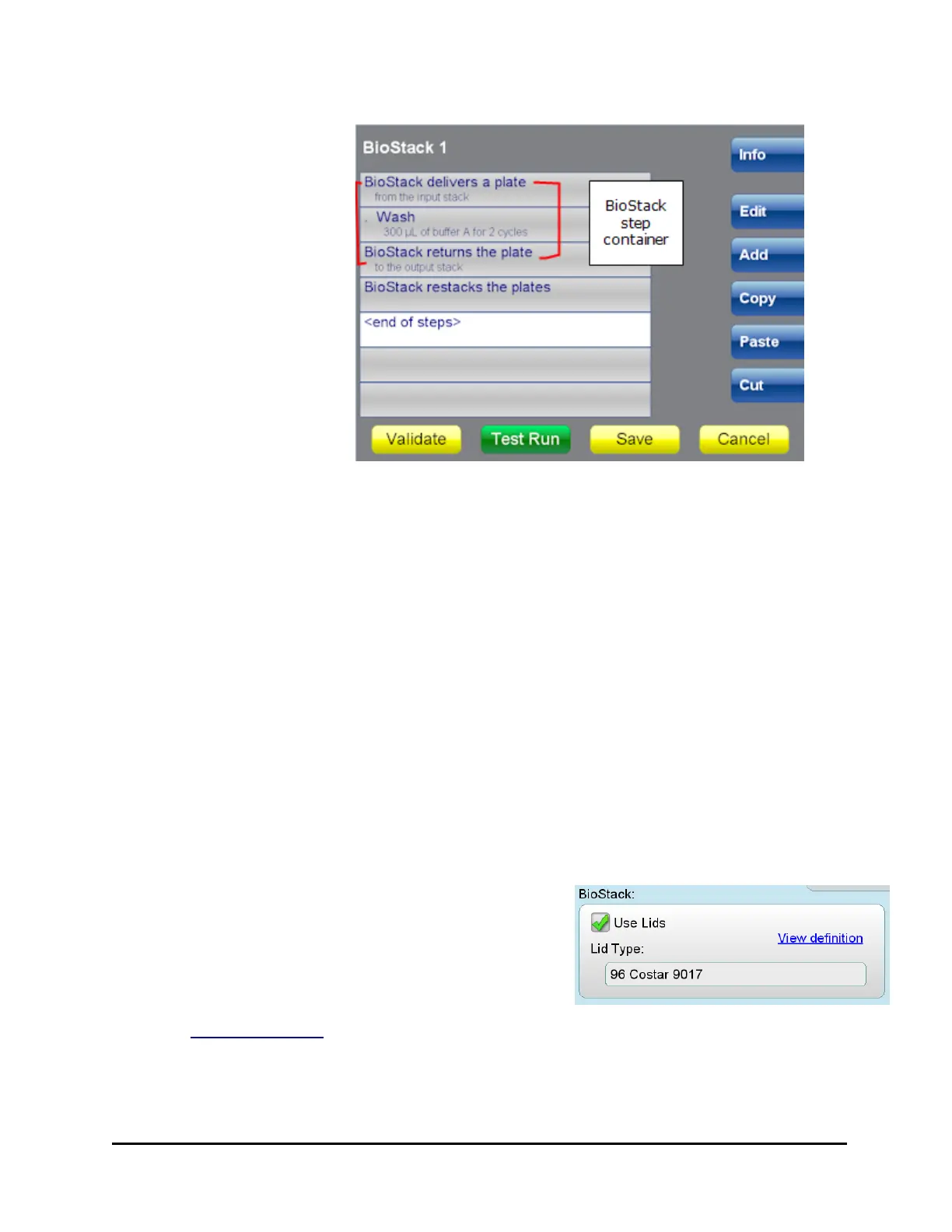
1. Highlight a step or
the <end of steps>
placeholder and press
Add and then
BioStack. This adds a
start step, BioStack
delivers and an end
step, BioStack returns
plate. The end step is
highlighted.
2. Press the desired
action button and
define the parameters
of the steps to be
performed on each
plate.
Make sure the steps to be performed on the plates are inside the 'BioStack
delivers' and 'BioStack returns' steps.
3. Optionally, highlight the <end of steps> placeholder, press Add and add a
Restack step to move the plates back to the input stack. A Restack step must
be outside the BioStack step container.
4. When all the protocol steps are defined, click Validate to make sure the
protocol is correctly designed.
5. Save the protocol.
6. At runtime, except when using plates with lids, you can define the Number of
plates to process in the Run Info section of the run screen: enter a specific
number or select the "Entire input stack" for processing.
How to run plates with lids
1. Select the Info button and fill the checkbox
to Use Lids.
2. Select a file in the Lid Type field that most
closely matches your plate type. (Touch
screen: press the field to select a file.) (Select
View definition to see the file's details.)
Conversely, de-select Use Lids to process plates without them.
MultiFlo™ FX Multi-Mode Dispenser



 To Next Page