Cell Wash | 143
3.
Add a Wash step and define it as you normally would, except
with these special parameters:
o
Set the Aspiration Travel Rate to 6 CW and the Delay to 0.
o
Set the Dispense Flow Rate to 1 or 2.
l
Select the Dispense Advanced Options link and enable the Delay start of Vacuum
until sufficient fluid has been dispensed. For small dispense volumes, BioTek
recommends setting the delay volume to equal your dispense volume.
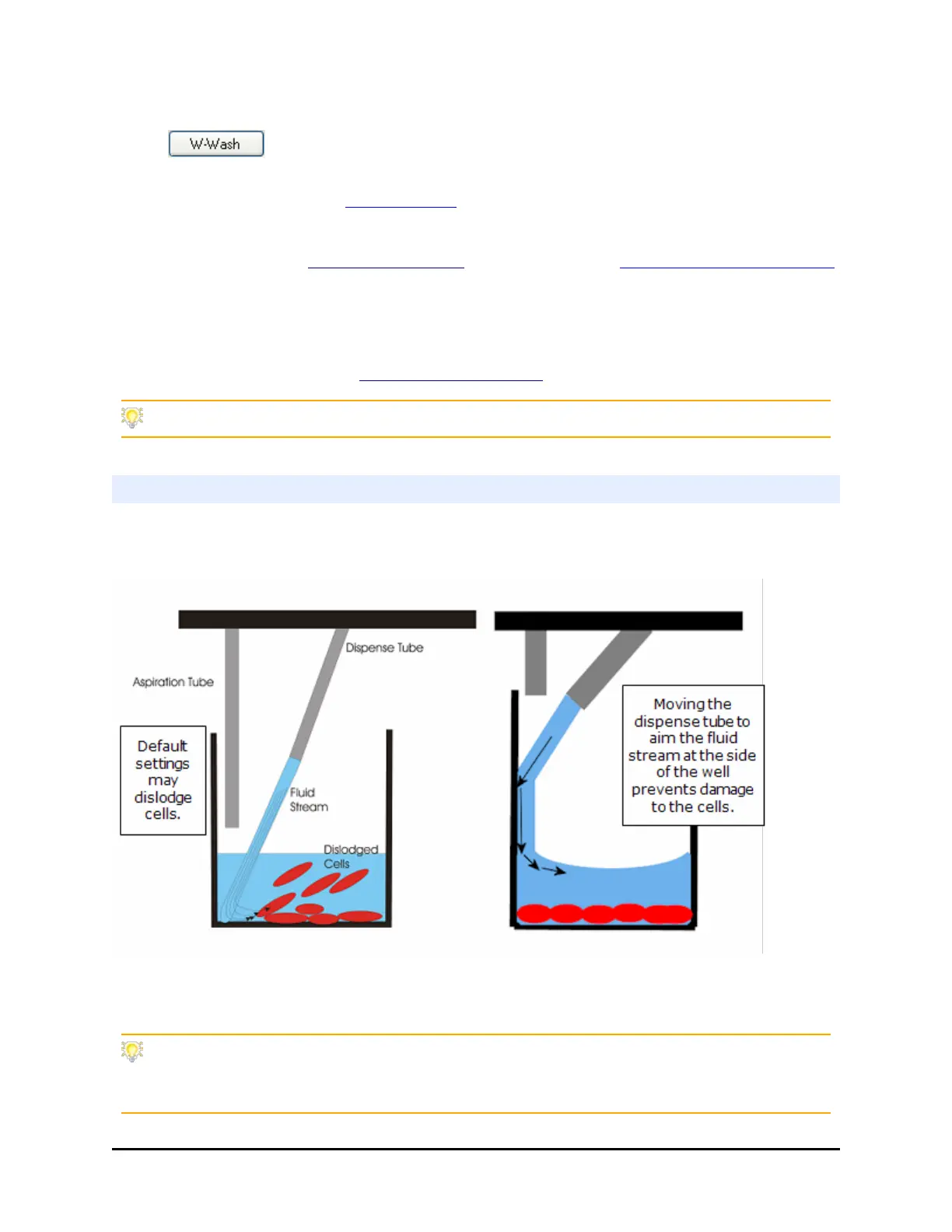
l Reposition the dispense tubes to aim fluid at the side of the wells to reduce turbulence
and change the aspirate height to increase the amount of residual fluid left in the well to
protect the cell layer. See Cell Wash Strategies below.
Be sure to check the parameters for Final Aspiration.
Cell Wash Strategies
To give you a starting point for optimizing your own assays, here are some
recommendations for improving your cell wash assays:
Repositioning the dispense and aspirate tubes helps minimize turbulence in the
wells, preserving more cells.
For loosely adherent cells, the best performance was seen by increasing the aspirate
height and using both a standard and secondary (or crosswise) aspiration. Moving the
BioTek Instruments, Inc.



 To Next Page