144 | Chapter 3: Operation
aspirate tubes from one side of the well to the other prevents a fluid stream from forming
and dislodging the cells. Increased residual in the well means increased cell retention.
Best practice:
l Use the Adjust Utility to determine the optimal X, Y, and Z axis adjustments needed to
best position the manifold above the wells during the wash routine.
l Test the protocol settings by running the protocol using only water and an empty plate
before actually running your assay to make sure the fluid stream hits the wells as
desired.
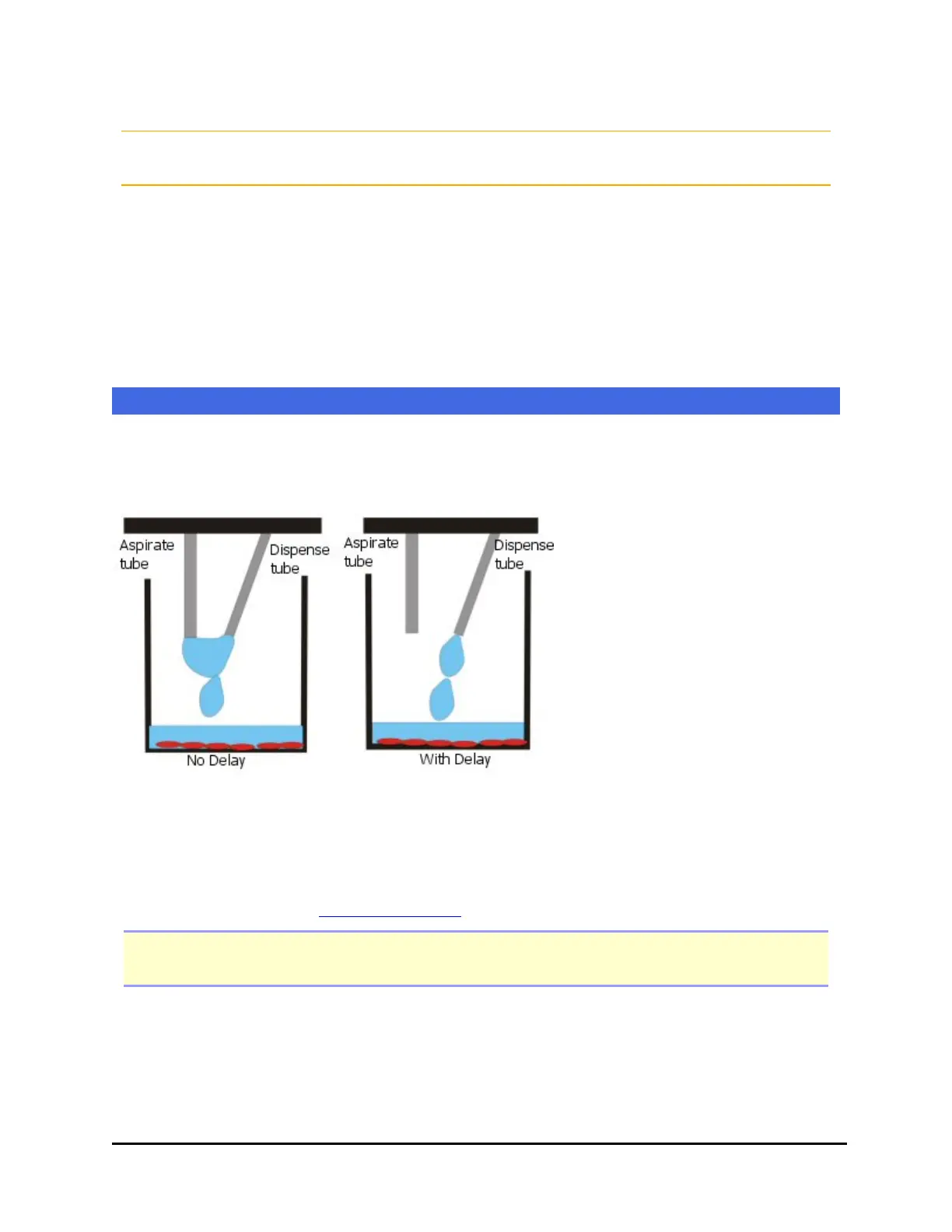
Delay Aspiration or Vacuum-On Volume Control
Touch Screen: Edit the Wash or Dispense Step>Advanced Options
During regular plate washing, aspiration and dispensing occurs simultaneously.
This allows "overflow" dispensing, because the fluid is aspirated before
overflowing the plate.
Use this control to begin aspiration only after the specified volume is dispensed.
For cell wash assays, specify at least 10 µL/well. For small dispense volumes or to
disable aspiration for the entire dispense duration, set the vacuum-on volume to
equal your dispense volume. Refer also to application notes on the BioTek web site
for more information (www.biotek.com).
Note: When the volume is set to 1120 µL/well or more, aspiration is disabled during the
dispense step.
MultiFlo™ FX Multi-Mode Dispenser



 To Next Page