4
4
4-53
4-53
Disassembly/Assembly > Document Exposure/Feeder System > Removing the DADF Pickup Roller Unit (MF4890dw/MF4880dw) > Procedure
Disassembly/Assembly > Document Exposure/Feeder System > Removing the DADF Pickup Roller Unit (MF4890dw/MF4880dw) > Procedure
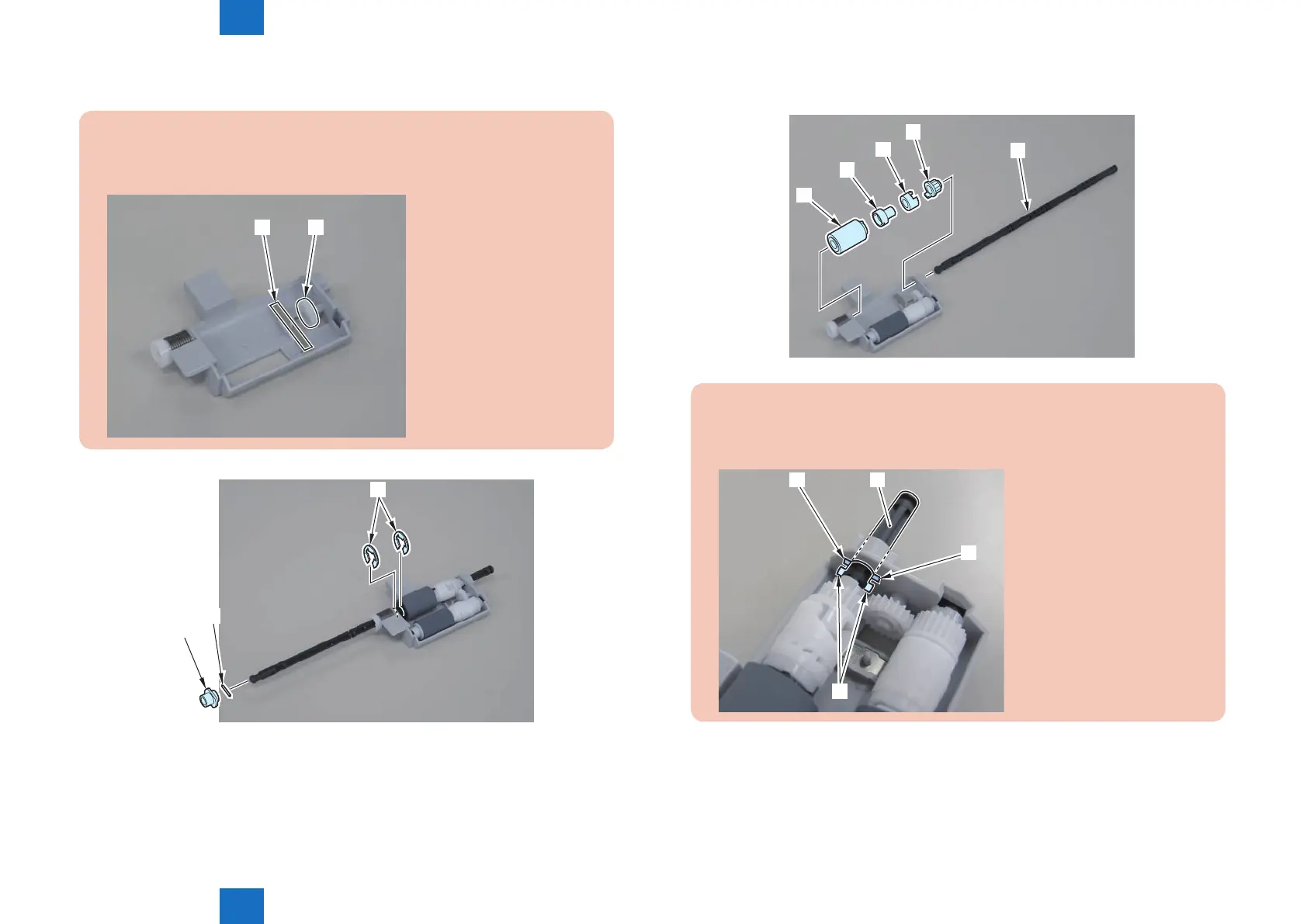
4)Remove the bushing[1],pin[2] and 2 e-rings[3]
Caution:
When disassembling/assembling, take care not to lose the plate spring[1] and
gear[2]
[2][1]
[3]
[1]
[2]
F-4-133
5)Pull out pickup roller shaft[1], and remove the pickup roller[2], bushing[A], bushing[B], and
gear[3].
[2]
[A]
[B]
[3]
[1]
Note
When pulling out the pickup roller shaft[1], be sure to align the boss[2] of the roller
shaft with the hole on the [A] part.
[2]
[1]
[A]
[A]
F-4-134















 To Next Page