4
4
4-67
4-67
Disassembly/Assembly > Document Exposure/Feeder System > Removing the SADF Motor Unit (MF4870dn/MF4830d) > Procedure
Disassembly/Assembly > Document Exposure/Feeder System > Removing the SADF Motor Unit (MF4870dn/MF4830d) > Procedure
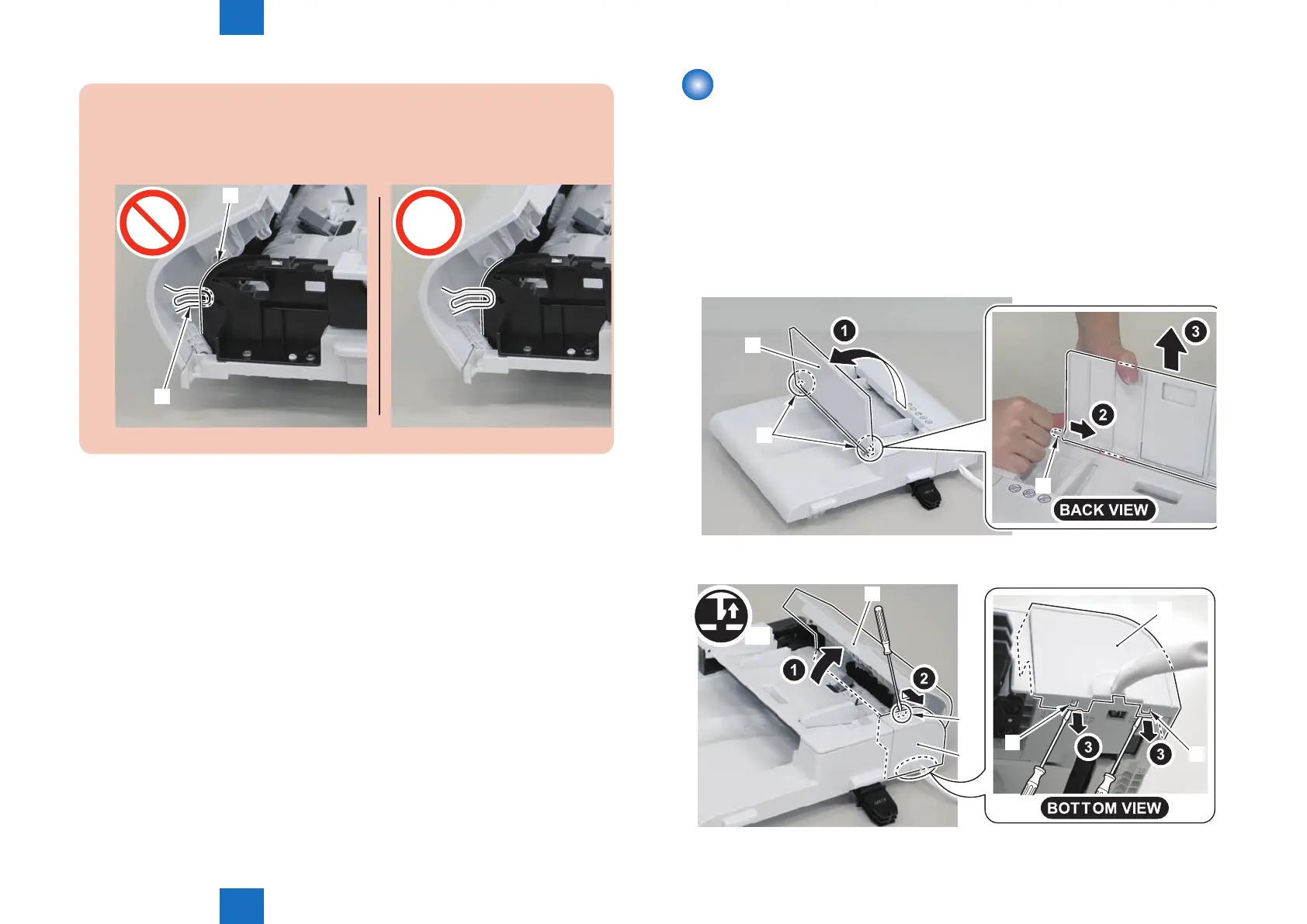
Caution:
When install the SADF upper cover, be sure that the guide[1] does not get inside
the[A] part.
[1]
[A]
Removing the SADF Motor Unit (MF4870dn/MF4830d)
■
Preparation
1) Remove the left cover.
2)Remove the SADF unit and reader unit
3)Remove the SADF unit.
■
Procedure
1) Open the SADF pickup tray[1] and remove the SADF pickup tray.
• 2 shafts[2]
[1]
[2]
[2]
2) Open the SADF upper cover[1] and remove the SADF rear cover[2].
• 3 claws[3]
[1]
[2]
x3
[3]
[2]
[3]
[3]
F-4-164
F-4-165















 To Next Page