8
8
8-7
8-7
Service Mode > COPIER > COUNTER > JAM
Service Mode > COPIER > COUNTER > JAM
COUNTER
■
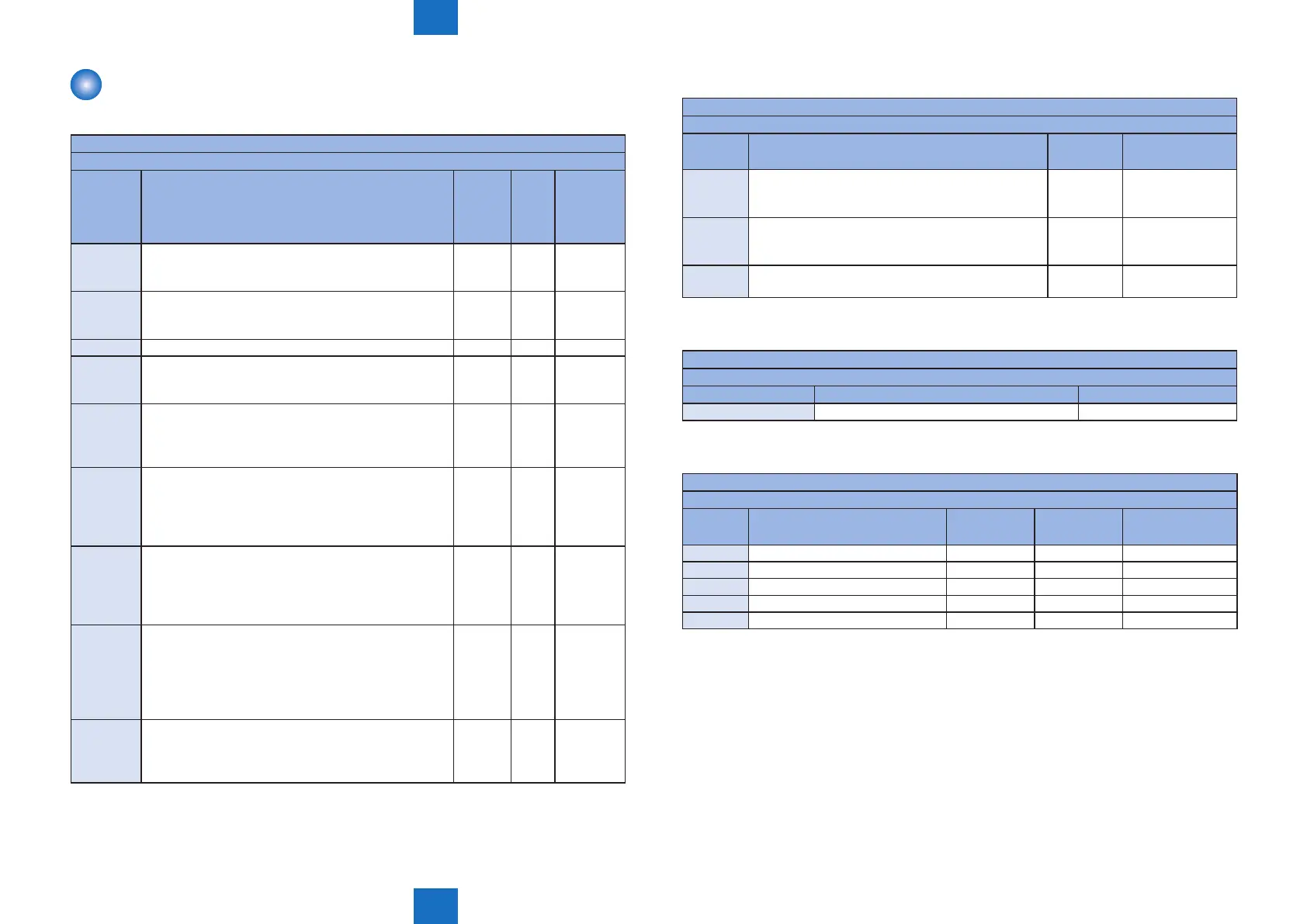
TOTAL
COPIER>COUNTER>TOTAL
Display/ Setting/ Adjustment rage: 0 ~ 999,999 Return to 0 when exceeding 999,999.
Sub item Description
Common
to all
models
FAX
model
only
Double
sided
printing
model only
SERVICE1 Total counter 1 for service
Count up when a paper is ejected from the machine
(regardless of sizes such as large size and small size.)
Yes
SERVICE2 Total counter 2 for service
Count up when a paper is ejected from the machine
(regardless of sizes such as large size and small size.)
Yes
TTL Total counter (Copier + Printer + FAX + Combination) Yes
COPY Total copy counter
Count up when a paper is ejected from the machine
after execution of copy operation.
Yes
PDL-PRT PDL printing counter
Count up when PDL printing, ejecting a paper from
the machine, and duplex stacking. Blank paper is also
counted. Count up by 1 regardless of large or small.
Yes
FAX-PRT FAX reception printing counter
Count up when FAX reception printing, ejecting a paper
from the machine, and duplex stacking. Blank paper
is also counted. Count up by 1 regardless of large or
small. It can be cleared.
Yes
RPT-PRT Report printing counter
Count up when report printing, ejecting a paper from
the machine, and duplex stacking. Blank paper is also
counted. Count up by 1 regardless of large or small. It
can be cleared.
Yes
2-SIDE 2 sided copy/ print counter
Count up the number of passing through the duplex
path in copying/ printing when ejecting a paper from the
machine and duplex stacking.
Blank paper is also counted. Count up by 1 regardless
of large or small. It can be cleared.
Yes
SCAN Scanning counter
Count up the number of scanning when scanning is
completed. Count up by 1 regardless of large or small.
It can be cleared.
Yes
T-8-15
■
PICK-UP
COPIER>COUNTER>PICK-UP
Display/ Setting/ Adjustment rage: 0 ~ 999,999 Return to 0 when exceeding 999,999.
Sub item Description
Common to
all models
Double sided
printing model only
C1 Total counter of cassette 1 pickup
Display the number of pages picked up from cassette
1.
Yes
MF Total counter of multi-purpose tray pickup
Display the number of pages picked up from multi-
purpose tray.
Yes
2-SIDE Total counter of 2-sided pickup
Display the number of pages by 2-sided pickup.
Yes
■
FEEDER
COPIER>COUNTER>FEEDER
Display/ Setting/ Adjustment rage: 0 ~ 999,999 Return to 0 when exceeding 999,999.
Sub item Description ADF model only
FEED Total counter of document pickup by ADF Yes
■
JAM
COPIER>COUNTER>JAM
Display/ Setting/ Adjustment rage: 0 ~ 999,999 Return to 0 when exceeding 999,999.
Sub item Description
Common to
all models
ADF model
only
Double sided
printing model only
TOTAL Total jam counter Yes
FEEDER Total jam counter for feeder Yes
2-SIDE Jam counter for duplex unit Yes
MF Jam counter for multi-purpose tray Yes
C1 Jam counter for cassette 1 Yes
T-8-16
T-8-17
T-8-18















 To Next Page