8
8
8-5
8-5
Service Mode > COPIER > FUNCTION > PARAM
Service Mode > COPIER > FUNCTION > PARAM
FUNCTION
■
CLEAR
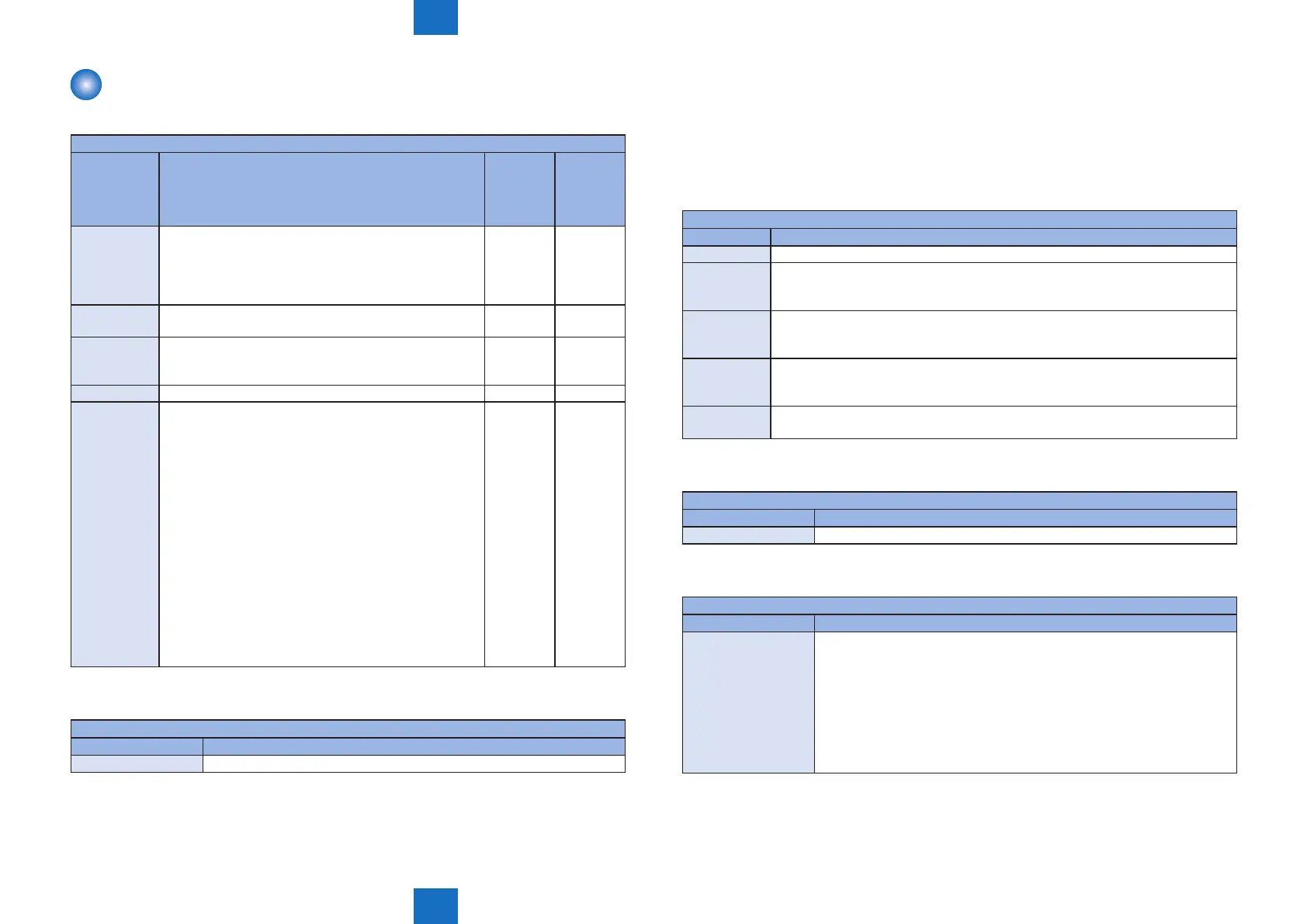
COPIER>FUNCTION>CLEAR
Sub item Description
Common
to all
models
Network
model and
FAX model
only
TEL-USER Clear the user data and the registered address data.
SSSW is not cleared.
When this service mode is executed, a message
"REBOOTING..." is displayed on the Control Panel, and
the host machine is automatically restarted.
Yes
SRVC-DAT SERVICE DATA is cleared.
User data is not cleared.
Yes
HIST Each log data is cleared.
ACT-HIST: Communication log is cleared.
ACT-HIST: Each print log is cleared.
Yes
PWD-CLEAR Password of the system administrator is cleared. Yes
ALL The following data are cleared.
• USER DATA
• SERVICE DATA
• JOB ID
• Each log
• CLEAR DATE
USER DATA/ SERVICE DATA are reset to the default
location value.
Appropriate values for LOCAL / SIZE-LC needs to be
preset before executing of CLEAR -> ALL When this
service mode is executed without setting the appropriate
values for LOCAL / SIZE-LC, factory default settings are
continued to use.
When this service mode is executed, a message
"REBOOTING..." is displayed on the Control Panel, and
the host machine is automatically restarted.
Yes
■
MISC-R
COPIER>FUNCTION>MISC-R
Sub item Description
SCANLAMP Execution of lighting function for Scanning Lamp.
T-8-6
T-8-7
■
MISC-P
●
OUTPUT
When outputting the report, place paper in the Pickup Cassette, and remove paper from the
Multi-purpose Tray.
If paper is placed in the Multi-purpose Tray, the report is not output even if paper is placed in
the Pickup Cassette.
COPIER>FUNCTION>MISC-P
Sub item Description
SRVC-DAT To output the system data list/ system dump list as follows;
SYS-DAT To output the system data list.
Service software switches and parameters used in FAX function are mainly
outputted.
SYS-DMP To output the system dump list.
Service data such as the number of communications, the number of receiving pages
and sending pages, and the number of error are outputted.
CNTR To output the counter report.
Counter values of use trend for reading, storage, communications, and copy are
displayed.
SPEC To output the spec report.
Current device status is printed out.
■
SYSTEM
COPIER>FUNCTION>SYSTEM
Sub item Description
DOWNLOAD To switch to the download mode.
■
PARAM
COPIER>FUNCTION>PARAM
Sub item Description
EXC-NAVI To switch of installation navigation.
Setting value
0: Enable (Default)
1: Disable
Set this switch to 1 after the termination of installation navigation.
Installation navigation is not executed when this switch is 1 at next start-up.
When this service mode is executed, a message "REBOOTING..." is
displayed on the Control Panel, and the host machine is automatically
restarted.
T-8-8
T-8-9
T-8-10















 To Next Page