3
3
3-4
3-4
Periodical Services > Cleaning > Reader ADF > DADF
Periodical Services > Cleaning > Reader ADF > DADF
Reader ADF
■
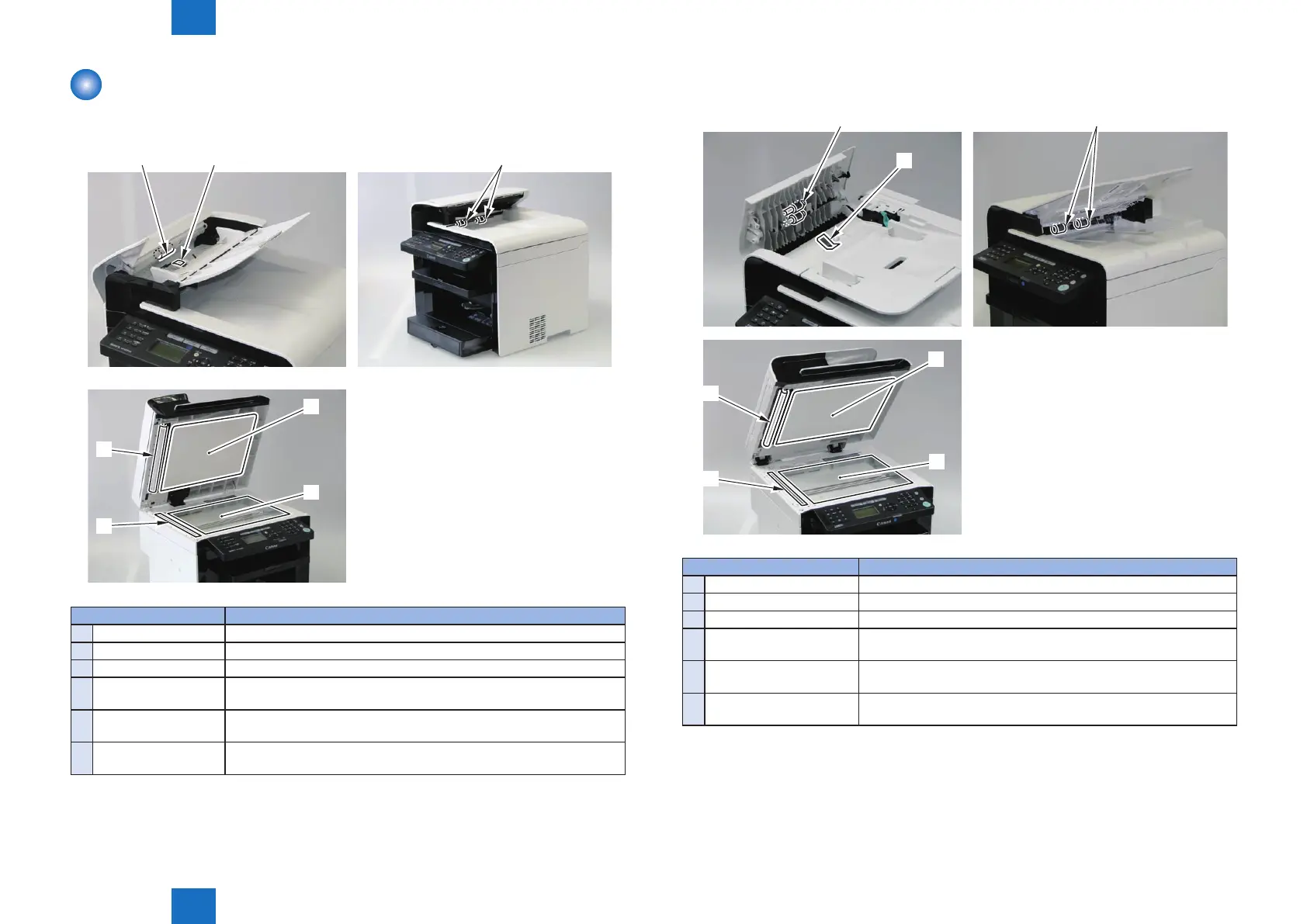
SADF
[1] [2] [3]
[4]
[4]
[5]
[6]
Cleaning parts Procedure
1
SADF Pickup Roller Open the ADF and wipe off the smudge with the soft dry cloth.
2
SADF Separation Pad Open the ADF and wipe off the smudge with the soft dry cloth.
3
Delivery Roller Wipe off the smudge with the soft dry cloth.
4
Backside of copyboard
cover
Open the copyboard cover and wipe off the smudge with the soft dry
cloth.
5
Copyboard glass Open the copyboard cover and wipe off the smudge with the soft dry
cloth.
6
ADF reading area Open the copyboard cover and wipe off the smudge with the soft dry
cloth.
F-3-2
T-3-2
■
DADF
[1]
[2]
[3]
[4]
[4]
[5]
[6]
Cleaning parts Procedure
1
DADF Pickup Roller Unit Open the ADF and wipe off the smudge with the soft dry cloth.
2
DADF Separation Pad Open the ADF and wipe off the smudge with the soft dry cloth.
3
Delivery Roller Wipe off the smudge with the soft dry cloth.
4
Backside of copyboard
cover
Open the copyboard cover and wipe off the smudge with the soft
dry cloth.
5
Copyboard glass Open the copyboard cover and wipe off the smudge with the soft
dry cloth.
6
ADF reading area Open the copyboard cover and wipe off the smudge with the soft
dry cloth.
F-3-3
T-3-3















 To Next Page