4
4
4-101
4-101
Disassembly/Assembly > Document Exposure/Feeder System > Removing the SADF Separation Pad(MF4780w/MF4770n/MF4750/MF4730) > Procedure
Disassembly/Assembly > Document Exposure/Feeder System > Removing the SADF Separation Pad(MF4780w/MF4770n/MF4750/MF4730) > Procedure
Removing the SADF Separation Pad(MF4780w/
MF4770n/MF4750/MF4730)
■
Preparation
1) Remove the left cover.
2)Remove the SADF unit and reader unit
3)Remove the SADF unit.
4)Remove the SADF pickup unit.
■
Procedure
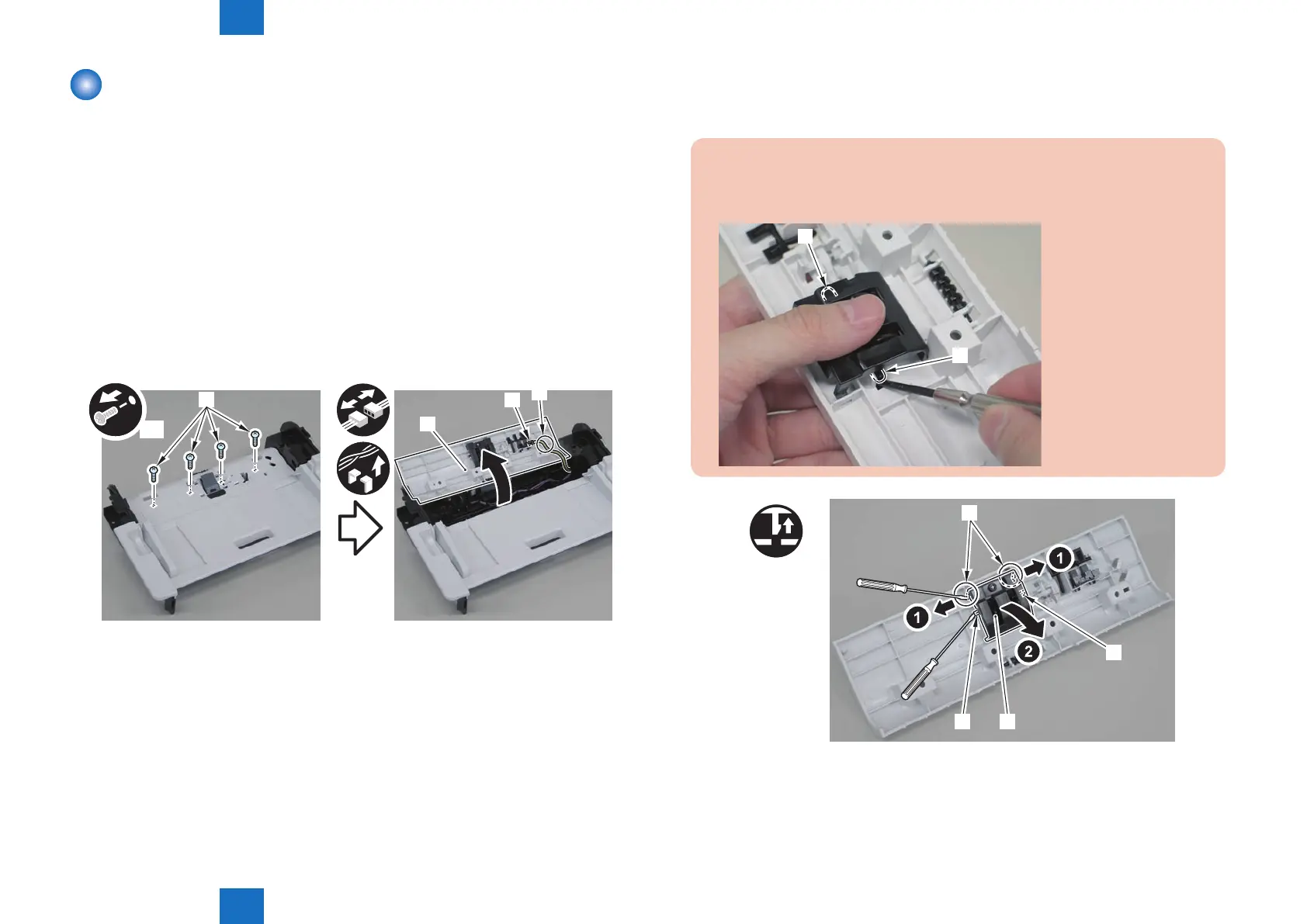
1)Remove the SADF pickup upper cover[1], and free the harness from the connector[2] and
the harness guide[A].
• 4 screws[3]
[1]
[2]
[A]
x4
[3]
F-4-244
2)Remove the separation pad unit[1].
• 2 claws[2]
• 2 protrusions[3]
Caution.
Be sure to hold the separation pad unit with your ngers when releasing its 2
protrusions[3]
[3]
[3]
[1]
[3]
x2
[2]
[3]
F-4-245















 To Next Page