4
4
4-345
4-345
Disassembly/Assembly > Pickup And Feeding System > Removing the Duplex Feed Unit (MF4820d) > Procedure
Disassembly/Assembly > Pickup And Feeding System > Removing the Duplex Feed Unit (MF4820d) > Procedure
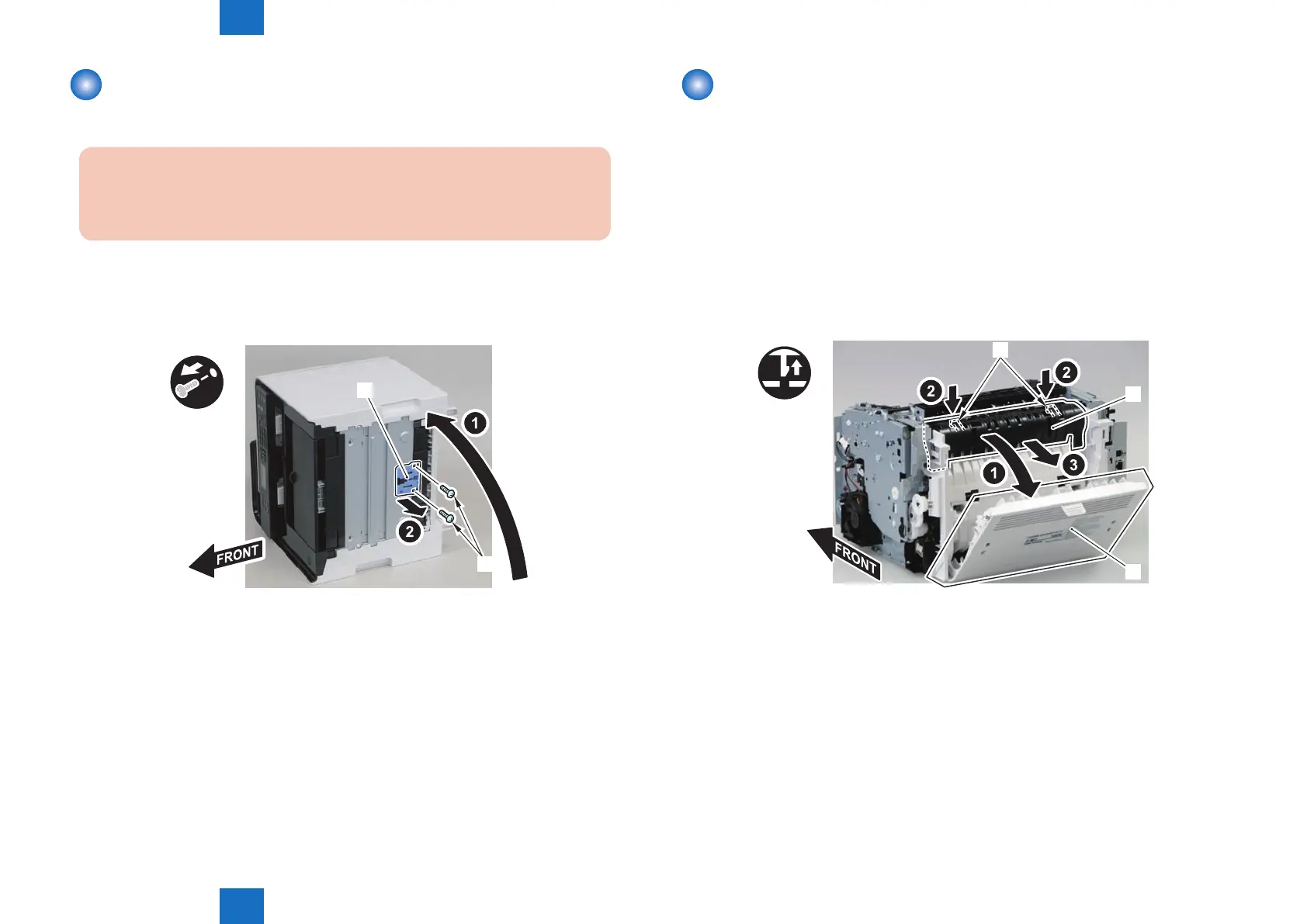
Removing the Separation Pad (MF4820d)
■
Procedure
Caution:
When assembling/disassembling the separation pad, do not touch the surface of
the separation pad.
1) Face the left side of the host machine downwards.
2) Remove the separation pad [1].
• 2 screws [2]
[1]
x5x2
[2]
F-4-949
Removing the Duplex Feed Unit (MF4820d)
■
Preparation
1) Remove the left cover
2)Remove the copyboard cover and reader unit.
3)Remove the right cover
4)Remove the front cover unit.
5)Remove the upper cover.
■
Procedure
1)Open the rear cover[1], and remove the duplex guide[2]
• 2 claws[3]
x2
[1]
[3]
[2]
F-4-950















 To Next Page