8
8
8-17
8-17
Service Mode > TESTMODE > NETWORK > SSSW
Service Mode > TESTMODE > NETWORK > SSSW
●
RELAY-1
TESTMODE>FAX>MODEM>RELAY-1
Sub item Description FAX model only
CML Test ON/OFF of port SW and relay on NCU
Setting value: ON, OFF
Yes
H Test ON/OFF of port SW and relay on NCU
Setting value: ON, OFF
Yes
■
FACULTY
TESTMODE>FAX>FACULTY
Sub item Description FAX model only
G34800TX Transmit the frequency of 4800bps using G3 signal transmission
function after DC circuit closure.
Yes
DETECT1 Ring detection
Check the status (ON, OFF) of hook and Ci, Fc from i line.
Yes
DETECT2 CNG detection test 1
Execute CNG signal check and FED check.
Detect CNG after CML relay is ON.
Yes
DETECT3 CNG detection test 2
Execute CNG signal check and FED check.
Detect CNG after CML relay is OFF.
Yes
■
PANEL
TESTMODE>FAX>PANEL
Sub item Description
KEY CHECK START Key check
[Applicable case]
Check if all keys functions normally after replacement of Control Panel.
LED CHECK START LED check
[Applicable case]
Check if all LEDs are lit normally after replacement of Control Panel.
LCD CHECK START LCD check
[Applicable case]
Check if LCD can display without any missing dot after replacement of
Control Pannel.
T-8-49
T-8-50
T-8-51
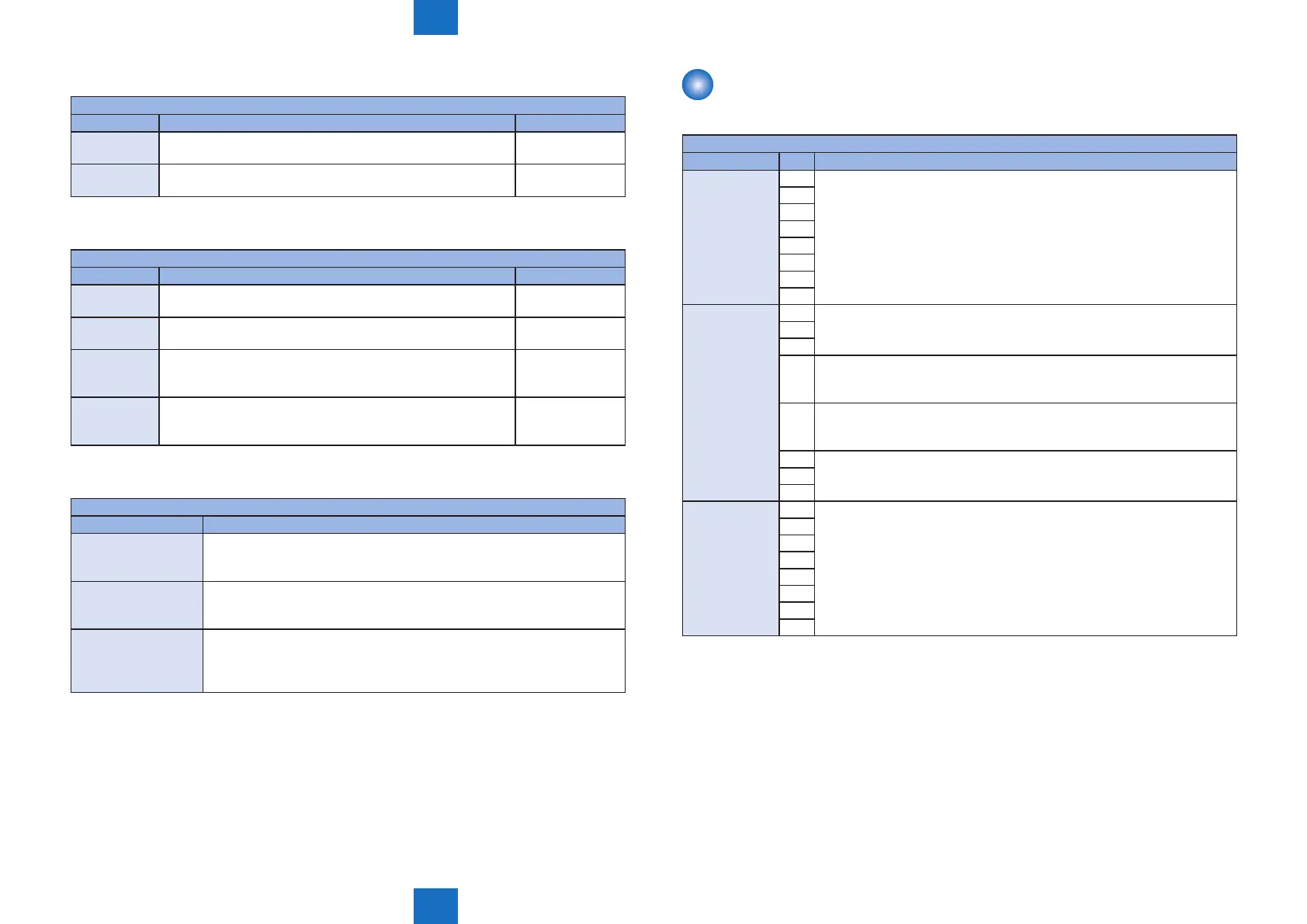
NETWORK
■
SSSW
NETWORK>SSSW
Sub item BIT Description
SW01 ~ SW09
0
Not in use
1
2
3
4
5
6
7
SW10
Network Cong
System
0
Not in use1
2
3 Turn ON(Enable)/ OFF(Disable) for acquisition of host name (Option 12) by
DHCP
Default value: 0
4 Turn ON(Enable)/ OFF(Disable) for registration of host name (Option 81) by
DHCP
Default value: 1
5
Not in use6
7
SW11 ~ SW50
0
Not in use
1
2
3
4
5
6
7
T-8-52















 To Next Page