4
4
4-92
4-92
Disassembly/Assembly > Document Exposure/Feeder System > Removing the SADF Unit and Reader Unit(MF4780w/MF4770n/MF4750/MF4730) > Procedure
Disassembly/Assembly > Document Exposure/Feeder System > Removing the SADF Unit and Reader Unit(MF4780w/MF4770n/MF4750/MF4730) > Procedure
Removing the SADF Unit and Reader Unit(MF4780w/
MF4770n/MF4750/MF4730)
■
Preparation
1) Remove the left cover.
■
Procedure
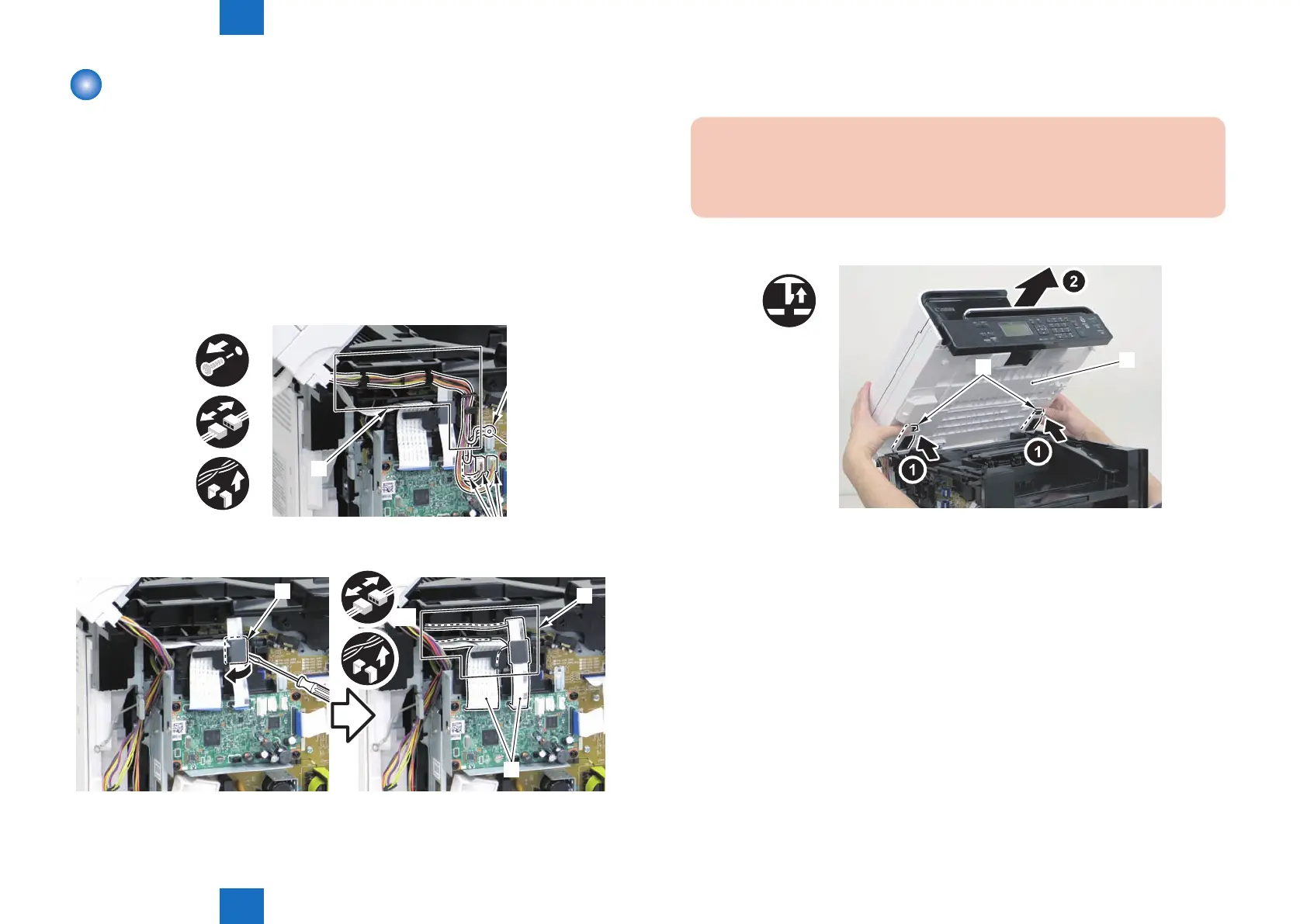
1) Remove the 2 grounding wires[1].
• 1 screw(black TP)
2) Disconnect the 3 connectors[3], and free the grounding wire and the harnesses from the
harness guide[A].
x3
[A]
3)Remove the ferrite core[1], and disconnect the 2 at cables from the harness guide[A]
[1]
[A]
[2]
x2
F-4-220
F-4-221
4)Remove the DADF unit and reader unit.
• 2 claws[2]
Caution:
When placing the removed copyboard cover and reader unit on the desk, oor,
etc.,be careful not to get the at cable and harnesses trapped under them.
x2
[1]
[2]
F-4-222















 To Next Page