4
4
4-74
4-74
Disassembly/Assembly > Document Exposure/Feeder System > Removing the Copyboard Glass(MF4870dn/MF4830d) > Procedure
Disassembly/Assembly > Document Exposure/Feeder System > Removing the Copyboard Glass(MF4870dn/MF4830d) > Procedure
Removing the Copyboard Glass(MF4870dn/MF4830d)
■
Preparation
1) Remove the left cover.
2)Remove the SADF unit and reader unit
3)Remove the SADF unit.
■
Procedure
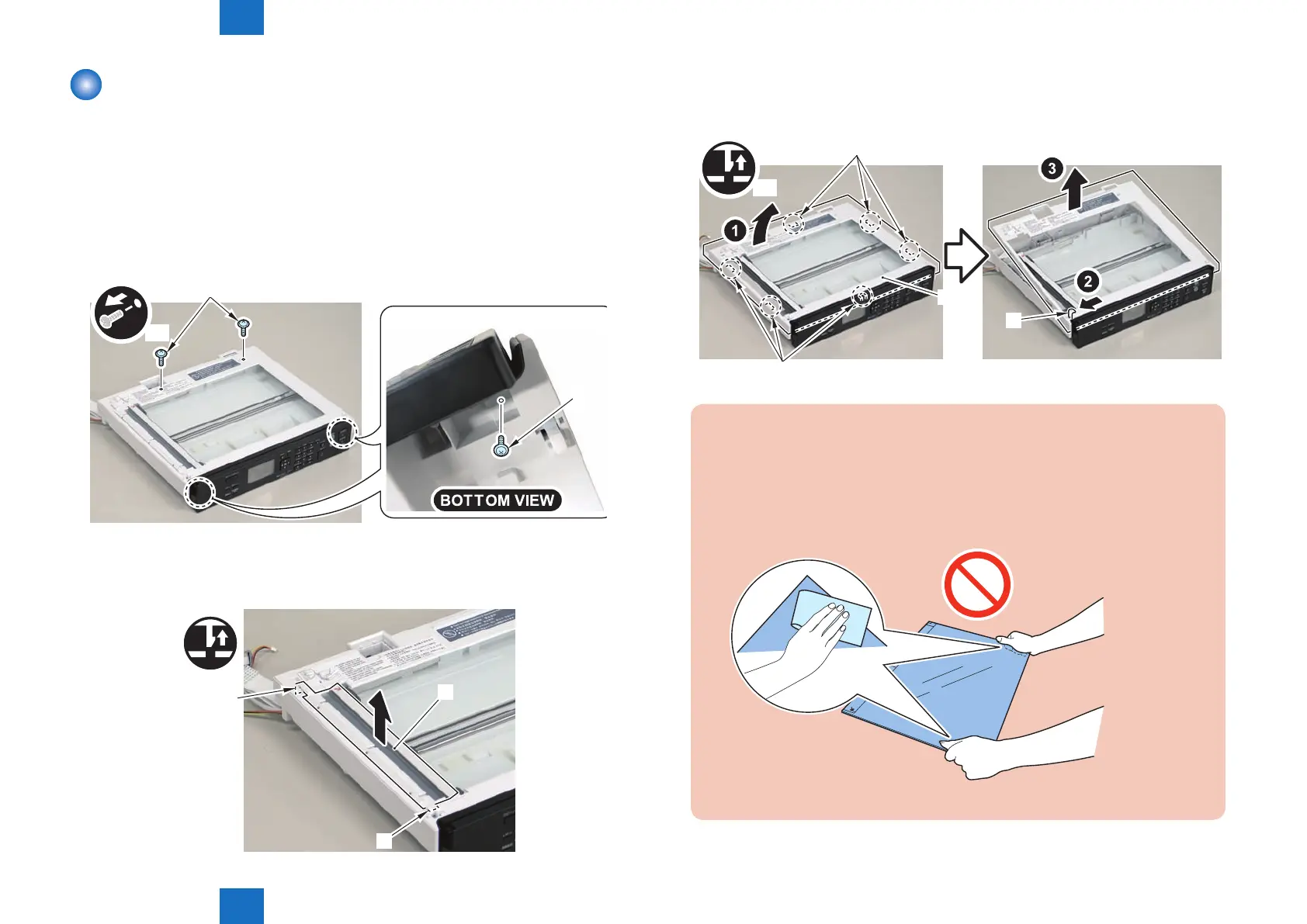
1)Remove the 4 screws(TP)[1]
x4
[1]
[1]
2)Remove the copyboard guide holder[1]
• 1 claw[2]
• 1 protrusions[3]
[1]
[3]
[2]
F-4-178
F-4-179
3)Remove the reader upper cover[1]
• 6 claws[2]
• 1 hook[3]
x6
[1]
[2]
[3]
[2]
Caution.
Place the detached copyboard glass cover on a cloth etc. to avoid damaging the
bottom sheet.
When removing the copyboard glass, take care not to touch the glass surface.
If the surface becomes dirty, clean it with lens-cleaning paper.
F-4-180















 To Next Page