4
4
4-22
4-22
Disassembly/Assembly > External Cover, Interior > Removing the Upper Cover (MF4870dn/MF4830d) > Procedure
Disassembly/Assembly > External Cover, Interior > Removing the Upper Cover (MF4870dn/MF4830d) > Procedure
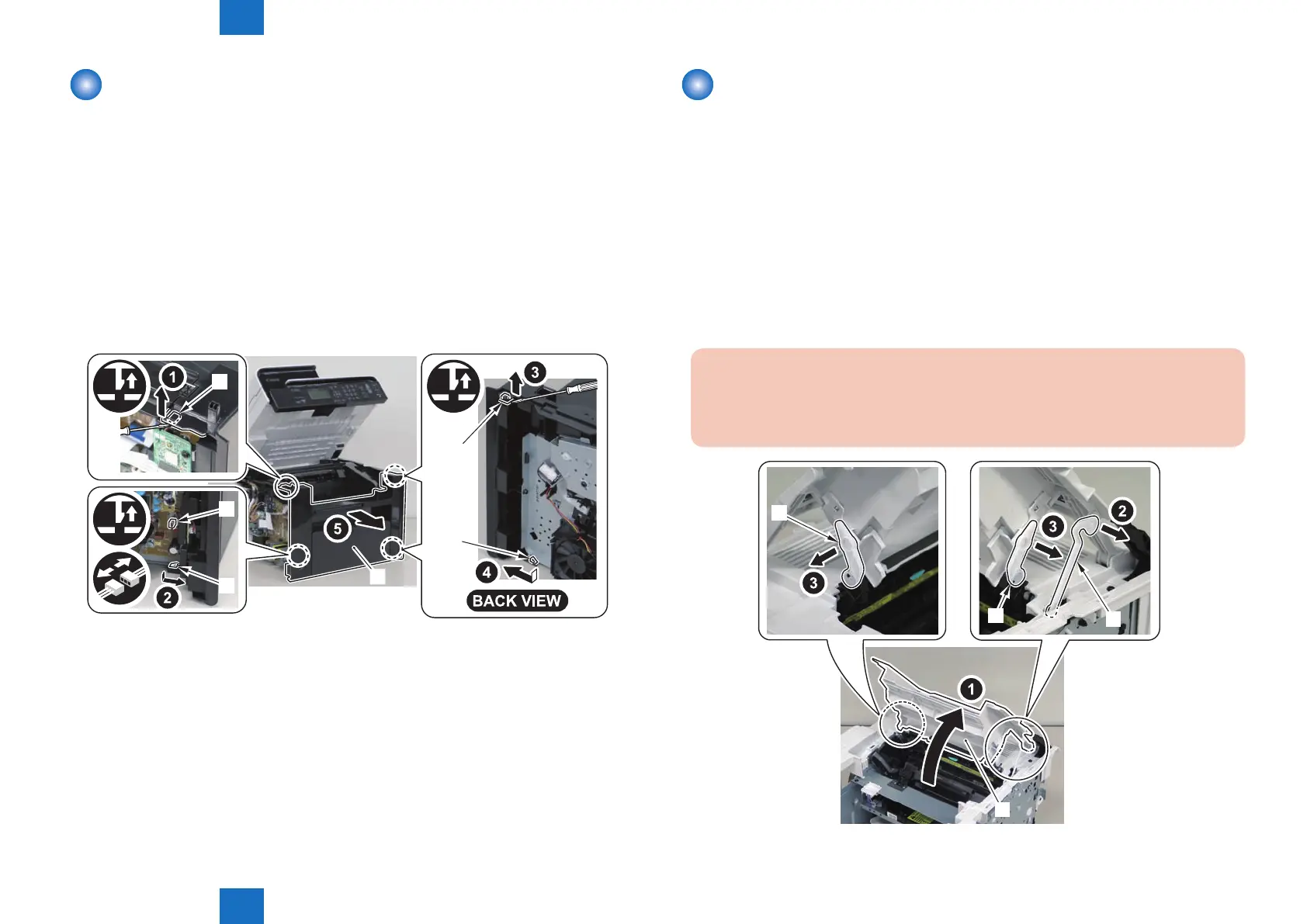
Removing the Front Cover Unit(MF4870dn/MF4830d)
■
Preparation
1) Remove the left cover.
2)Remove the right cover
■
Procedure
1)Remove the front cover unit[1]
• connector[2]
• 2 protrusions[3]
• 2 claws[4]
[4]
[3]
[2]
[1]
[4]
[3]
F-4-42
Removing the Upper Cover (MF4870dn/MF4830d)
■
Preparation
1) Remove the left cover.
2)Remove the SADF unit and reader unit.
3)Remove the right cover
4)Remove the front cover unit
■
Procedure
1)Open the delivery tray[1].
2)Remove the cartridge arm[2]
3)Remove the 2 xing pressure arms[3].
Caution:
When assembling/disassembling the upper cover, take care not to lose the cartridge
arm [2] and the 2 xing pressure arms [3].
[1]
[2]
[3]
[3]
F-4-43















 To Next Page