4
4
4-87
4-87
Disassembly/Assembly > Document Exposure/Feeder System > Removing the Copyboard Glass(D530) > Procedure
Disassembly/Assembly > Document Exposure/Feeder System > Removing the Copyboard Glass(D530) > Procedure
Caution:
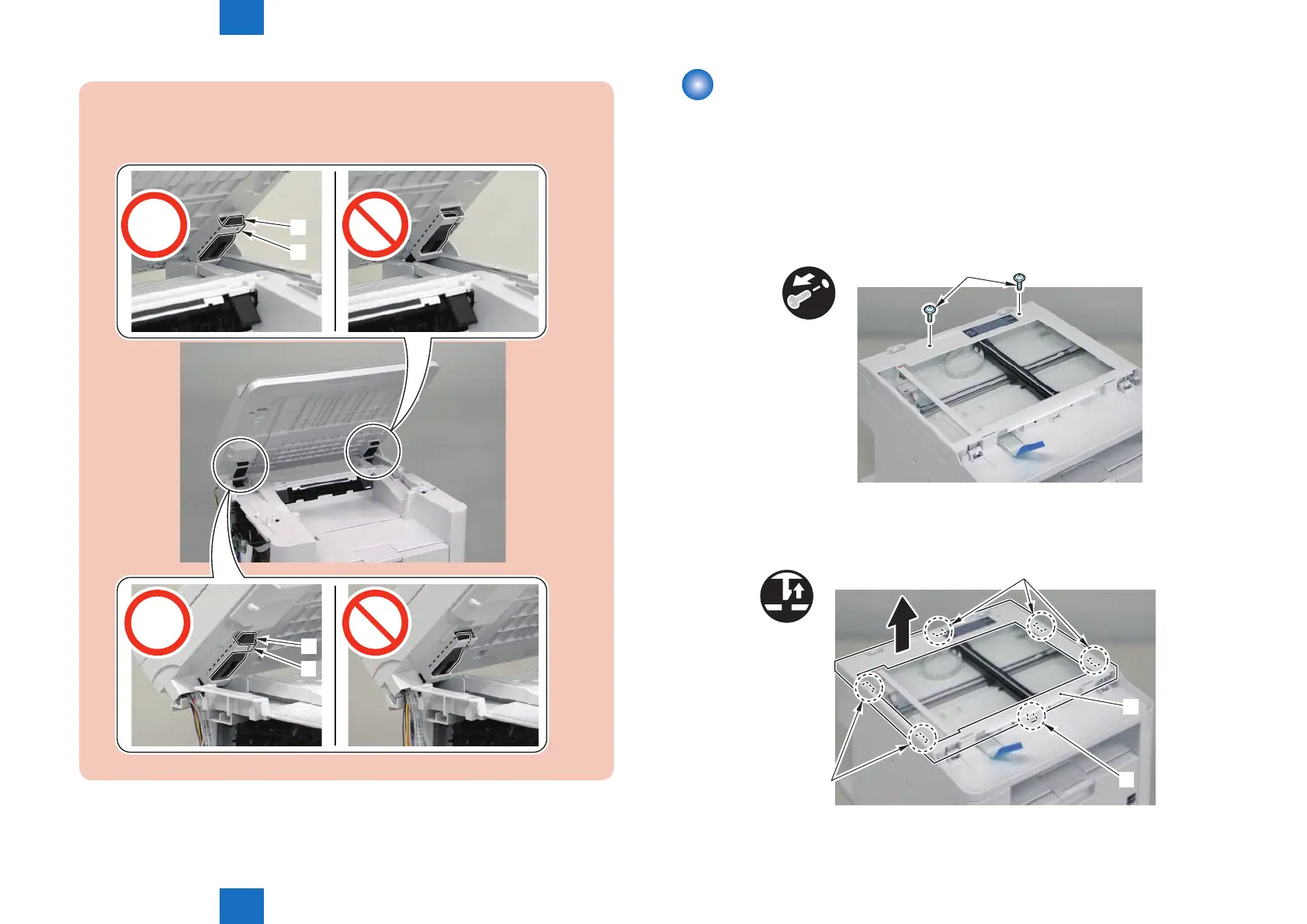
When mounting the reader unit and copyboard cover, x the 2 hinge arm claws [1]
to the 2 latches [2] of the reader unit.
[2]
[1]
[2]
[1]
Removing the Copyboard Glass(D530)
■
Preparation
1)Remove the copyboard cover.
2)Remove the control panel unit.
■
Procedure
1)Remove the 2 screws[1]
x2
[1]
2)Remove the reader upper cover[1]
• 6 claw[2]
x6
[1]
[2]
[2]
[2]
3)Remove the copyboard glass[1].
F-4-209
F-4-210















 To Next Page