4
4
4-16
4-16
Disassembly/Assembly > External Cover, Interior > Removing the Left Cover(MF4890dw/4880dw)
Disassembly/Assembly > External Cover, Interior > Removing the Left Cover(MF4890dw/4880dw)
External Cover, Interior
Removing the Left Cover(MF4890dw/4880dw)
Note:
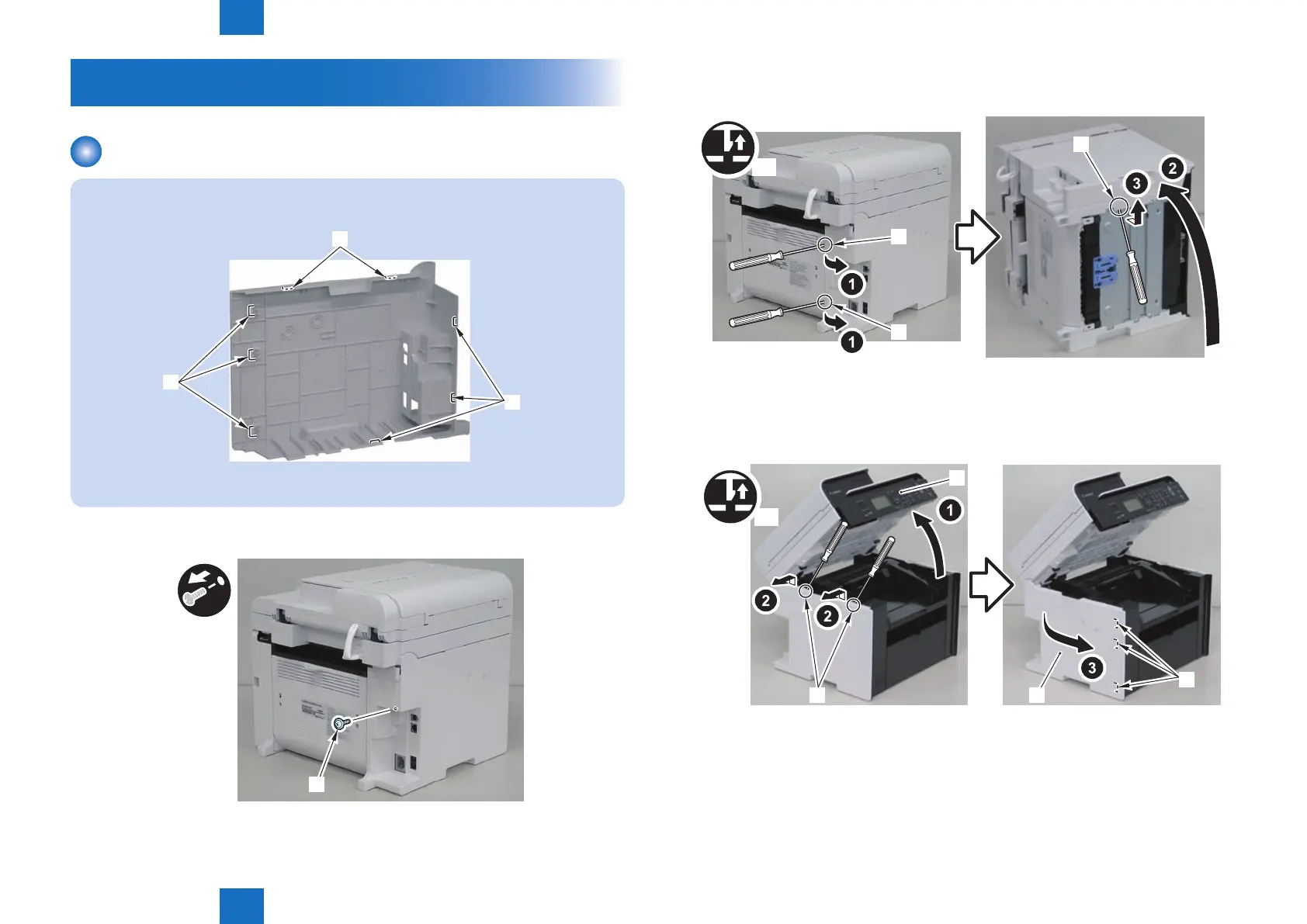
The locations of the 5 left cover claws [1] and 3 hooks [2] are shown here.
[1]
[2]
[1]
F-4-21
1) Remove the screw(black TP)[1].
[1]
F-4-22
2) Remove the 2 rear claws [1]
3)Place the machine with its right side down, and remove the claw[2] on the underside.
x3
[1]
[1]
[2]
4)Return the host machine to its original position.
5)Open the reader unit[1] and remove the 2 upper claws[2].
• 3 hooks[4]
x2
[1]
[3]
[4]
[2]
F-4-23
F-4-24















 To Next Page