8
8
8-11
8-11
Service Mode > FAX > List of NCU > TONE/PULSE
Service Mode > FAX > List of NCU > TONE/PULSE
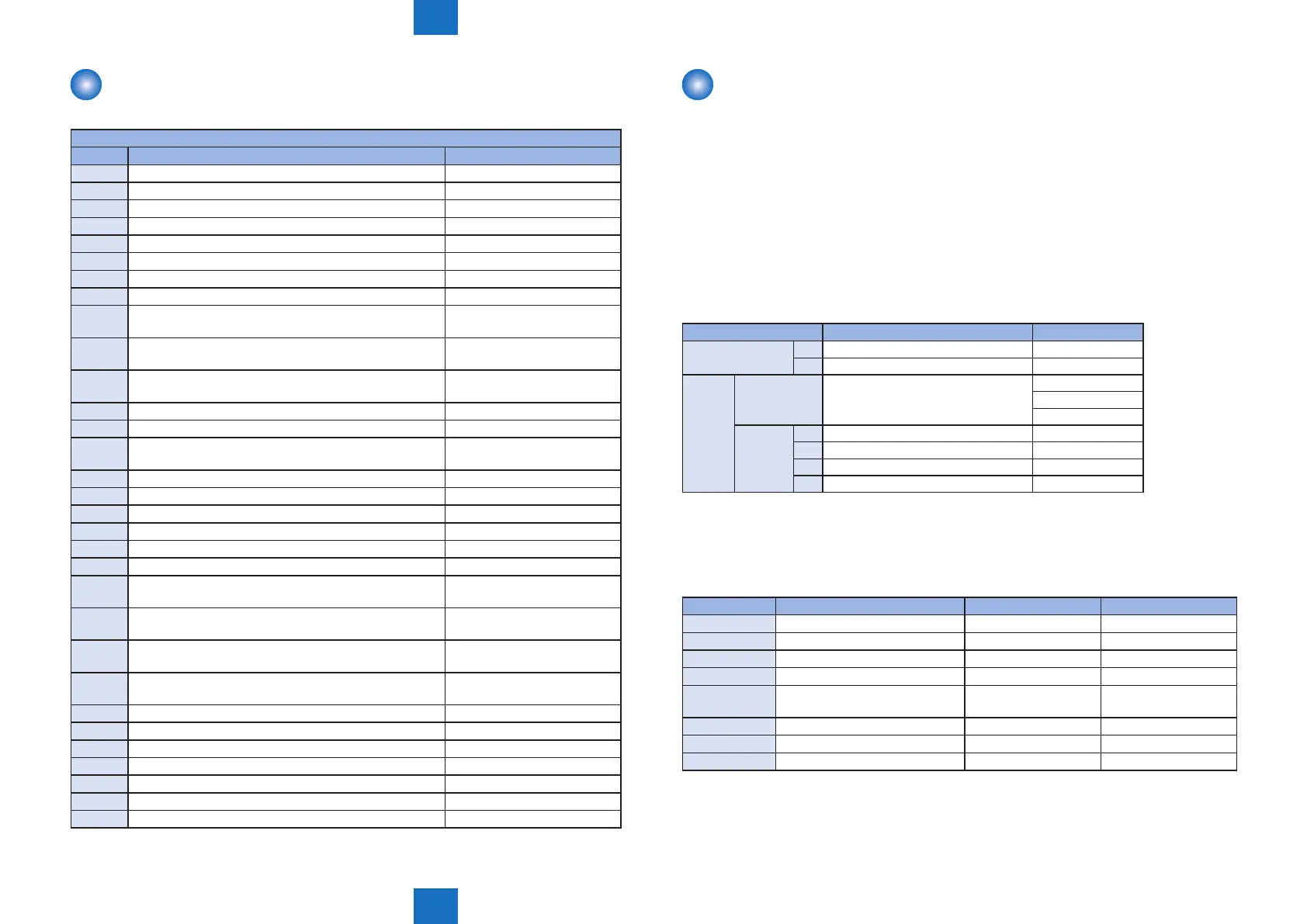
List of NUM
• FAX model only
Numeric parameter setting mode
No. Parameter Allowable setting range
01
Not in use
02
RTN transmission criteria X 1 to 99%
03
RTN transmission criteria n 2 to 99 times
04
RTN transmission criteria m 1 to 99 lines
05
NCC pause (before ID code) 1 to 60s
06
NCC pause (after ID code) 1 to 60s
07-09
Not in use
10
T.30 T0 timer 55s principally
11
T.30 T1 timer (for incoming transmission) 0 to 9999 (France=3500,
Others=3000)
12
Maximum incoming lines 0 to 65535 (line)
0: without limitation
13
T.30 EOL timer 500 to 3000
(set to 55s by default)
14
Not in use
15
Threshold between hooking and on-hook 0 to 999
16
Lead time to the rst response when switching between
FAX and TEL
0 to 9
17
Duration to activate pseudo-RBT cadence 0 to 999
18
Duration to deactivate pseudo-RBT cadence (short) 0 to 999
19
Duration to deactivate pseudo-RBT cadence (long) 0 to 999
20
Duration to activate pseudo-ring cadence 0 to 999
21
Duration to deactivate pseudo-CI cadence (short) 0 to 999
22
Duration to deactivate pseudo-CI cadence (long) 0 to 999
23
CNG detection level when switching between FAX and
TEL
0 to 7
24
Pseudo-RBT outgoing level when switching between
FAX and TEL
10 to 20 (100v),
0 to 20 (120, 230v)
25
CNG monitor duration while the answering device is
activated
0 to 999
26
No signal detection level while the answering device is
activated
0 to 7
27
Duration to detect preamble of V21 low-speed ag 20 (*10ms)
28-50
Not in use
51
Threshold to detect hook 10 to 9999
53
Set DTMF calling counts when receiving FAX remotely 0 to 9999
54
Set BusyTone outgoing duration when using handset 0 to 9999
55-73
Not in use
78-80
Exclusive use of a developer
T-8-23
List of NCU
• FAX model only
■
TONE/PULSE
(1)Setting of Tone Parameters
While “#NCU” is displayed, press “OK” key -> Select “#TONE” and press “OK” key so that it
becomes tone parameter setting mode.
(2)Setting of Pulse Parameters
While “#NCU” is displayed, press “OK” key -> Select “#PULSE” and press “OK” key so that
it becomes pulse parameter setting mode.
Item Function Setting range
TONE 01: Tone signal sending time (PSTN) 10 to 9999 (ms)
02: Minimum pause time (PSTN) 10 to 9999 (ms)
PULSE PULSE
FORM
Pulse digit format 0 -> DP (N)
1 -> DP (N+1)
2 -> DP (10-N)
PULSE
NUM
01: Pulse dial speed (10pps) 5 to 300 (x0.1pps)
02: Pulse dial speed (20pps) 5 to 300 (x0.1pps)
03: Pulse dial make ratio 10 to 90 (%)
04: Minimum pause time 10 to 9999 (ms)
■
TONE/PULSE
(1) Bit switch
Bit No. Function 1 0
Bit 0
Frequency detection method Modem Tonal counter
Bit 1
Bit 2
Signal frequency Changed Not changed
Bit 3
Bit 4
Judgment of intermittent signal Start from valid ON
signal
Start from either valid
ON signal or OFF signal
Bit 5
Bit 6
Signal form Continuous Intermittent
Bit 7
Signal detection Detected Not detected
T-8-24
T-8-25















 To Next Page