4
4
4-220
4-220
Disassembly/Assembly > Controller System > Removing the Main Controller PCB (MF4780w/MF4770n/MF4750/MF4730) > Procedure
Disassembly/Assembly > Controller System > Removing the Main Controller PCB (MF4780w/MF4770n/MF4750/MF4730) > Procedure
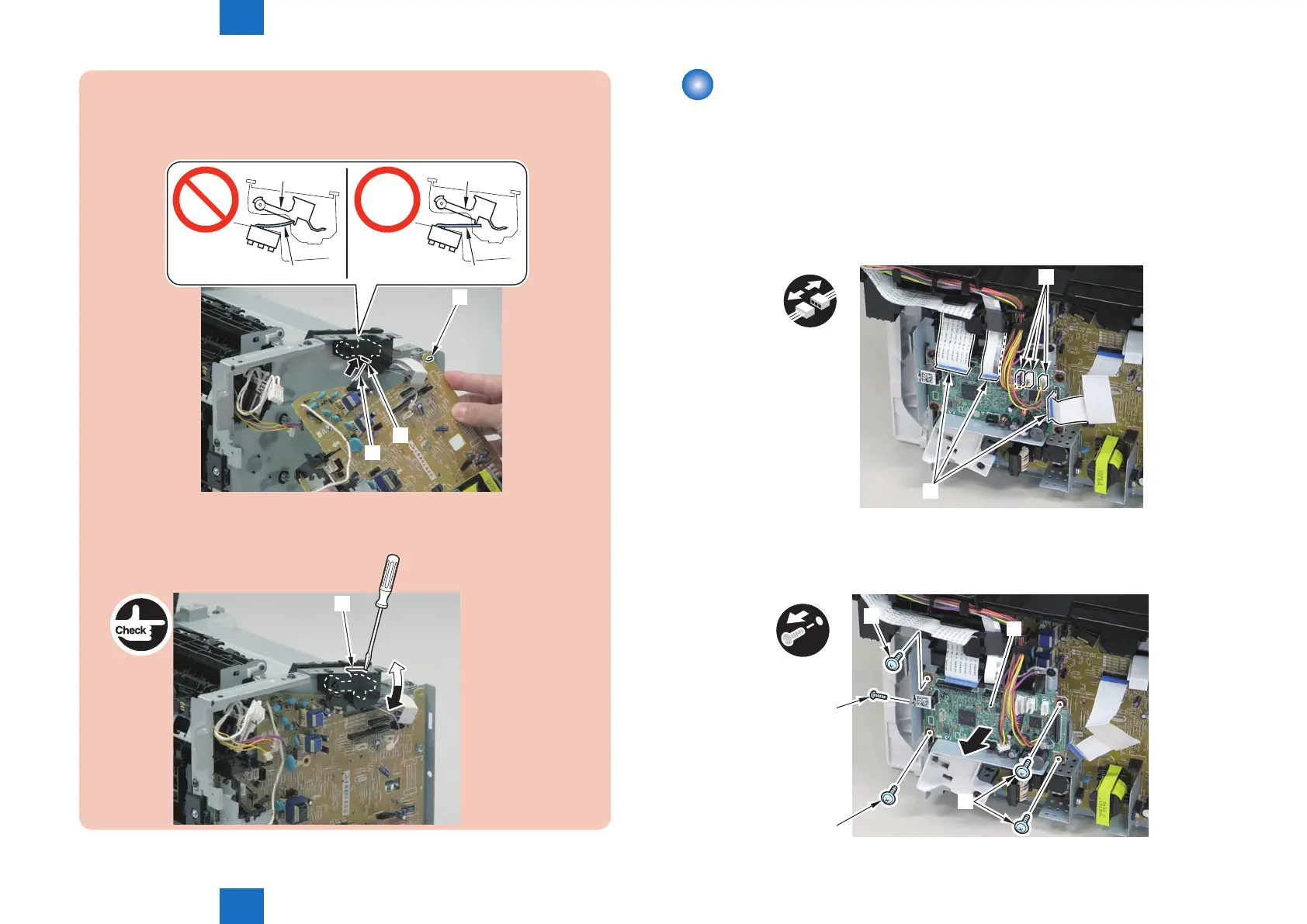
Caution:
When reassembling, attach the engine controller PCB to the hook [1] and then
mount the switchboard [3] to the lower side of the switch arm [2].
[3]
[1]
[2]
[3]
[2][2]
[3]
Ensure that the switch arm [1] can move vertically.
[1]
F-4-574
Removing the Main Controller PCB (MF4780w/
MF4770n/MF4750/MF4730)
■
Preparation
1) Remove the left cover
■
Procedure
1)Remove the 3 at cables[1] and 3 connectors[2].
x6
[1]
[2]
2)Remove the main controller PCB[1].
• 1 screw(bind)[2]
• 4 screws(black TP)[3]
x5
[1]
[2]
[3]
[3]
[3]
F-4-575
F-4-576















 To Next Page