4
4
4-160
4-160
Disassembly/Assembly > Controller System > Removing the Main Motor (MF4870dn/MF4830d) > Procedure
Disassembly/Assembly > Controller System > Removing the Main Motor (MF4870dn/MF4830d) > Procedure
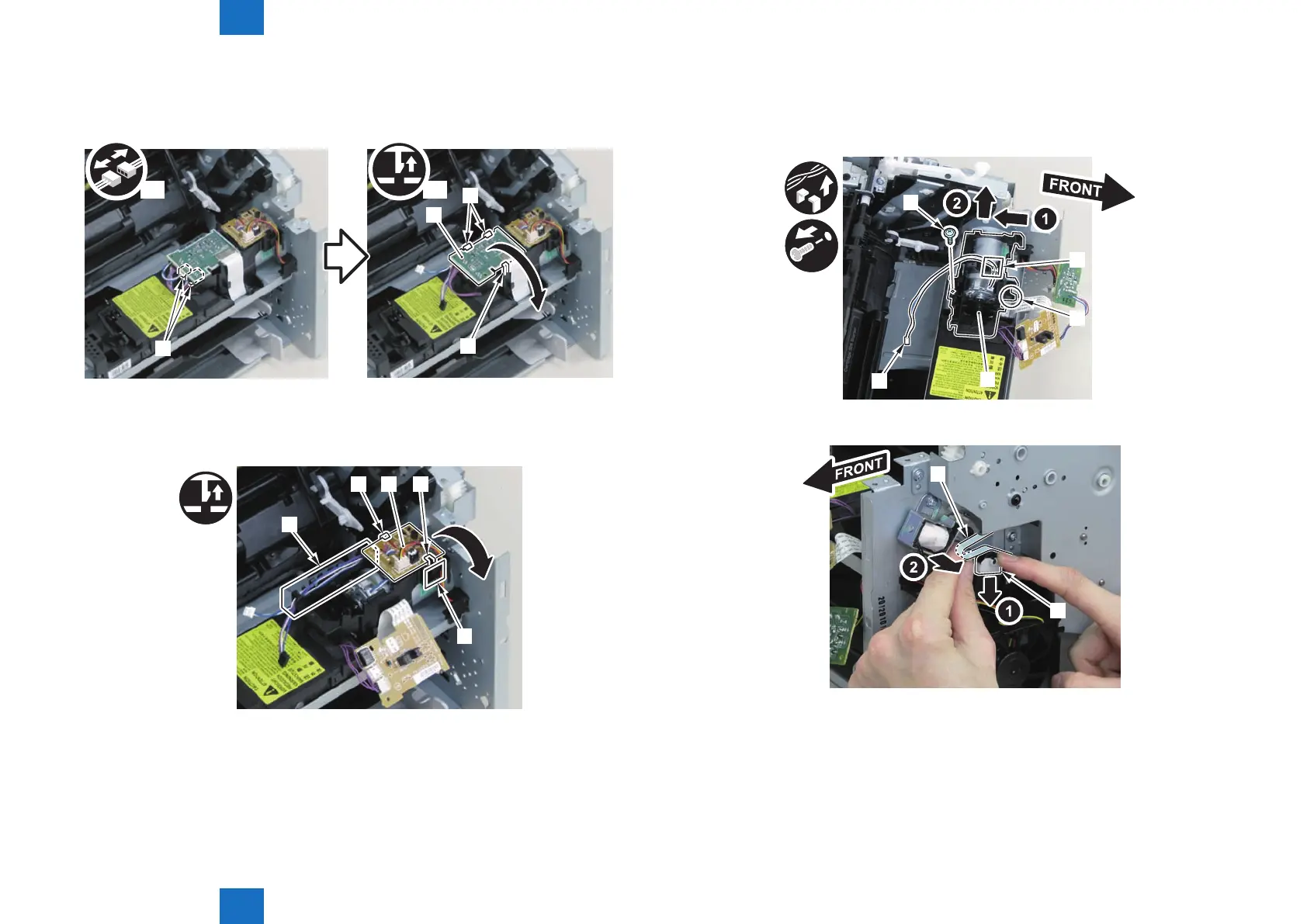
2)Disconnect the connectors[1], and remove the motor driver PCB[2]
• 2 claws[3]
• 1 hook[4]
[4]
[2]
x2
[3]
x2
[1]
3)Free the harness from the harness guide[A] and [B], and remove the duplex relay PCB[1]
• 1 claw[2]
• 1 hook[3]
[A]
[2]
[1]
[B]
[3]
F-4-389
F-4-390
4)Free the motor harness[1] from the harness guide[C].
5)Remove the motor guide[2]
• 1 screw[3]
• 1 hook[4]
[3]
[1]
[2]
[4]
[C]
6)Lower the tension unit[1], and remove the belt[2].
[1]
[2]
F-4-391
F-4-392















 To Next Page