4
4
4-162
4-162
Disassembly/Assembly > Controller System > Removing the Main Fan (MF4870dn/MF4830d) > Procedure
Disassembly/Assembly > Controller System > Removing the Main Fan (MF4870dn/MF4830d) > Procedure
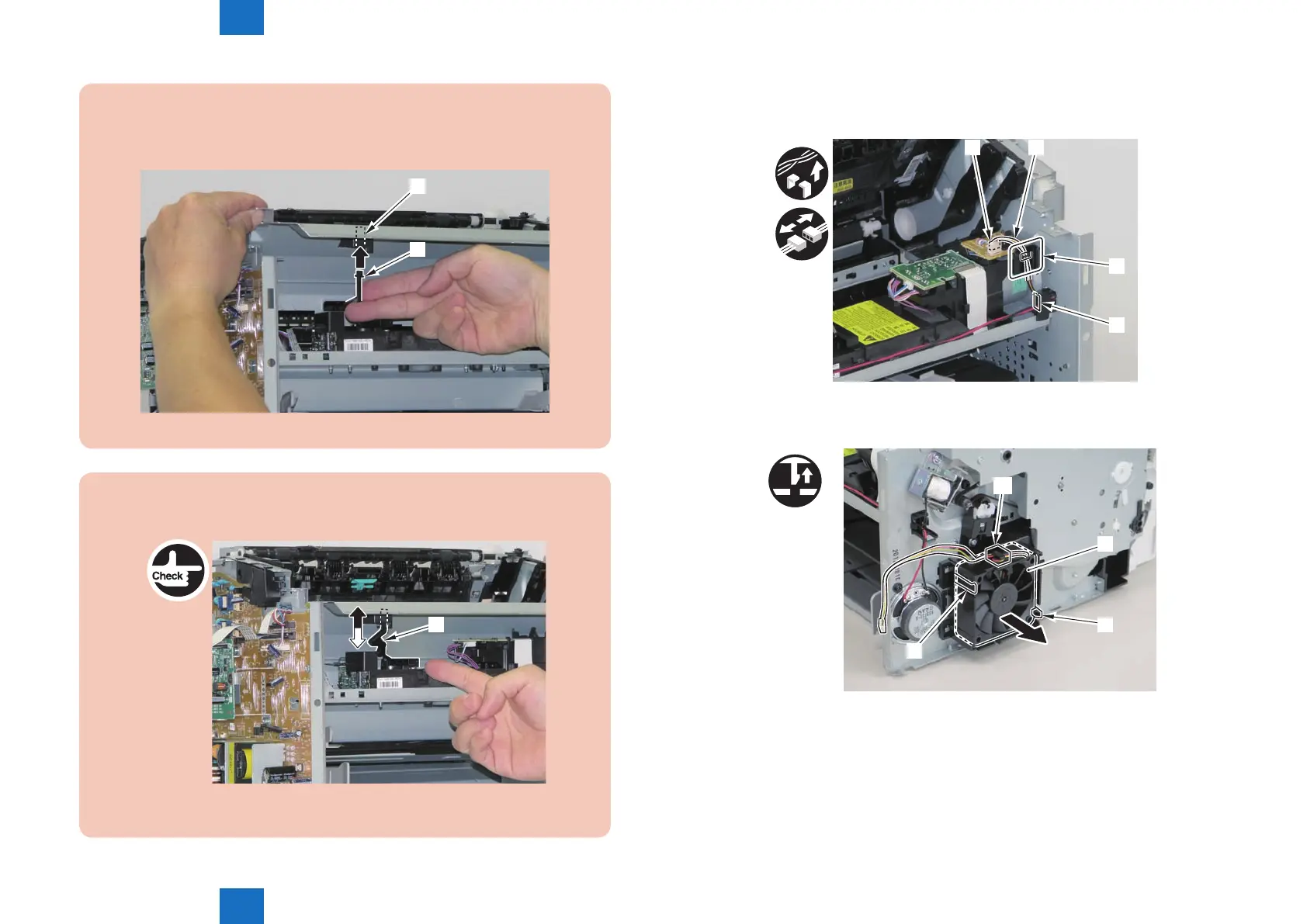
Caution:
When mounting the scanner cover, pass the shutter open/close lever [1] through the
hole [A] in the scanner cover
[1]
[A]
F-4-396
Caution:
Ensure that the shutter open/close lever [1] can move vertically.
[1]
F-4-397
2)Free the fan harness[1] from the harness guide[A], and put it through the hole[B] of the right
side plate to the outside.
• 1 connector[2]
[2] [1]
[A]
[B]
3)Free the harness from the guide[A], and remove the main fan[1].
• 2 claws[2]
[A]
[1]
[2]
[2]
x2
F-4-398
F-4-399















 To Next Page