4
4
4-208
4-208
Disassembly/Assembly > Controller System > Removing the Fixing Delivery/Paper Width Sensor PCB(D530) > Procedure
Disassembly/Assembly > Controller System > Removing the Fixing Delivery/Paper Width Sensor PCB(D530) > Procedure
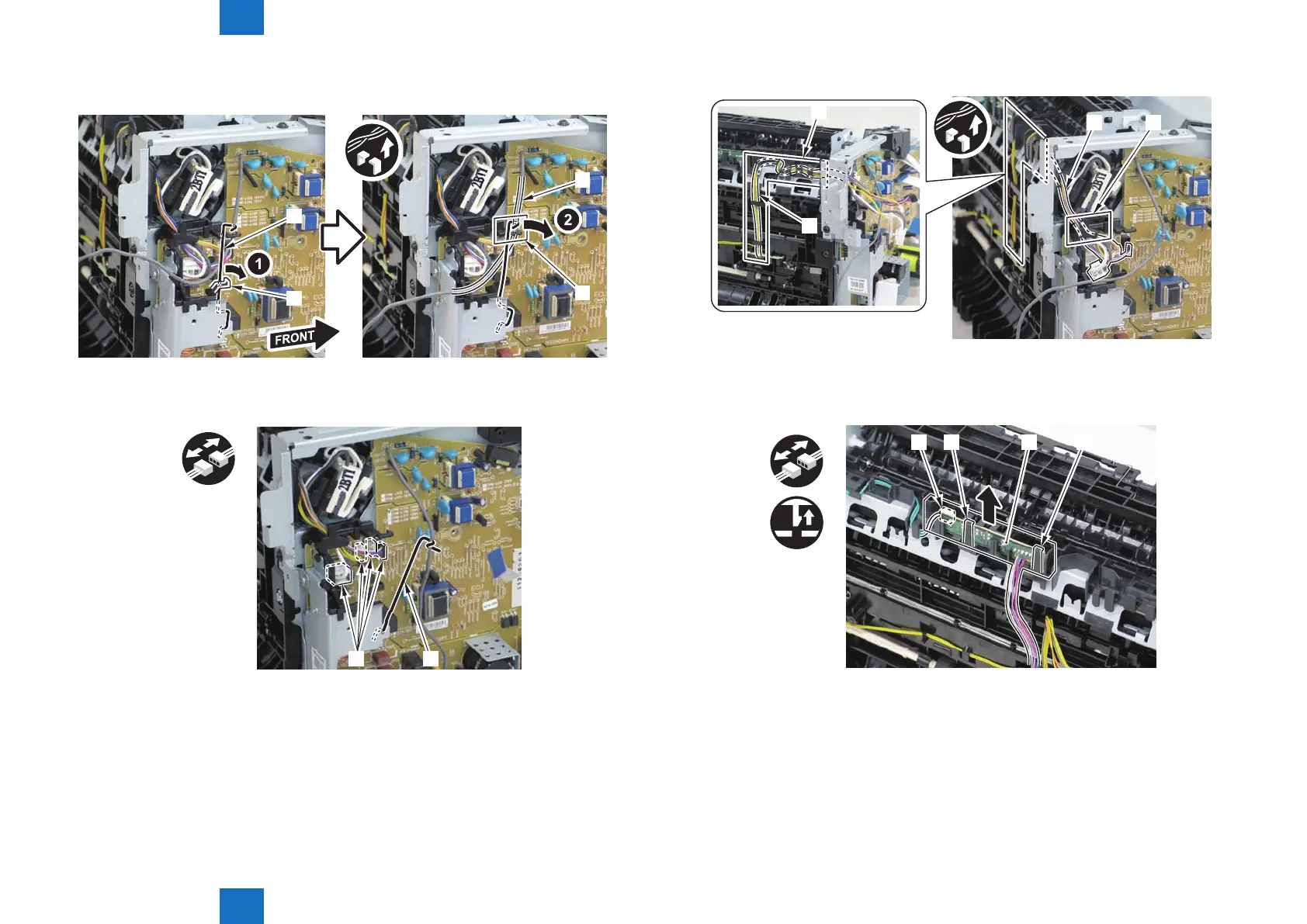
3)Remove the harness retaining spring[1] from the hook[2], and free the harness[3] from the
guide[A].
[1]
[2]
[3]
[A]
4)Remove the harness retaining spring[1] and 4 connectors[2].
x4
[1][2]
F-4-537
F-4-538
5)Remove the harness[1] from the guide[A] and [B].
[1] [A]
[1]
[B]
6)Remove the xing delivery/paper width sensor PCB[1]
• 1 connector
• 2 claws[3]
x2
[2] [3] [3][1]
F-4-539
F-4-540















 To Next Page