4
4
4-296
4-296
Disassembly/Assembly > Fixing System > Removing the Fixing Assembly (MF4820d)) > Procedure
Disassembly/Assembly > Fixing System > Removing the Fixing Assembly (MF4820d)) > Procedure
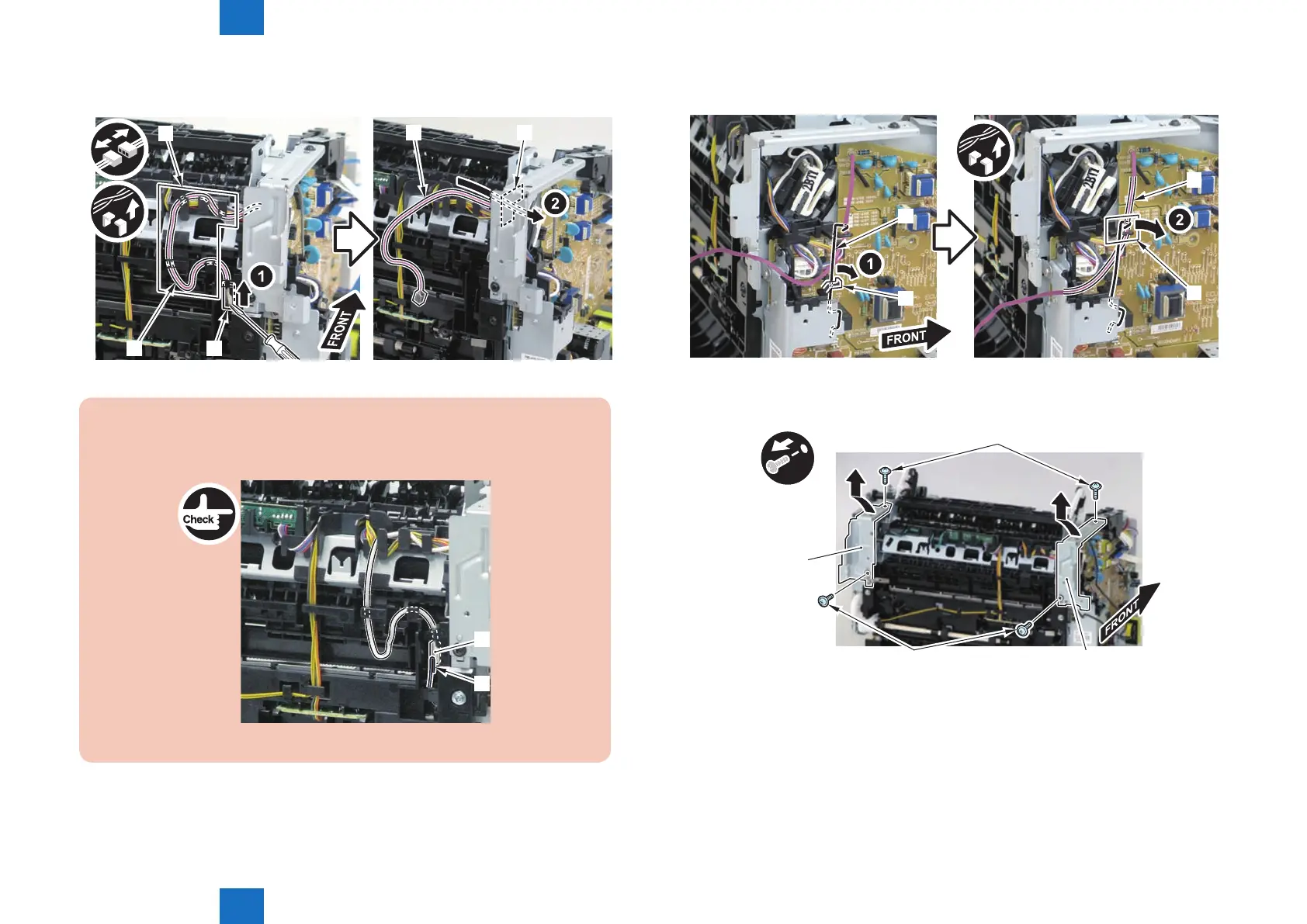
2)Disconnect the terminal[1], free the harness[2] from the harness guide[A], and then put it
through the hole[B].
[1][2]
[A]
[2] [B]
Caution:
When connecting the terminal[1], be sure that the contact spring[2] is in contact with
it.
[2]
[1]
F-4-810
F-4-809
3)Remove the harness retaining spring[1] from the hook[2], and free the harness[3] from the
guide[A].
[1]
[2]
[3]
[A]
4)Remove the 2 left/right reinforcing plates[1]
• 4 screws(black TP)[2]
x4
[2]
[2] [1]
[1]
5) Remove the 4 connectors [1].
6) Disengage the harness [2] from the harness guide [A].
F-4-811
F-4-812















 To Next Page