4
4
4-360
4-360
Disassembly/Assembly > Pickup And Feeding System > Removing the Duplex Solenoid (D530) > Procedure
Disassembly/Assembly > Pickup And Feeding System > Removing the Duplex Solenoid (D530) > Procedure
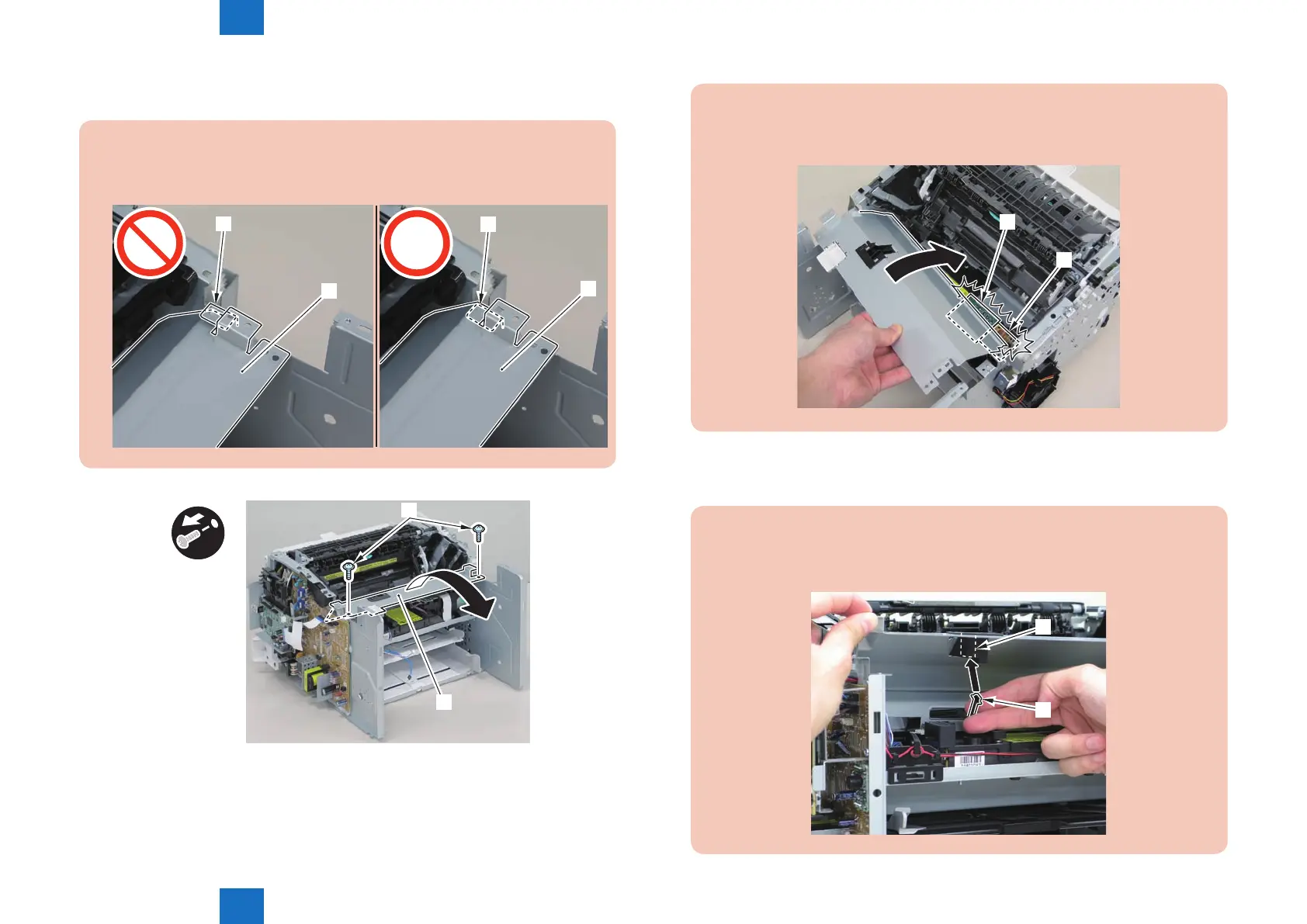
2)Remove the scanner cover[1]
• 2 screws(black TP)[2]
Caution:
When removing the scanner cover, be sure that the cover does not get under[A] part
of the right side plate.
[A]
[1]
[A]
[1]
[1]
x2
[2]
F-4-986
Caution:
When install the scanner cover, be careful not to damage the motor driver PCB[1]
and the duplex relay PCB[2]
[1]
[2]
F-4-987
Caution:
When mounting the scanner cover, pass the shutter open/close lever [1] through the
hole [A] in the scanner cover.
[1]
[A]
F-4-988















 To Next Page