2
2
2-64
2-64
Technology > MEAP > Enhanced System Application Management > Server authentication (Active Directory authentication)
Technology > MEAP > Enhanced System Application Management > Server authentication (Active Directory authentication)
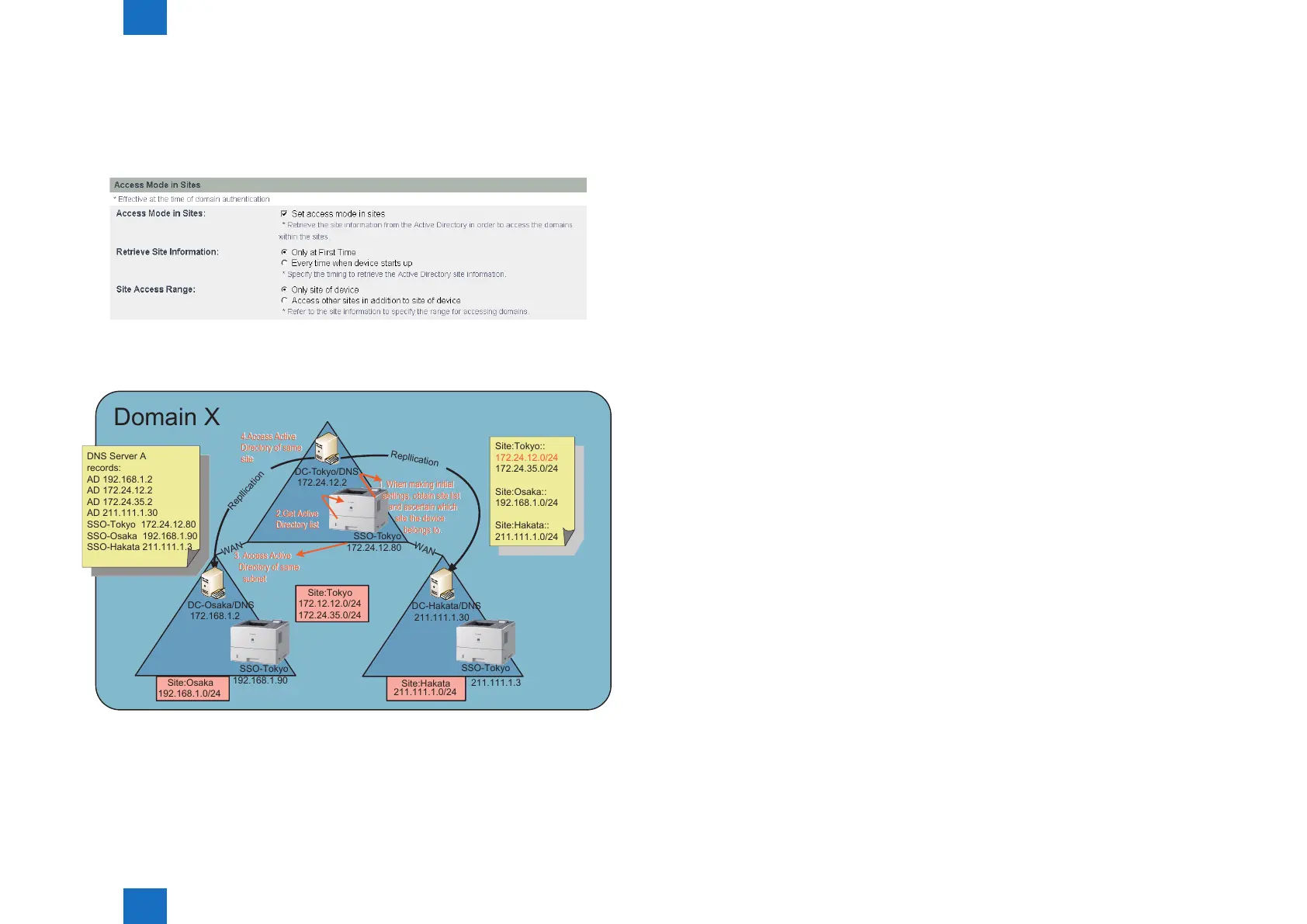
Settings for access mode in sites
Switching between site internal access mode/ non site internal access mode, as well as
detailed mode settings, are done via DMS or iWEMC.
Site internal access mode settings window (DMS)
The gure below shows a sample of processing Access Mode in Sites.
Sample of Processing Access Mode in Sites
Domain X
SSO-Tokyo
172.24.12.80
DC-Tokyo/DNS
172.24.12.2
SSO-Tokyo
192.168.1.90
DC-Osaka/DNS
172.168.1.2
SSO-Tokyo
DC-Hakata/DNS
211.111.1.30
211.111.1.3
WAN
WAN
Repllication
Repllication
Site:Tokyo
172.12.12.0/24
172.24.35.0/24
Site:Osaka
192.168.1.0/24
Site:Hakata
211.111.1.0/24
DNS Server A
records:
AD 192.168.1.2
AD 172.24.12.2
AD 172.24.35.2
AD 211.111.1.30
SSO-Tokyo 172.24.12.80
SSO-Osaka 192.168.1.90
SSO-Hakata 211.111.1.3
Site:Tokyo::
172.24.12.0/24
172.24.35.0/24
Site:Osaka::
192.168.1.0/24
Site:Hakata::
211.111.1.0/24
1. When making initial
settings, obtain site list
and ascertain which
site the device
belongs to.
4.Access Active
Directory of same
site
4.Access Active
Directory of same
site
1. When making initial
settings, obtain site list
and ascertain which
site the device
belongs to.
2.Get Active
Directory list
2.Get Active
Directory list
3. Access Active
Directory of same
subnet
3. Access Active
Directory of same
subnet
1) SSO-Tokyo acquires site lists from Active Directories.
Note, however, that the Active Directories accessed in order to acquire site lists are in the
order in which they were returned by DNS, so there is no guarantee that the same Active
Directory will be accessed as in the initial settings (upon device settings or changes to NW
settings, etc.).
[Site subnet list]
F-2-130
F-2-131
Site: Tokyo: = 172.24.12.0/24, 172.24.35.0/24
Site: Osaka: = 192.168.1.0/24
Site: Hakata: = 211.111.1.0/24
As a result, since SSO-Tokyo is 172.24.12.80, the subnet is 172.24.12.0/24, and is judged
as belonging to site Tokyo.
20) The DNS server obtains its Active Directory list from the primary or secondary DNS,
as set in the device.
[Active Directory]
172.24.12.2, 172.24.35.2, 192.168.1.2, 211.111.1.30
21) Of the Active Directories in 2), above, the ones that belong to the same site (Tokyo)
are 172.24.12.2 and 172.24.35.2.
Of these, the Active Directory that is the same subnet as SS-Tokyo is 172.24.12.2.
Therefore, this one will be accessed.
22) If access fails at step 3), above, the other Active Directory of the same site,
172.24.35.2, will be accessed.
23) If access fails at step 4), above, also, SSO-Osaka and SSO-Hakata will be accessed
(the order will depend on the order of the Active Directories in DNS). Note, however, that
this is an optional operation.
Logging into other domains at multi-domain
At multi-domain, if another domain is logged into, based on the site/ subnet information
retrieved in the home domain, the Active Directories of the login destination domain/ KDC
address list are computed. In the event that the domain controller IP addresses of other
domains are outside of the site access range, and only the domain controller within the site
is programmed for access, an error message will be displayed to the effect that the site
information is incorrect.














 To Next Page