3
3
3-42
3-42
Disassembly/Assembly > Controller System > Removing the High Voltage Power Supply Unit > Preparation (LBP3580/6780x)
Disassembly/Assembly > Controller System > Removing the High Voltage Power Supply Unit > Preparation (LBP3580/6780x)
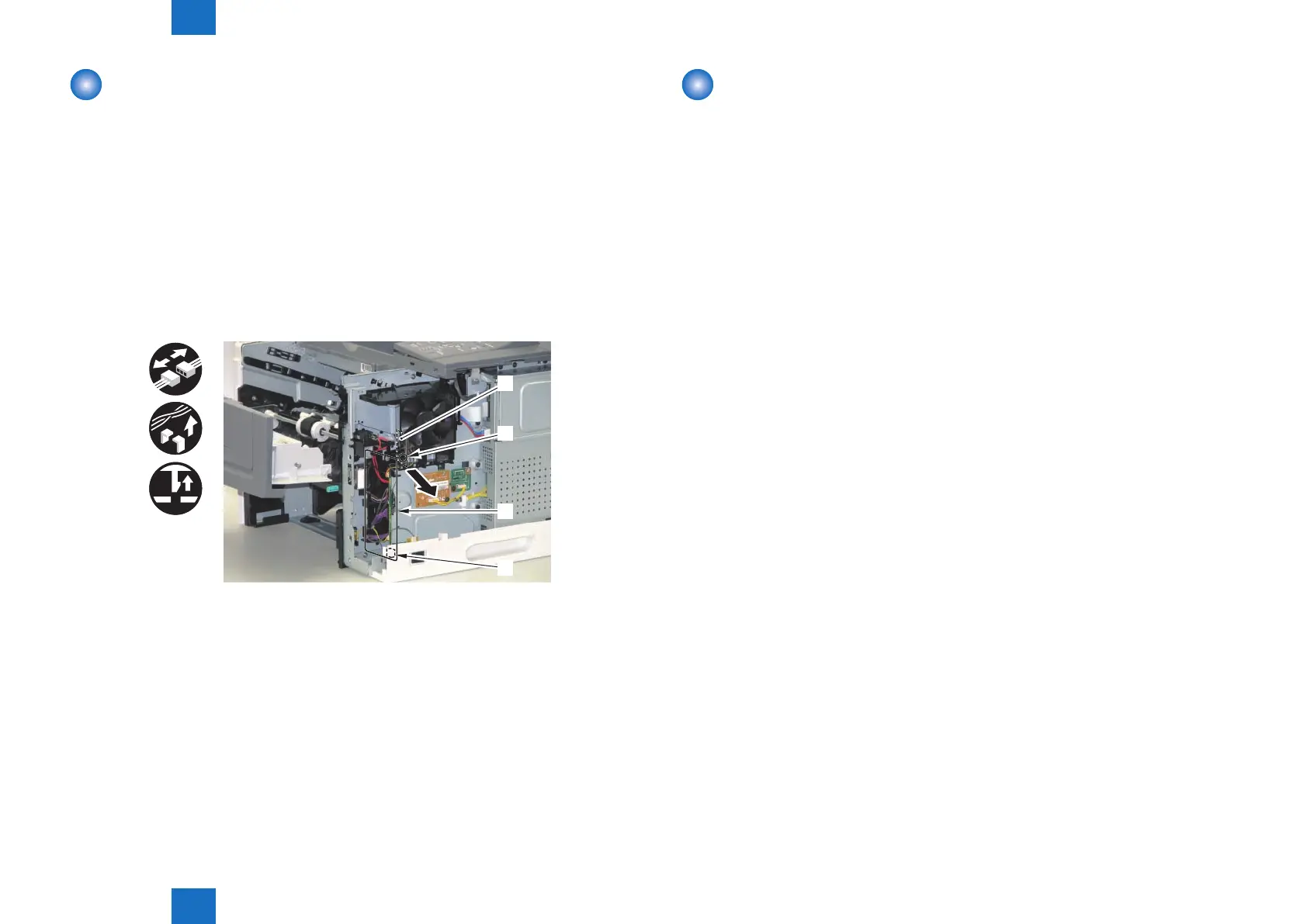
Removing the Environment Sensor
■
Preparation
1) Remove the Multi-purpose Tray Auxiliary Tray Unit.(Refer to page 3-20)
2) Remove the Right Cover.(Refer to page 3-17)
3) Remove the Right Front Inner Cover.(Refer to page 3-21)
■
Procedure
1) Remove the Environment Sensor [1].
• 1 Connector [2]
• 5 Harness Guides [3]
• 1 Claw [4]
x5
[1]
[2]
[3]
[4]
F-3-90
Removing the High Voltage Power Supply Unit
■
Preparation (LBP3560/6750dn)
1) Remove the Multi-purpose Tray Auxiliary Tray Unit.(Refer to page 3-20)
2) Remove the Right Cover.(Refer to page 3-17)
3) Remove the Right Front Inner Cover.(Refer to page 3-21)
4) Remove the Right Lower Cover.(LBP3560/6750dn)(Refer to page 3-22)
5) Remove the Left Cover.(Refer to page 3-17)
6) Remove the Main Controller PCB.(LBP3560/6750dn)(Refer to page 3-30)
7) Remove the Control Panel Unit.(LBP3560/6750dn)(Refer to page 3-28)
8) Remove the Upper Cover.(Refer to page 3-25)
9) Remove the Rear Cover Unit.(Refer to page 3-19)
10) Remove the Rear Right Cover.(Refer to page 3-19)
11) Remove the Engine Controller PCB.(LBP3560/6750dn)(Refer to page 3-35)
12) Remove the Fixing Unit.(Refer to page 3-62)
13) Remove the Duplex Feed Unit.(Refer to page 3-67)
14) Remove the Sub Fan.(Refer to page 3-51)
■
Preparation (LBP3580/6780x)
1) Remove the Multi-purpose Tray Auxiliary Tray Unit.(Refer to page 3-20)
2) Remove the Right Cover.(Refer to page 3-17)
3) Remove the Right Front Inner Cover.(Refer to page 3-21)
4) Remove the Right Lower Cover.(LBP3580/6780x)(Refer to page 3-22)
5) Remove the Left Cover.(Refer to page 3-17)
6) Remove the Main Controller PCB.(LBP3580/6780x)(Refer to page 3-30)
7) Remove the USB Cover Unit.(LBP3580/6780x)(Refer to page 3-24)
8) Remove the Control Panel Unit.(LBP3580/6780x)(Refer to page 3-28)
9) Remove the Upper Cover.(Refer to page 3-25)
10) Remove the Rear Cover Unit.(Refer to page 3-19)
11) Remove the Rear Right Cover.(Refer to page 3-19)
12) Remove the Engine Controller PCB.(LBP3580/6780x)(Refer to page 3-37)
13) Remove the Fixing Unit.(Refer to page 3-62)
14) Remove the Duplex Feed Unit.(Refer to page 3-67)
15) Remove the Sub Fan.(Refer to page 3-51)














 To Next Page