2
2
2-80
2-80
Technology > MEAP > MEAP Application Setting Information Management and Log Management > MEAP Application Log Management
Technology > MEAP > MEAP Application Setting Information Management and Log Management > MEAP Application Log Management
■
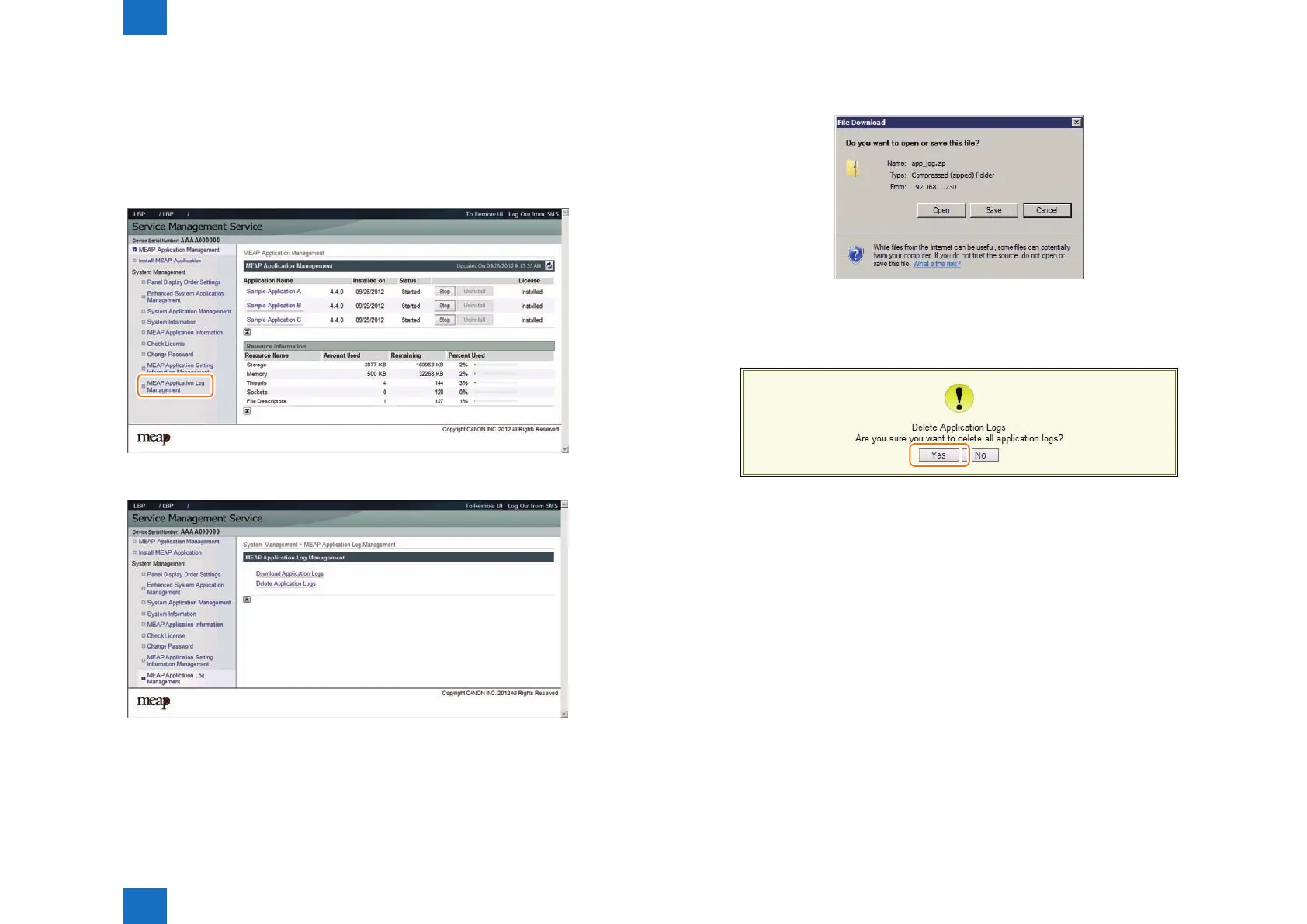
MEAP Application Log Management
The log data (stored on the device) of the MEAP application which supports the Log Service
can be downloaded or deleted. The procedure is shown below.
1) Log in to SMS.
2) On System Management menu, click [ MEAP Application Log Management ] button.
3) Click [ Download Application Logs ] or [ Delete Application Logs ].
F-2-178
F-2-179
4) To download the log
The le save dialog for the log le will appear. Specify a destination and save the le.
5) To delete the log
The conrmation screen will appear to prompt you to delete the log. Click the [ Yes ] button
to delete the log.
F-2-180
F-2-181














 To Next Page