3
3
3-57
3-57
Disassembly/Assembly > Controller System > Removing the Cassette Sensing Switch > Procedure
Disassembly/Assembly > Controller System > Removing the Cassette Sensing Switch > Procedure
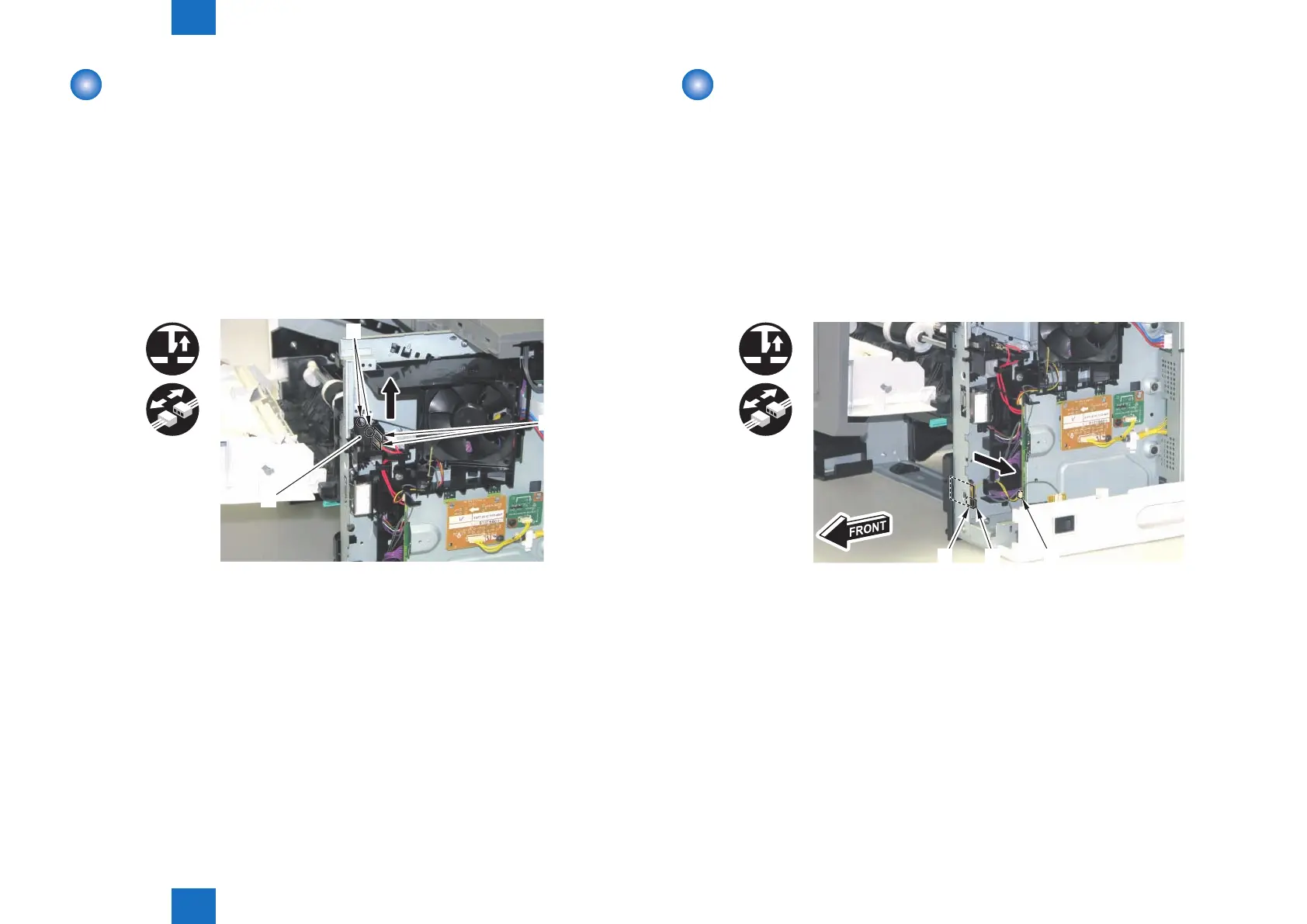
Removing the Cartridge Door Switch
■
Preparation
1) Remove the Multi-purpose Tray Auxiliary Tray Unit.(Refer to page 3-20)
2) Remove the Right Cover.(Refer to page 3-17)
3) Remove the Right Front Inner Cover.(Refer to page 3-21)
■
Procedure
1) Remove the Cartridge Door Switch [1].
• 2 Faston Terminals [2]
• 2 Claws [3]
x2
x2
[1]
[2]
[3]
F-3-120
Removing the Cassette Sensing Switch
■
Preparation
1) Remove the Multi-purpose Tray Auxiliary Tray Unit.(Refer to page 3-20)
2) Remove the Right Cover.(Refer to page 3-17)
3) Remove the Right Front Inner Cover.(Refer to page 3-21)
■
Procedure
1) Remove the Cassette Sensing Switch [1].
• 1 Connector [2]
• 1 Claw [3]
[1]
[2]
[3]
F-3-121












 To Next Page