2
2
2-41
2-41
Technology > MEAP > Login to SMS > Procedure to Log in
Technology > MEAP > Login to SMS > Procedure to Log in
Login to SMS
■
Procedure to Log in
Use the following procedure to log in to SMS.
1) From a browser of a PC on the same network as the device, enter the following URL to
access SMS.
URL: https://<MEAP Device IP address>:8443/sms/
Ex.) https://172.16.188.240:8443/sms/
Note:
To encrypt the password information input when logging in, SSL of the login screen
was made effective. However, even if you access SMS using a URL that has not been
encrypted with SSL (non-SSL), you will be redirected to a SSL encrypted URL (SSL
enabled).
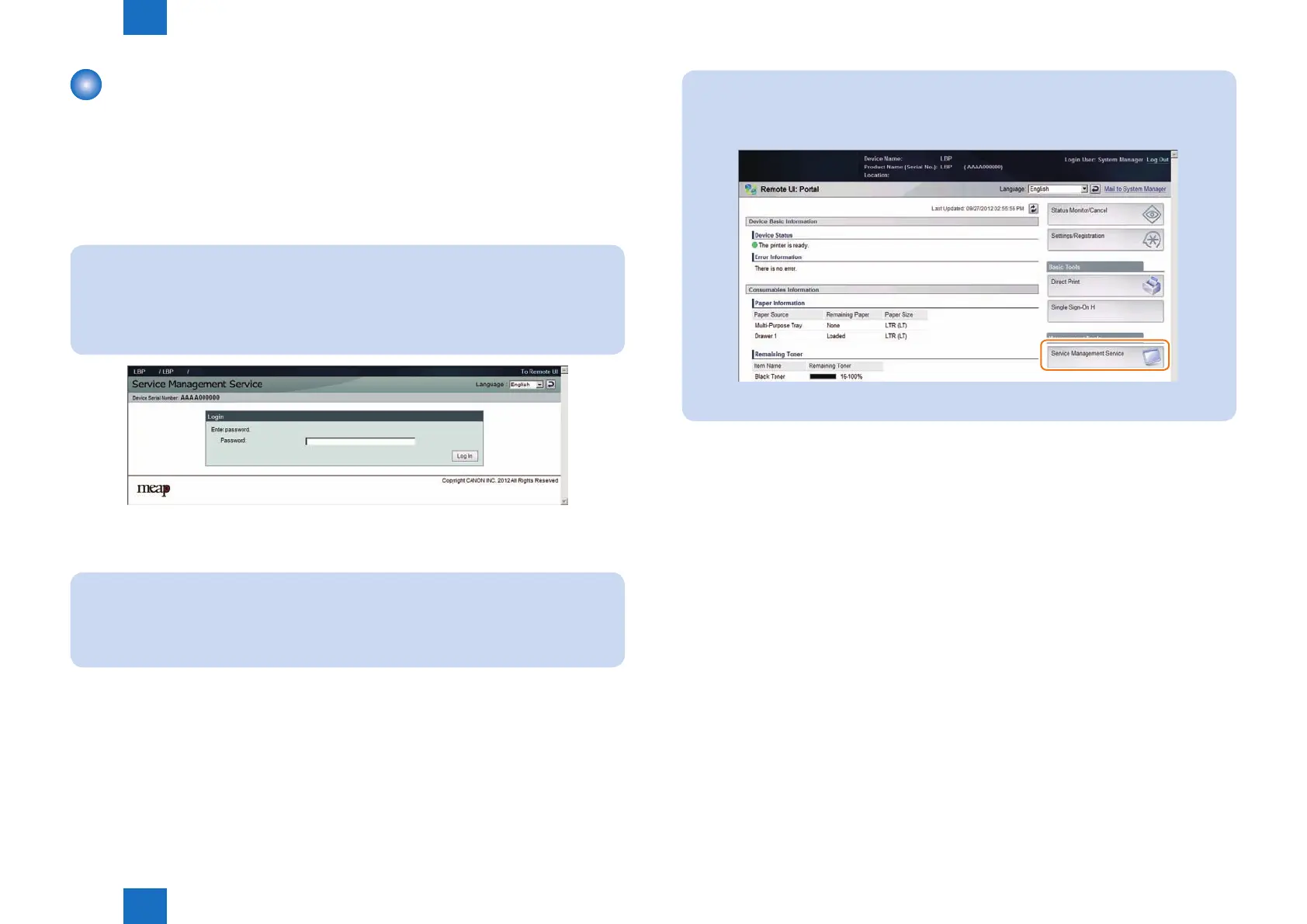
2) Enter the SMS login password in the password entry eld, and then click the [ Log In ]
button.
Note:
• The default password is “MeapSmsLogin.” (The password is case-sensitive.)
• When you want to change the display original language, change in the box in the right of
the screen. This setting is not affect by the setting of the language of the device.
F-2-73
Note:
SMS Access can be gained also from Remote UI.
Access Remote UI and click on SMS shortcut shown on the lower right of the screen to
gain access to SMS.
F-2-74














 To Next Page