3
3
3-19
3-19
Disassembly/Assembly > External Cover, Internal Cover > Removing the Rear Right Cover > Procedure
Disassembly/Assembly > External Cover, Internal Cover > Removing the Rear Right Cover > Procedure
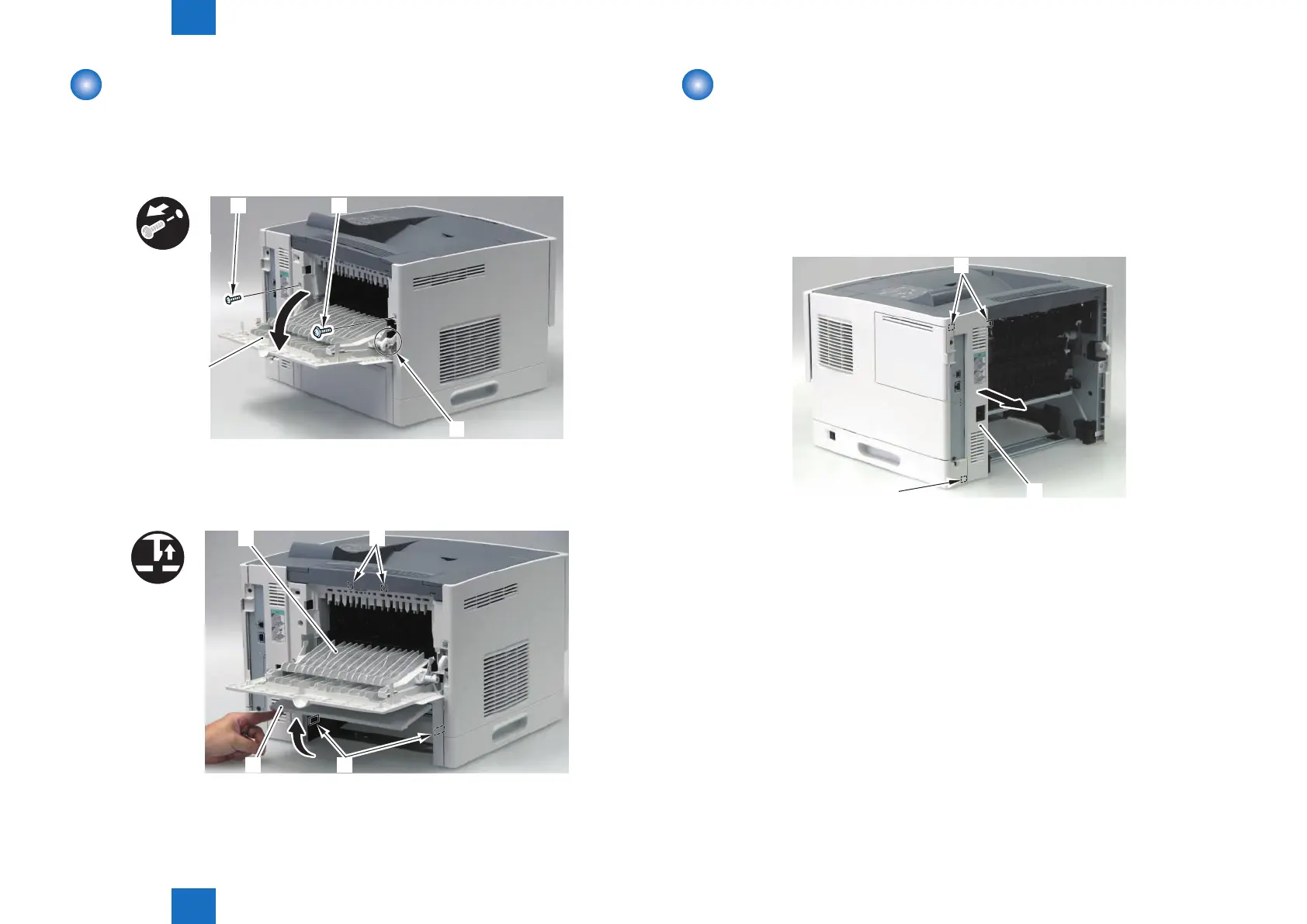
Removing the Rear Cover Unit
1) Remove the Cassette.
2) Open the Rear Cover [1].
3) Release the Link Arm [2].
4) Remove the 1 screw (TP) [3], and then remove the 1 screw (Tapping) [4].
[1]
[2]
x2
[4] [3]
5) Open the Rear Lower Cover [1], and release the 2 Claws [2].
6) Remove the Rear Cover Unit [3].
• 2 Hooks [4]
[3]
[1]
[2]
[4]
x2
F-3-28
F-3-29
Removing the Rear Right Cover
■
Preparation
1) Remove the Rear Cover Unit.(Refer to page 3-19)
■
Procedure
1) Remove the Rear Right Cover [1].
• 3 Hooks [2]
[2]
[1]
F-3-30














 To Next Page