3
3
3-66
3-66
Disassembly/Assembly > Pickup Feed System > Removing the Cassette Pickup Roller Unit
Disassembly/Assembly > Pickup Feed System > Removing the Cassette Pickup Roller Unit
Removing the Cassette Pickup Roller Unit
CAUTION:
Be sure not to touch the surface of the Roller.
1) Remove the Cassette.
CAUTION:
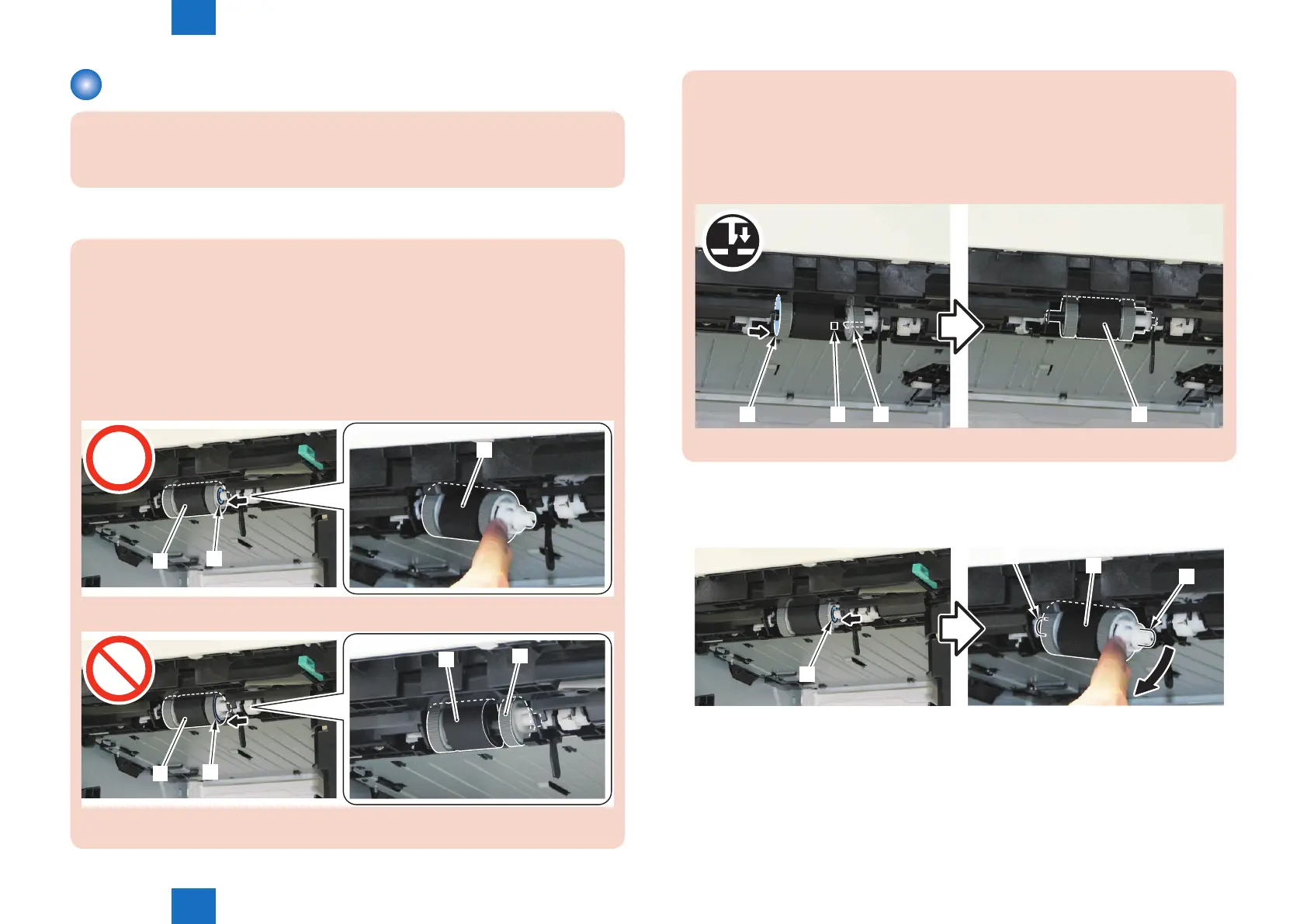
• When installing/removing the Cassette Pickup Roller Unit [1], be sure to push the
side [A] of the Cassette Pickup Roller Shaft Holder (white).
If the side [B] of the Cassette Pickup Roller Holder (left) is pushed, the unit may be
split in the Cassette Pickup Roller Holder (left) [2] and the Cassette Pickup Roller
Holder (black) [3].
When the Cassette Pickup Roller Unit [1] is split, it can no longer be installed to /
removed from the host machine.
[1]
[1]
[A]
[1]
[B]
[3]
[2]
F-3-137
F-3-138
• When the Cassette Pickup Roller Unit [1] is split, push the side [A] of the Cassette
Pickup Roller Holder (right), and t the hole [B] of the Cassette Pickup Roller Holder
(black) to the claw [2] of the Cassette Pickup Roller Shaft Holder (white) to assemble
the unit.
Be sure to assemble the Cassette Pickup Roller Unit [1] before installing/removing it
to/from the host machine.
[1][A] [B] [2]
F-3-139
2) Remove the Cassette Pickup Roller Unit [1] while pushing the side [A] of the Cassette
Pickup Roller Shaft Holder (white).
• 2 Shafts [2]
[A]
[1]
[2]
[2]
F-3-140












 To Next Page