2
2
2-44
2-44
Technology > MEAP > Installing an MEAP Application > Procedure to install applications
Technology > MEAP > Installing an MEAP Application > Procedure to install applications
■
Procedure to install applications
1) Long on to SMS.
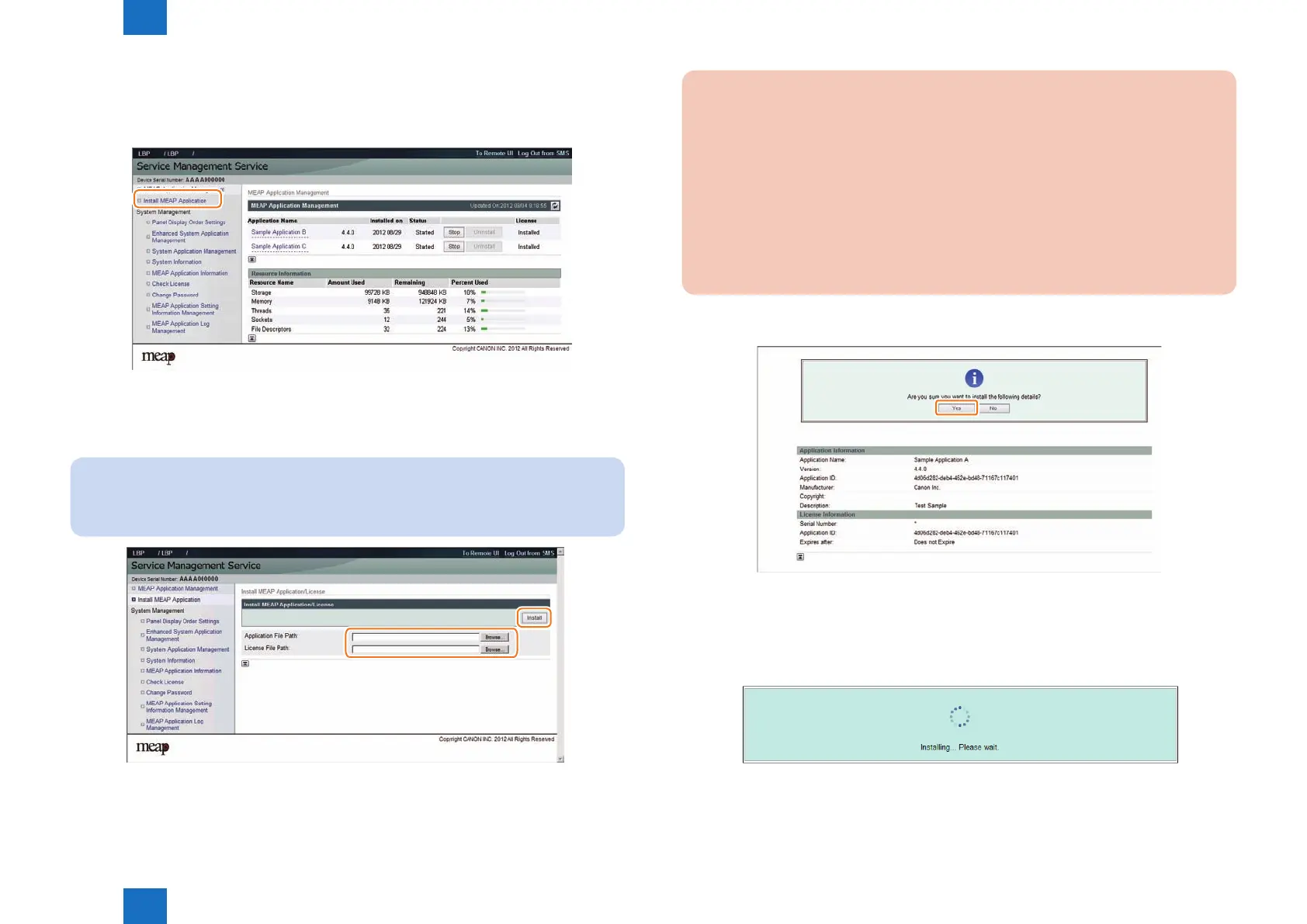
2) Click [ Install MEAP Application ] on the menu.
3) Check [ Install MEAP Application/License ]page appears.
4) Click [ Browse.. ] button, and select the application le and the license le of the application;
then, click [ Install ] button.
Note:
Application File: identied by the extension “jar”.
License File: identied by the extension “lic”.
.
F-2-78
F-2-79
CAUTION:
• You cannot install only the license.
• You will not be able to install the application without using the appropriate license.
Be sure to select its license le.
• If you are adding a license to an existing application, see "Procedure adding a
license le".
• If you are updating an existing application, stop the application; then, install the new
application or its license le. You will not be able to update an application while it is
running.
5) Check the contents of the Conrm page; then, click [ Yes ] button.
6) Some applications show a screen to indicate the terms of agreement. Read the terms, and
click [ OK ].
7) Check the message "Installing...Please wait." appears, beginning the installation.
F-2-80
F-2-81














 To Next Page