3
3
3-34
3-34
Disassembly/Assembly > Controller System > Removing the AC Relay PCB (LBP3580/6780x) > Procedure
Disassembly/Assembly > Controller System > Removing the AC Relay PCB (LBP3580/6780x) > Procedure
Removing the AC Relay PCB
(LBP3580/6780x)
■
Preparation
1) Remove the Right Cover.(Refer to page 3-17)
■
Procedure
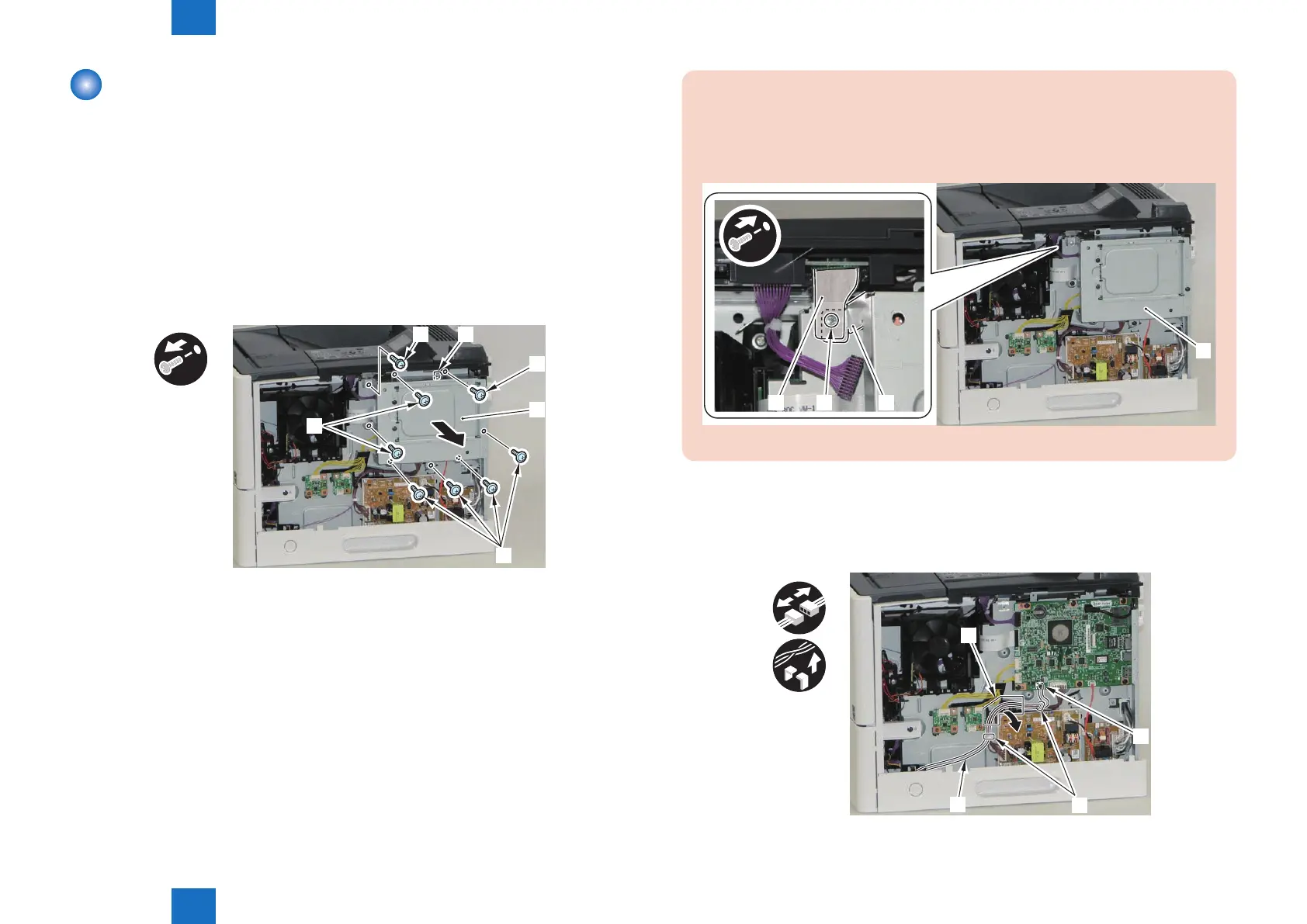
1) Remove the Main Controller Cover [1].
• 7 Screws (black) [2]
• 1 W Sems Screw (silver) [3]
• 1 Hook [4]
[1]
[2]
[2]
[3] [4]
[2]
x8
F-3-65
CAUTION:
When installing the Main Controller Cover [1], be sure to note the following point.
• Place the grounding sheet [2] on the outside of the Main Controller Cover [1] and
secure them together with the removed screw [3].
[1]
[2] [1][3]
F-3-66
2) Free the harness [1] connected to the Main Switch Unit.
• 1 Connector [2]
• 2 Wire Saddles [3]
• 1 Harness Guide [A]
x3
[A]
[2]
[3]
[1]
F-3-67














 To Next Page