2
2
2-19
2-19
Technology > Embedded RDS > E-RDS Setup > E-RDS setting items (service mode)
Technology > Embedded RDS > E-RDS Setup > E-RDS setting items (service mode)
E-RDS Setup
■
Conrmation and preparation in advance
To monitor a device with e-Maintenance/ imageWARE Remote, the following settings are
required.
(1) Advance conrmation
Conrm with the UGW administrator that the device to be monitored with e-Maintenance/
imageWARE Remote is registered in the UGW.
(2) Advance preparations
Interview the user's system administrator in advance to nd out the following information
about the network.
Information item 1
IP address settings
• Automatic setting : DHCP, RARP, BOOTP (ON/ OFF selection)
• Manual setting : IP address, subnet mask and gateway address to be set
Information item 2
Is there a DNS server in use?
If there is a DNS server in use, nd out the following.
• Primary DNS server address
• Secondary DNS server address
Information item 3
Is there a proxy server?
If there is a proxy server in use, nd out the following.
• Proxy server address
• Port No. for proxy server
Information item 4
Is proxy server authentication required?
If proxy server authentication is required, nd out the following.
• User name and password required for proxy authentication
(3) Network settings
Based on the results of the information obtained in (2) Advance preparations, make the
device network related settings.
See Users’ Guide for detailed procedures.
CAUTION:
Ensure to reboot the device when any change is added to the network setting.
■
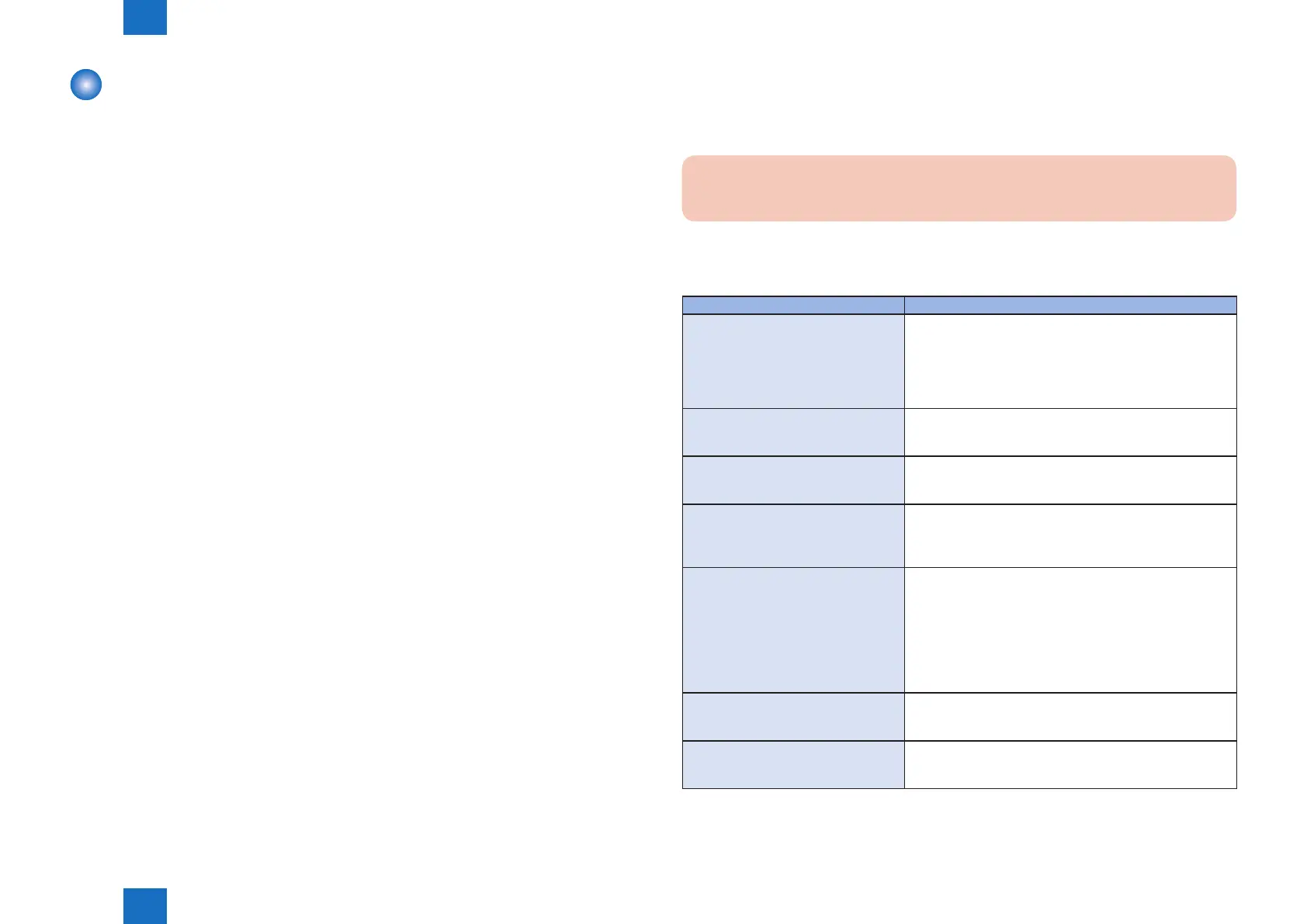
E-RDS setting items (service mode)
Item Description
E-RDS SWITCH
(NETWORK GR. > E-RDS)
Set use/ no use of Embedded-RDS function
0: Function not used / 1: Function used
e-Maintenance/ imageWARE Remote system to send
device information, counter data, error statuses to the
UGW.
Default : 0 (Function not used)
RGW-ADDRESS
(NETWORK GR. > E-RDS)
URL setting of UGW
Max 128 characters
Default : https://a01.ugwdevice.net/ugw/agentif01
RGW-PORT
(NETWORK GR. > E-RDS)
Set port number of UGW
Validation : 1 to 65535
Default : 443
COM-TEST
(NETWORK GR. > E-RDS)
Execution of a communication test with UGW / Display of
the result
Perform Communication test with UGW and set "Done." or
"Could not execute." as the result.
COM-LOG
(NETWORK GR. > E-RDS)
Display of detailed information about a communication error
with UGW
Error information of a connection failure with UGW is
displayed.
Error occurrence date and time, error code, and detailed
error information are displayed.
Max 5 latest loggings retained
Max 128 characters for Error information.
CLEAR
(NETWORK GR. > E-RDS)
Initialization of E-RDS SRAM data
SRAM data of E-RDS is initialized and returned to the
factory setting value at shipment.
CLEAR
(NETWORK GR. > CA-KEY)
Initialization of CA certicate
When the power is turned OFF/ ON after execution, the CA
certicate in the factory setting is automatically installed.
T-2-6














 To Next Page