2
2
2-18
2-18
Technology > Embedded RDS > Service cautions
Technology > Embedded RDS > Service cautions
Embedded RDS
Product Overview
■
Overview
Embedded RDS (hereafter, referred to as E-RDS, which stands for EMBEDDED-RDS)
is a network module embedded with a customer's device and enables e-Maintenance/
imageWARE Remote (Remote Diagnosis System), which can collect and transmit status
changes, counter values, error logs, and consumable information such as the toner low/ out
of the device to a remote maintenance server called UGW (Universal Gateway Server) via
Internet.
The following device information/ status can be monitored.
• Service mode counter (Billing counts)
• Global click counter
• Parts counter
• Mode counter
• Firmware info
• Service call error log
• Jam log
• Alarm log
• Status changes (Toner low/ out, etc.)
Since high condentiality is required for the information shown above, it performs
communication between a device and the UGW using HTTPS/ SOAP protocol.
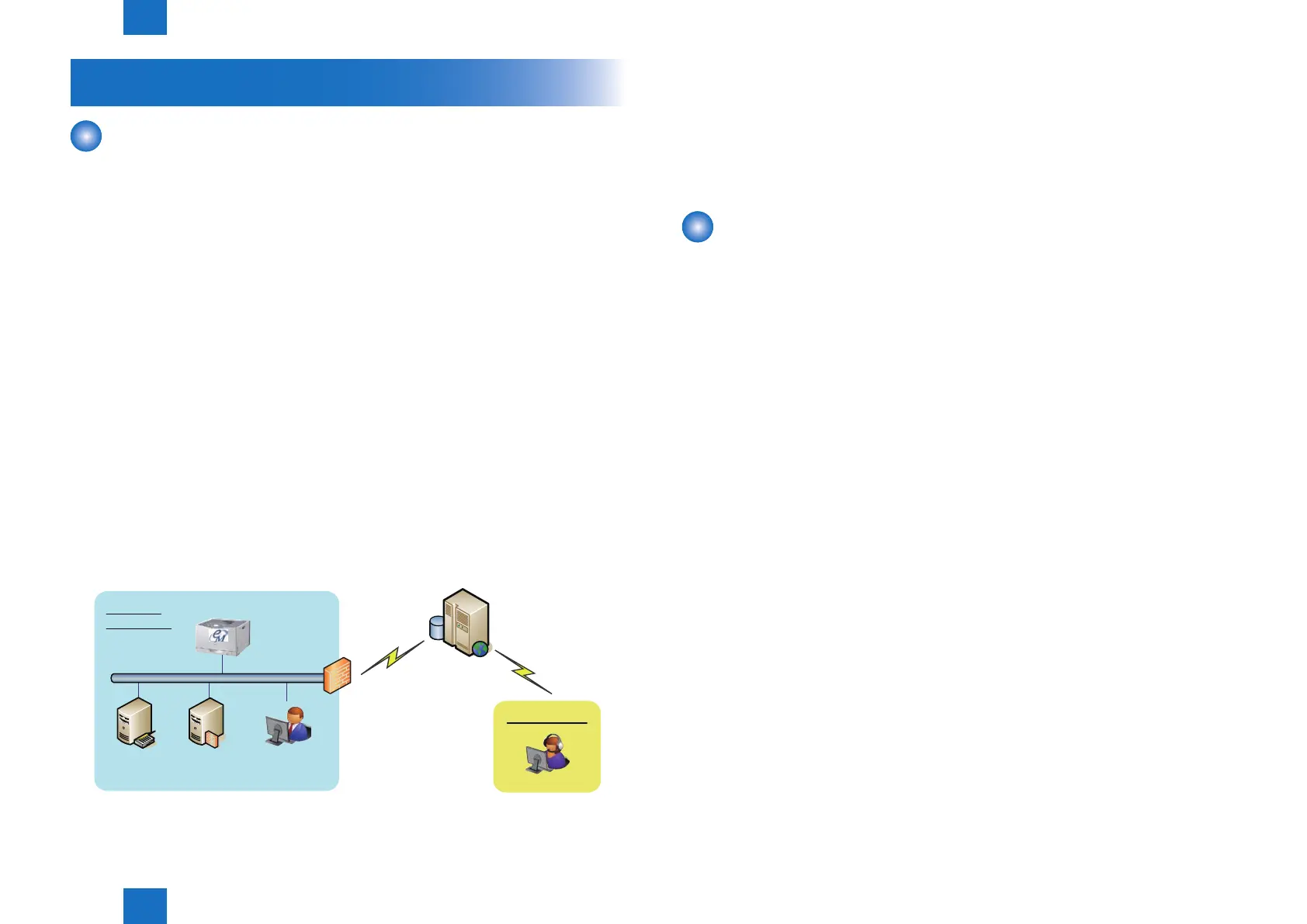
The e-Maintenance/ imageWARE Remote system configuration
UGW
Internet
Firewall
DNS Server
This machine
Proxy Server
Administrator
Customer
Environment
Sales Company
F-2-23
■
Features and benets
E-RDS embedded with a network module in advance can realize a front-end processing
of e-Maintenance/ imageWARE Remote system without attaching any extra hardware
equipment.
Service cautions
1) After performing the following service actions, it is necessary to perform initializing E-RDS
settings (CLEAR), E-RDS settings (E-RDS SWITCH : ON) and communication test (COM-
TEST).
Failure to do so will result that the counter transmitting value to the UGW may become
unusual.
• System upgrade
• System installation
• RAM clear of MNCON
Also, after replacing the main controller board, all settings must be reprogrammed.
2) The following settings in service mode must not be change unless there are specic
instructions to do so. Changing these values will cause error in communication with UGW.
• Set port number of UGW
[SERVICE MODE] > [NETWORK GR.] > [E-RDS] > [RGW-PORT]
Default : 443
• URL setting of UGW
[SERVICE MODE] > [NETWORK GR.] > [E-RDS] > [RGW-ADDRESS]
Default : https://a01.ugwdevice.net/ugw/agentif010














 To Next Page