5
5
5-62
5-62
Troubleshooting > Backup/Restoration by Expansion ROM for servicing and Sublog Board > Backup and Restoration (Export and Import) > Installing the Expansion ROM for servicing and Sublog Board
Troubleshooting > Backup/Restoration by Expansion ROM for servicing and Sublog Board > Backup and Restoration (Export and Import) > Installing the Expansion ROM for servicing and Su
blog Board
■
Installing the Expansion ROM for servicing and Sublog Board
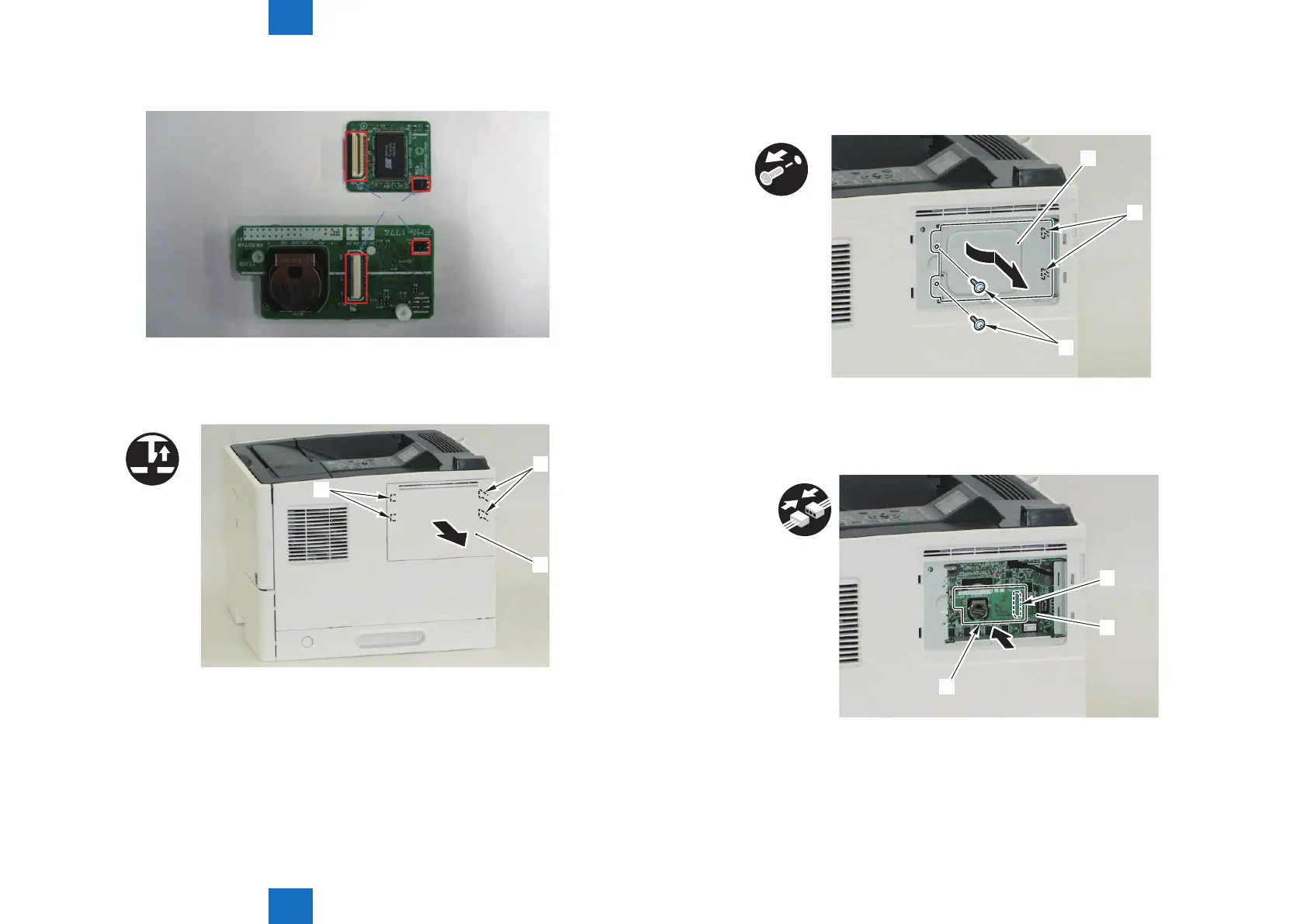
1) Install the Expansion ROM for servicing to the Sublog Board.
Connectors
Sublog Board
Expansion ROM for servicing
2) Remove the Right Cover (Small) [1]
• 2 Claws [2]
• 2 Hooks [3]
x2
[1]
[3]
[2]
F-5-66
F-5-67
3) Remove the Main Controller Cover (Small) [1]
• 2 screws [2]
• 2 Hooks [3]
x2
[3]
[1]
[2]
4) Install the Sublog Board [1] attached with the Expansion ROM for servicing to the Main
Controller PCB [2].
• 1 Connector [3]
[3]
[2]
[1]
F-5-68
F-5-69












 To Next Page