3
3
3-28
3-28
Disassembly/Assembly > Controller System > Removing the Control Panel Unit(LBP3560/6750dn) > Procedure
Disassembly/Assembly > Controller System > Removing the Control Panel Unit(LBP3560/6750dn) > Procedure
Removing the Control Panel Unit(LBP3560/6750dn)
■
Preparation
1) Remove the Right Cover.(Refer to page 3-17)
■
Procedure
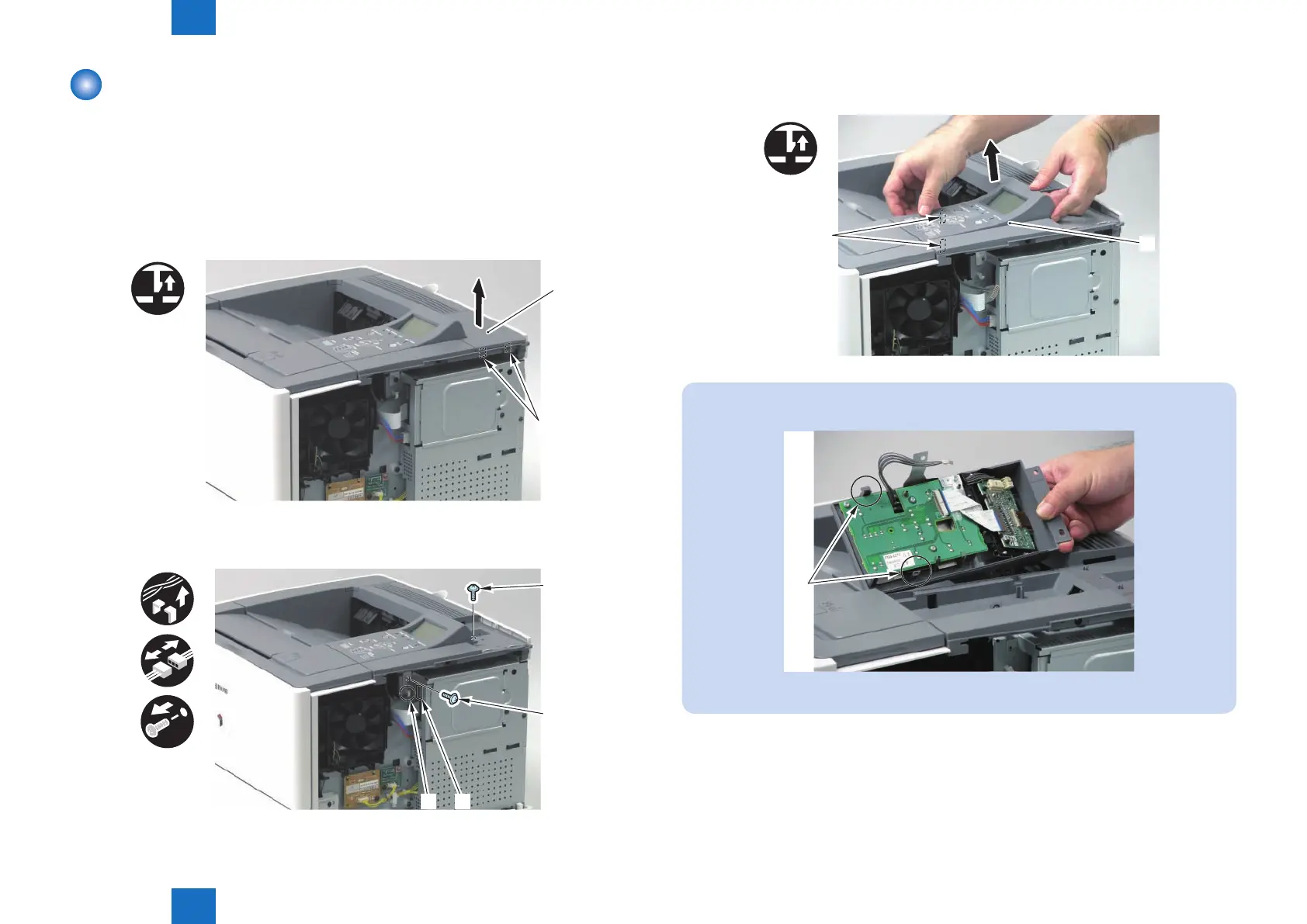
1) Remove the Upper Right Rear Cover [1].
• 2 Claws [2]
[1]
[2]
x2
2) Release the cable from the Wire Saddle [1], disconnect the connector [2], and remove the
screw (silver) [3] and screw (tapping) [4].
[1] [2]
[3]
[4]
F-3-48
F-3-49
3) Remove the Control Panel Unit [1].
• 2 Claws [2]
x2
[1]
[2]
NOTE:
The following shows the 2 claws [1] of the Control Panel Unit.
[1]
F-3-51
F-3-50














 To Next Page