1
1
1-9
1-9
Product Description > Using The Machine > Control Panel(LBP3560/6750dn) > Key Operations
Product Description > Using The Machine > Control Panel(LBP3560/6750dn) > Key Operations
Using The Machine
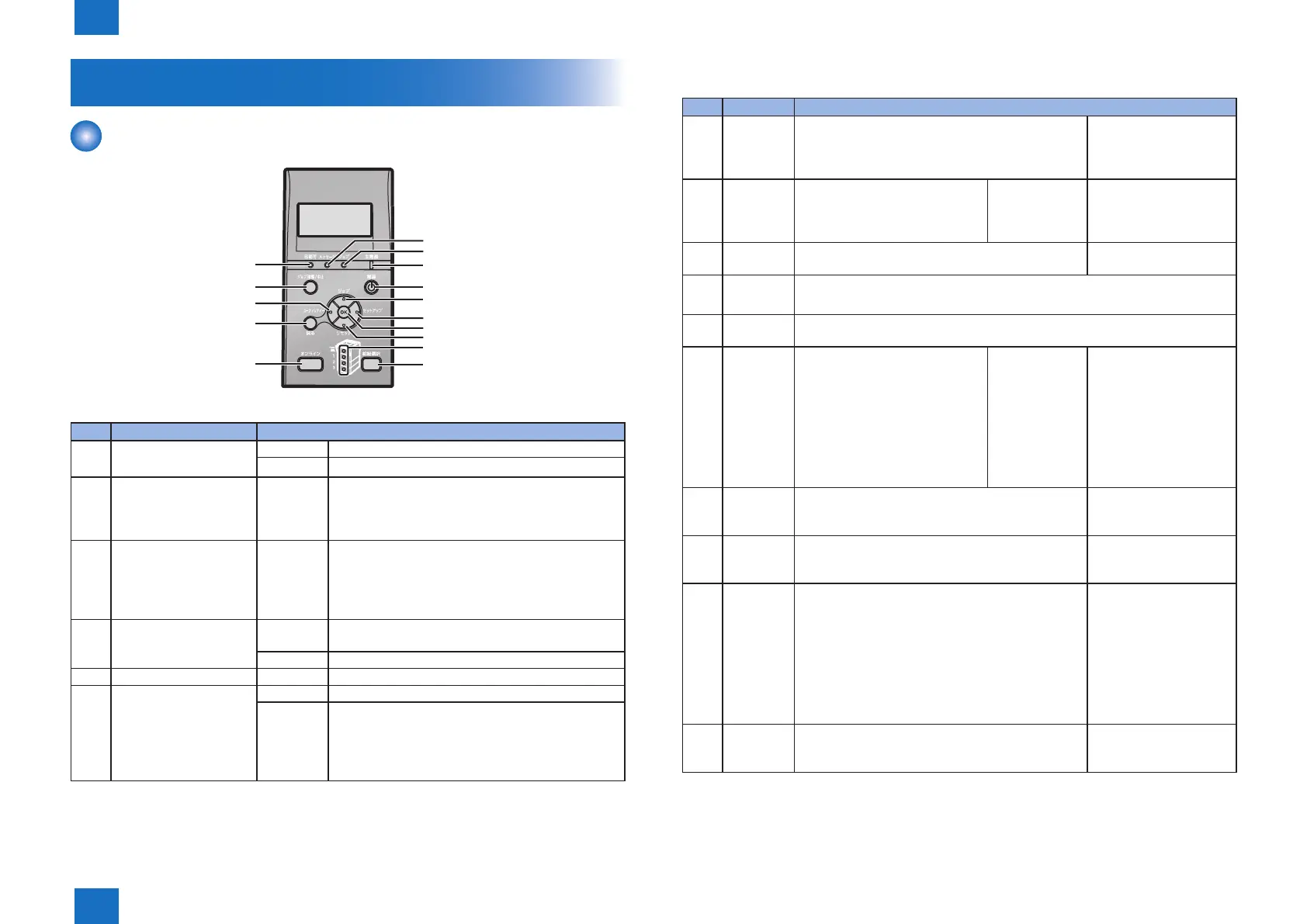
Control Panel(LBP3560/6750dn)
(6)
(7)
(8)
(14)
(15)
(5)
(4)
(3)
(2)
(1)
(13)
(12)
(11)
(10)
(9)
■
Panel Indicators
No. Name Condition
[1] Ready Indicator On The printer is ready to print.
Blinking The printer is preparing to print.
[5] Online Indicator On Online (The printer can receive print data from the
computer.)
If the printer enters Power Save Mode, the Online
indicator is off even when the printer is online.
[6] Message Indicator On A problem has occurred and printing cannot be
performed.
(If the printer enters Power Save Mode when it is
ofine, the Message indicator comes on even when
no problem is occurring.).
[7] Job Indicator On The printer is receiving data.
Data remains in the printer memory.
Blinking The printer is processing data.
[8] Main Power Indicatorr On The power of the printer is on.
[14] Paper Source Indicators On A paper source is selected.
Blinking Printing cannot be performed because no paper is
loaded.
The paper cassette is not installed.
(For the multi-purpose tray, the indicator comes on
even when no paper is loaded.)
F-1-8
T-1-11
■
Key Operations
No. Name Function
[2] Job Status/
Cancel
Cancels the job when the Job indicator is on or
blinking. Does not function when the Job indicator is
off.
The printer is ready to print..
Does not function.
[3] Utility Displays the [Utility] menu. Prints
information about the printer
settings including the current
settings.
Does not
function.
Goes back up the
previous hierarchy.
[4] Back Does not function. Goes back up the
previous hierarchy.
[5] Online Switches between online and ofine. The printer is online when the indicator
under the key is on and is ofine when the indicator is off.
[9] Power If [Power Save Mode] is set to a setting other than [Off], the printer enters
Power Save Mode.
[10] Job Displays the [Job] menu. You can
print various log lists.
Does not
function.
Selects the next upper
item in the same hierarchy.
When the setting value
is numeric, increases the
value. If you keep holding
down the key, the speed
of the value increasing is
increased depending on
the item.
[11] Settings Displays the [Setup] menu. Congure the printing
environment including the layout adjustment and
scaling print output.
Goes down the hierarchy.
[12] OK Does not function. Executes the selected
item. Otherwise, goes
down the hierarchy.
[13] Reset Displays the [Reset] menu. Performs the printer
reset operation, the print data output, and the
shutdown operation.
Selects the next lower
item in the same hierarchy.
When the setting value
is numeric, reduces the
value. If you keep holding
down the key, the speed
of the value decreasing is
increased depending on
the item.
[15] Feeder
Selection
Displays the [Select Feeder] menu. Specify which
paper source is used to print between the paper
cassette and multi-purpose tray and the paper size.
Does not function.
T-1-12














 To Next Page