2
2
2-46
2-46
Technology > MEAP > Resource Information > About MEAP Application Management Page
Technology > MEAP > Resource Information > About MEAP Application Management Page
Resource Information
■
About MEAP Application Management Page
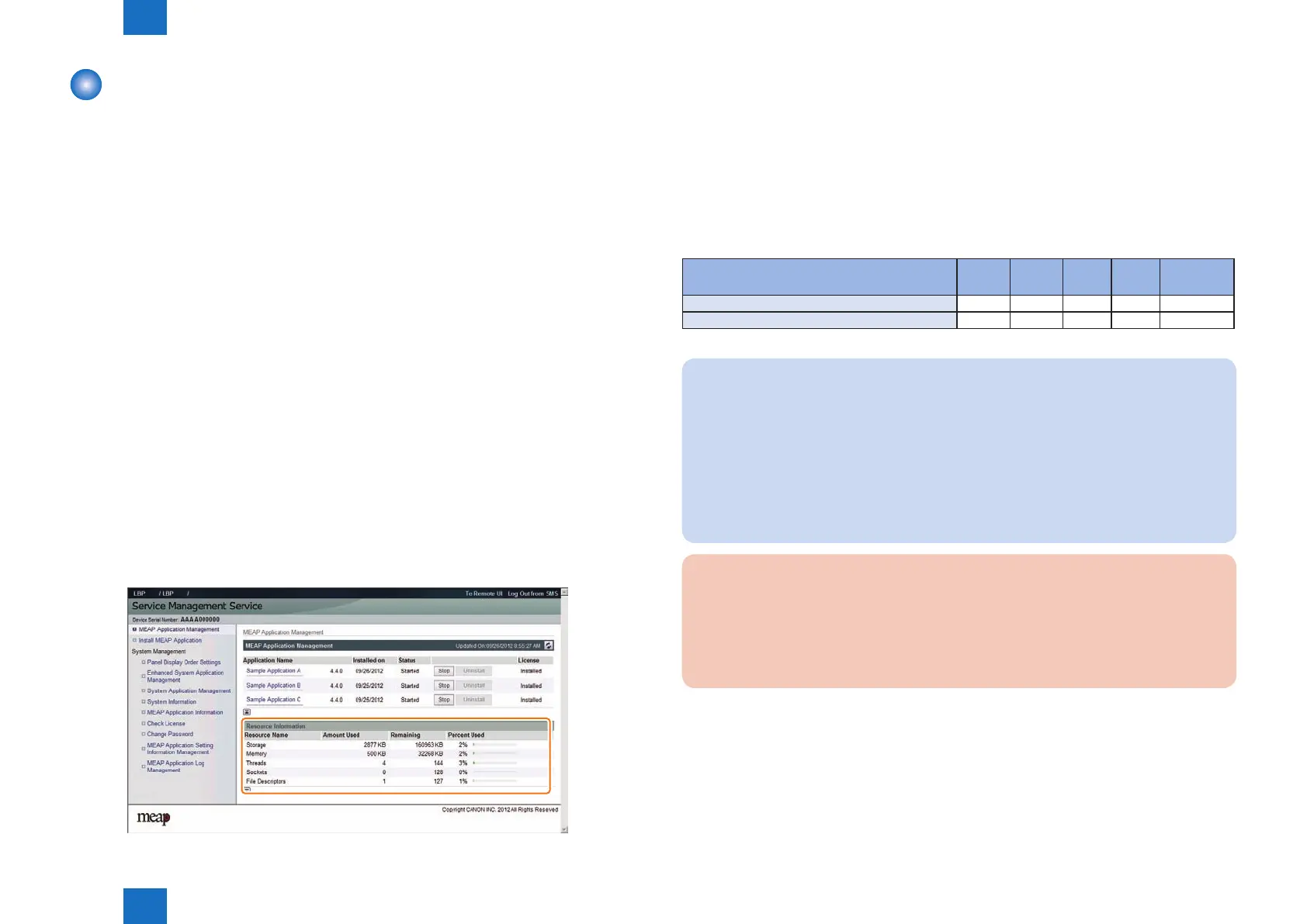
Application Management page shows [ resource information ] for information of the whole
device resources including Amount Used, Remaining, and Percent Used.
This function enables users to judge the remaining resources before installing the additional
application. Such resource information is shown based on the manifest header stated at the
top of each application, which declares the resources required in the application. Therefore,
the information does not necessarily show the resources actually in use.
The following resource information is shown:
• Storage
• Memory
• Thread
• Socket
• File Descriptor
You will not be able to install an application if the size of the remaining disk space falls short
of the size declared by the application. Moreover, the specications have been designed so
that an application will not be able to start up if there is a shortage of memory for any of the
foregoing items (i.e., memory, thread, socket, le descriptor).
Follow the steps below to check the remaining memory:
1) Log in to SMS.
2) Click [ MEAP Application Management ].
3) Check [ Resource Information ] for information of the whole device resources.
F-2-85
●
Device's resources
When 1 MEAP application operates, the resource volume allocated to each device is as
follows (loaded resource list). Since the following value is an estimate, when installing the
MEAP applications, it needs to check the available resource of SMS.
Since the indication of SMS resource volume uctuates by the login service (authentication
function) and conguration (future model), which the user selected, it may show a bigger
value than the following values.
List of Available Resources
Product Name Storage Memory Thread Socket File
Description
None 160MB 32MB 148 128 128
None 160MB 32MB 148 128 128
Note:
• As for memory, check the available resource when starting up the application. For other
resources other than memory, check them when installing.
• Some applications call for a specic set of conditions for installation. For details, see the
User's Guide that comes with the individual applications.
• Maximum installable application is up to 8 even if the remaining resource is adequate.
(However, the Send function consumes 1, it must be 19 in practice.) Authentication
application is not included in this number.
• The MEAP application, which can be started simultaneously, is up to 5. (Authentication
application is not included in this number.)
CAUTION:
To install an application, the user needs to use the following URL when accessing the
license control system to obtain a license le. In doing so, he/she needs to register the
license access number of the application and the serial number of the device.
http://www.canon.com/lms/license/
T-2-14














 To Next Page